

B-roll is the supporting footage you cut to while the main footage keeps talking. In a UGC ad, the A-roll is you speaking to camera, or your voiceover, and the B-roll is what the viewer sees while you talk: close-ups of the product, your hands using it, the result and the place it lives. This guide covers what B-roll means, where the term comes from, how A-roll and B-roll fit together in a 30-second UGC ad, and which B-roll shots to film for each type of product.
What does B-roll mean?
Merriam-Webster defines B-roll as recorded video used to provide supplementary material for a film or television show. Wikipedia describes it as supplemental or alternative footage intercut with the main shot. Dictionary.com also lists stock footage used to establish a place or atmosphere as B-roll.
In plain terms, the main footage tells the story and the B-roll shows what the story is about. For UGC, that translates like this:
- A-roll is the creator talking to camera, or the voiceover that carries the script.
- B-roll is everything you cut to while that voice keeps going: product close-ups, hands in use, textures, the before and the result, the unboxing and the setting.
"B-roll footage" and "B-roll shots" mean the same thing: the individual clips you cut in.
Where the term comes from
The name started as a fix for a film problem. 35 mm film was wide enough to hide splices, but 16 mm film showed them as flaws in the picture. So editors put the odd-numbered shots on an A-roll and the even-numbered shots on a B-roll, each matched by black leader on the other roll, a method also called checkerboard printing. According to the Filmmakers Academy glossary, A and B roll editing was also how dissolves and fades were made, and the process is now obsolete.
The words carried over to video. In linear video editing the A deck held the main tape, the B deck held supporting footage, and the sound usually came from the A deck alone, so the B deck supplied picture without sound. That is why people still think of B-roll as silent footage that sits under someone's voice.
Merriam-Webster says the name was originally used in opposition to an A-roll that held the principal footage, and dates its first known use to 1983. Today B-roll is a general term for all supplemental or cutaway footage.
A-roll vs B-roll: what's the difference?
A-roll is the main footage that carries the message, usually a person speaking with their own sound. B-roll is the supporting footage that shows the viewer what that person is talking about. Dictionary.com defines A-roll as the primary footage, shot by the principal crew and recording both video and audio. In a UGC ad, the A-roll is you; the B-roll is the product, your hands, the result and the setting.
| A-roll | B-roll | |
|---|---|---|
| What it carries | The message: what you say and what you think | The proof: what the viewer can see for themselves |
| Whose audio plays | Its own, your voice | Usually the A-roll voice, with natural sound kept low underneath |
| What is on screen | You, looking at the lens | The product, your hands, the result, the setting |
| Where it goes in a UGC ad | The hook, your honest opinion, the call to action | The demo, the details, the before and the result, the unboxing |
| Typical shots | Talking head, voiceover, walk and talk | Close-ups, hands in use, pours, labels, reveals |
| If it's missing | Pretty clips with no story or opinion | A talking head with nothing to show |
You will hear the term A-roll less often than B-roll. Wikipedia notes that the term A-roll has fallen out of use to some degree, and many editors just call it the main footage or the talking head.
How A-roll and B-roll fit together in a 30-second UGC ad
Here is a made-up 30-second ad for a made-up leak-proof travel mug, split into its two tracks. The voice runs from start to finish. The picture cuts to B-roll each time the line names something the viewer could see, and comes back to the creator's face for the opinion and the call to action.
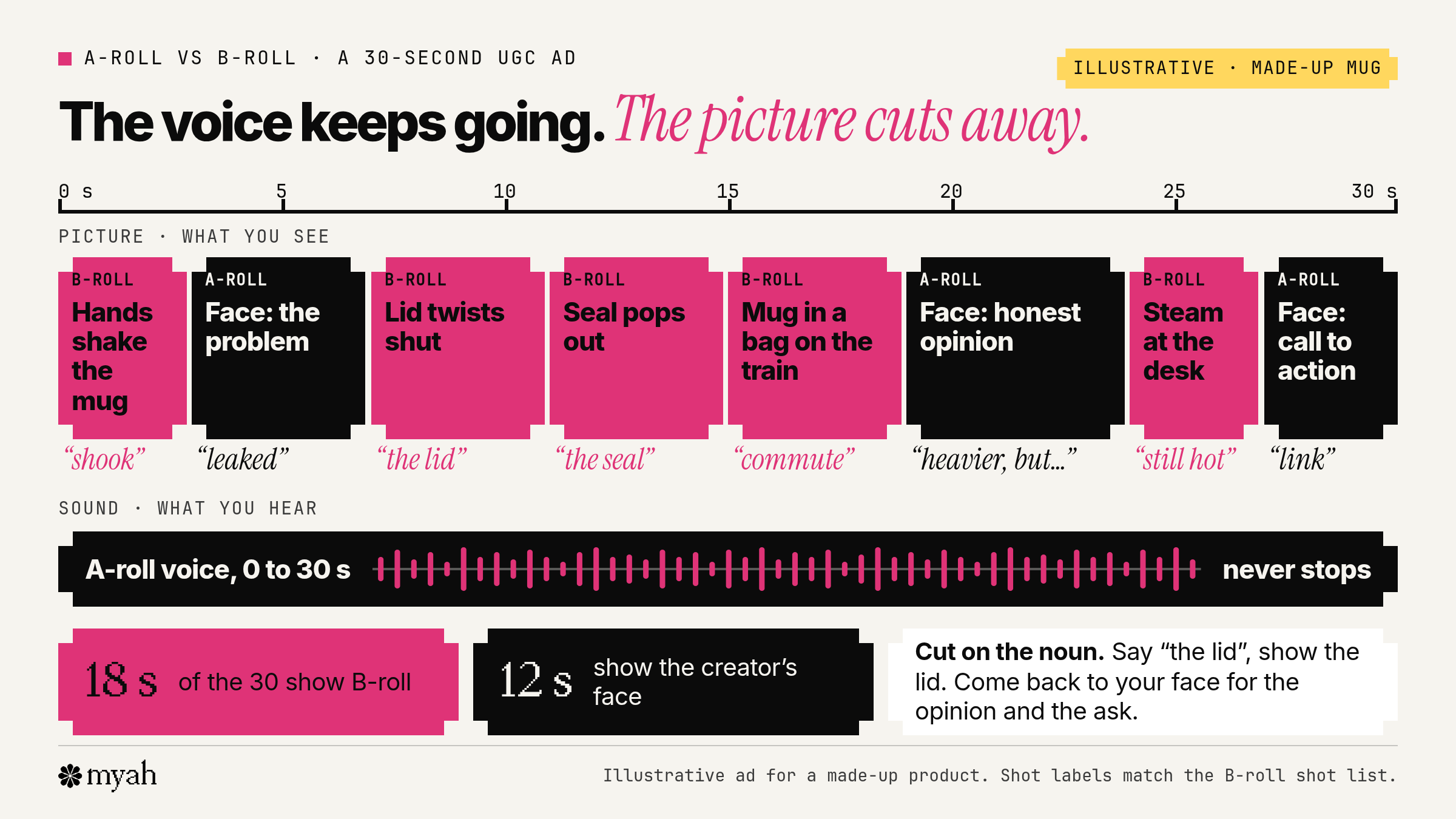
| Time | What you hear | What you see | Track on screen |
|---|---|---|---|
| 0 to 3 s | "I just shook my coffee upside down over my laptop bag." | Hands shaking the closed mug upside down above an open bag | B-roll: hands in use |
| 3 to 7 s | "Every travel mug I've owned has leaked, so I wasn't hopeful." | Creator talking to camera | A-roll |
| 7 to 11 s | "The lid twists and clicks, so you know it's locked." | Close-up of the lid twisting shut | B-roll: detail close-up |
| 11 to 15 s | "The seal pops out in one piece for the dishwasher." | Thumb pulling the seal out and holding it up to the lens | B-roll: process step |
| 15 to 19 s | "It's been in my bag on every commute this month." | The mug in a bag on a train seat | B-roll: real setting |
| 19 to 24 s | "It's heavier than my old one. But my bag is dry." | Creator talking to camera | A-roll: honest opinion |
| 24 to 27 s | "And the coffee's still hot when I get to my desk." | Steam rising as the lid opens at a desk | B-roll: result |
| 27 to 30 s | "The link's below if you want the one I use." | Creator to camera, holding the mug | A-roll: call to action |
In this made-up example, 18 of the 30 seconds show B-roll and 12 show the creator's face, but the voice never stops. It also opens on B-roll rather than the face. TikTok's own advice for the opening is to show the product clearly through an unboxing, close-up views or a demonstration.
The structure follows the hook, proof and call to action spine in our UGC examples by format. It also maps straight onto a two-column UGC script template: the "what you hear" column is your A-roll audio, and the "what you see" column is your B-roll shot list.
How much B-roll should a 30-second UGC video have?
There is no set ratio. The Meta and TikTok creative guidance we read doesn't give one, and we haven't found a reliable study that does. A working method is more useful than a percentage:
- Cut to B-roll whenever the line names something the viewer could see. If you say "the lid", show the lid.
- Keep your face on screen for the lines that need a person. That usually means a talking hook, your honest opinion and the call to action.
- Don't let the talking head run on with nothing to show. If a stretch of A-roll has no visual, either cut the line or find the shot.
- Film far more B-roll than you will use. Spare clips let you, or the brand, recut the ad, swap the opening or make a shorter version without a reshoot.
The opening matters most. TikTok advises putting the hook in the first 6 seconds and introducing the proposition in the first 3 seconds. If a brand runs your video as an ad, those opening seconds are what hook rate measures, so it's worth filming more than one opening shot.
Pictures also carry the ad for anyone not listening closely. Meta's Reels ad guidance is to build 9:16 vertical video, with audio, inside the safe zones so the interface does not cover your message. Meta notes that text overlays help viewers follow along without sound. B-roll does a similar job: a viewer who misses a word can still see the product working.
B-roll shots that work in UGC ads
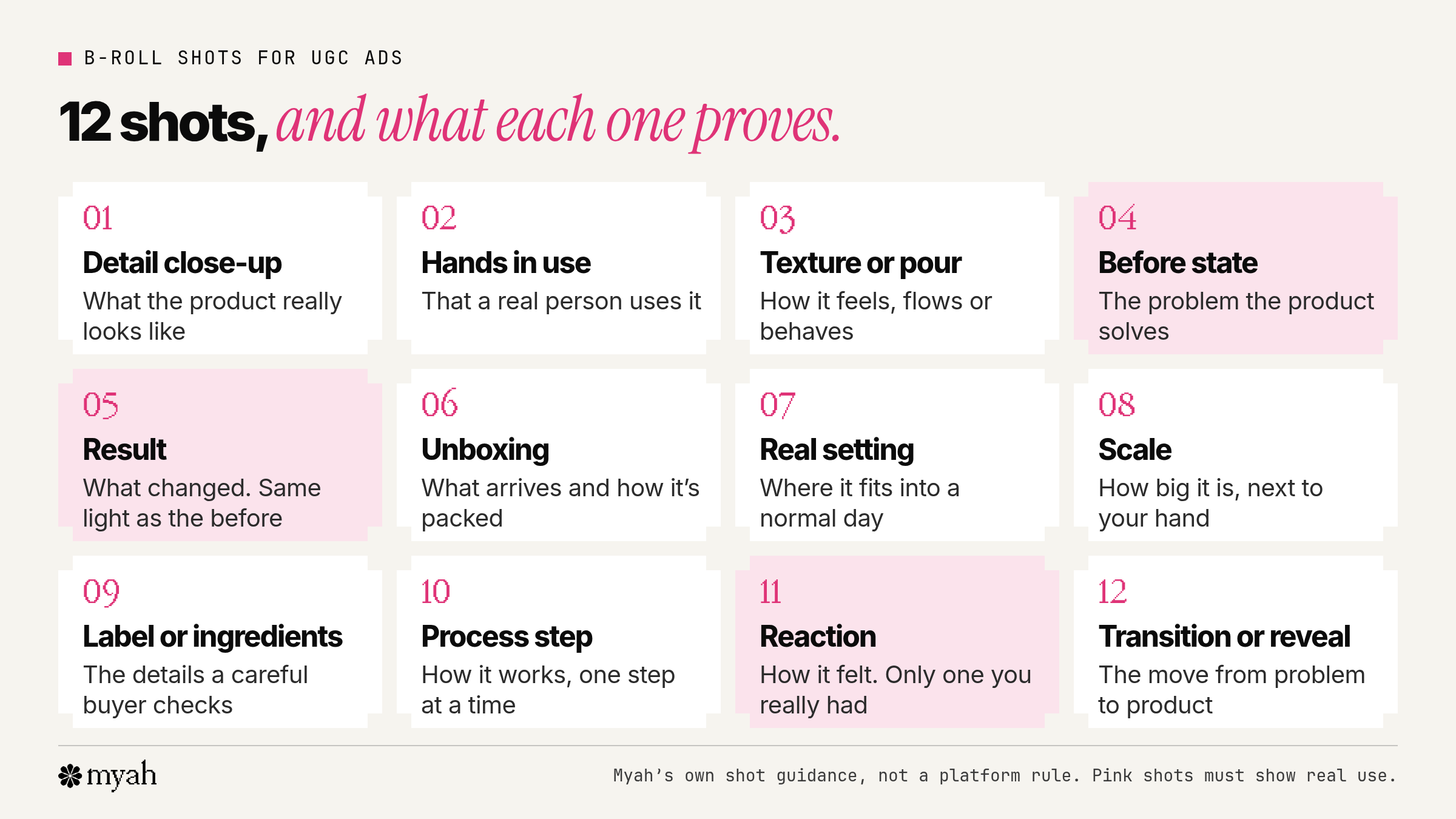
These 12 shot types cover most UGC ads. The list is our own guidance, not a platform rule. TikTok describes the product demo as showing viewers exactly how the product works, and calls it especially useful for beauty, tech and fitness brands. Most of the shots below are pieces of that demo.
| Shot | What it proves | How to film it on a phone |
|---|---|---|
| Detail close-up | What the product really looks like | Move the phone close, tap to focus on the product and hold still |
| Hands in use | That a real person uses it | Film from your own point of view or from the side, product facing the lens |
| Texture or pour | How it feels, flows or behaves | Side light from a window, a slow pour or swipe, and a steady hand |
| Before state | The problem the product solves | Film it first, in the same spot and light you will use for the result |
| Result | What changed | Same angle and light as the before, with no filter or retouching |
| Unboxing | What arrives and how it's packed | Top-down or front-on, slowly, one item at a time |
| Real setting | Where it fits into a normal day | The product in place: bathroom shelf, desk, bag, kitchen counter, gym floor |
| Scale | How big it is | Next to your hand or a familiar object such as a phone or a mug |
| Label or ingredients | The details a careful buyer looks for | Fill the frame, hold it steady and keep it away from the edges |
| Process step | How it works, one step at a time | One short shot per step, with the same framing for each |
| Reaction | How it felt to use | Your face on first use, and only a reaction you really had |
| Transition or reveal | The move from problem to product | Cover the lens with your hand or pass behind an object, then reveal |
B-roll shot ideas by product category
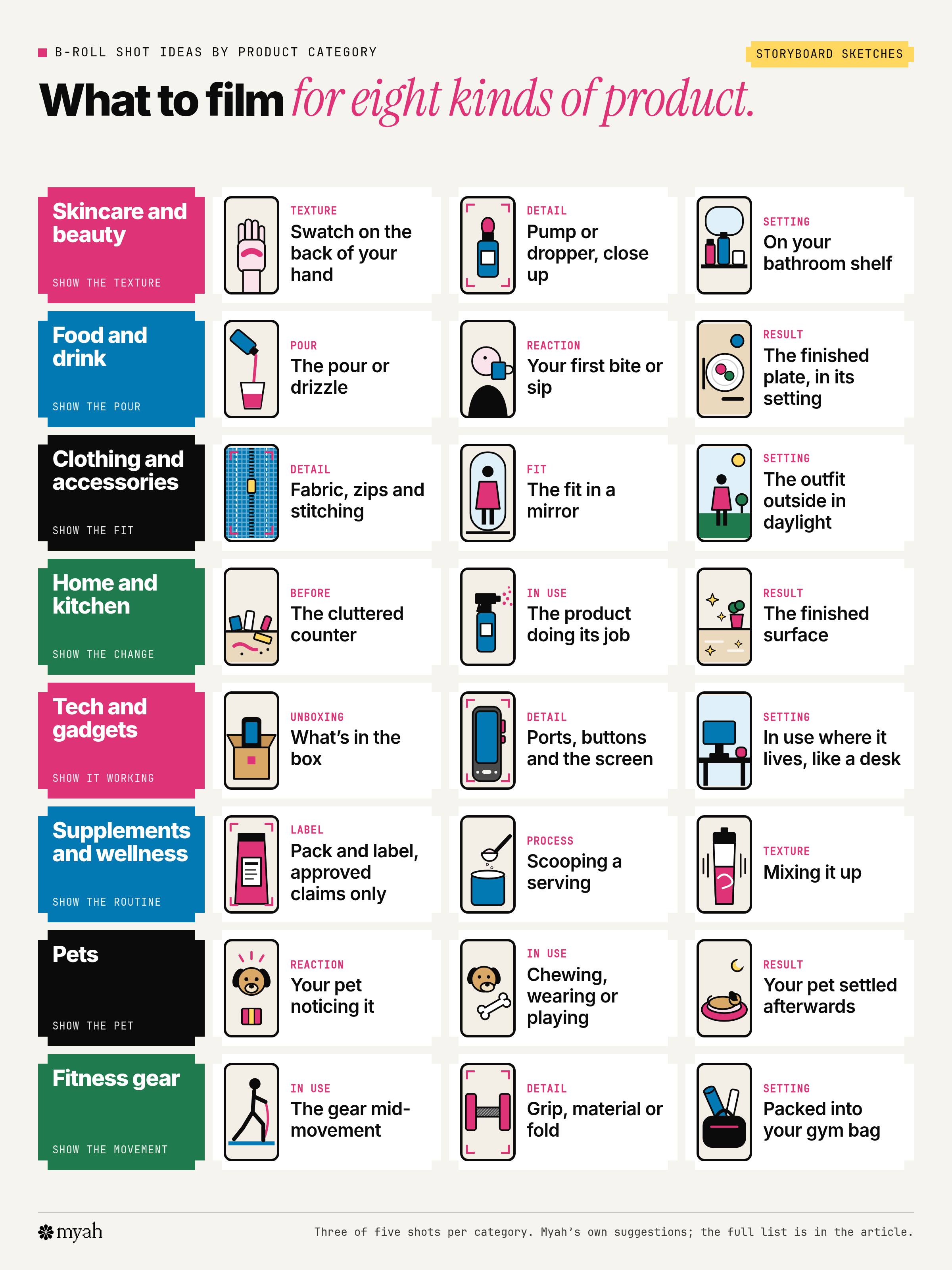
The best B-roll depends on what the product has to prove. A serum has to show its texture; a gadget has to show itself working. These are our own suggestions for eight common categories. Pick four or five shots per video and film each one more than once.
| Category | B-roll shots to film |
|---|---|
| Skincare and beauty | A texture swatch on the back of your hand; the pump or dropper in close-up; applying it in the mirror; the label and ingredients; the product on your bathroom shelf |
| Food and drink | The pour or drizzle; one prep or cooking step; the pack opened on the counter; your first bite or sip; the finished plate or glass in its setting |
| Clothing and accessories | The fabric in close-up; zips, stitching or clasps; a stretch or movement test; the fit in a mirror; the outfit outside in daylight |
| Home and kitchen | The before state, such as a cluttered counter; the product doing its job; your hand next to it for scale; the finished surface or room; putting it away |
| Tech and gadgets | Unboxing and what's in the box; ports, buttons and the screen in close-up; setting it up or pairing it; using it where it really lives, such as a desk or car; the result on screen |
| Supplements and wellness | The pack and label, showing only claims the brand has approved; scooping or pouring a serving; mixing it and the texture; where it sits in your morning routine; the shelf or bag where it lives |
| Pets | Your pet noticing the product; the product in use, such as chewing, wearing or playing; its size next to your pet; the clean-up or how it holds up; your pet settled afterwards |
| Fitness gear | The gear in use mid-movement; grip, material or fold detail; setting it up; packing it into a bag; your workout space |
How to film B-roll on your phone
Our guide to how to film and edit UGC on your phone covers light, sound and camera settings. These habits are specific to B-roll:
- Film B-roll in the same light as your A-roll. If the talking head is by a window in the morning, film the close-ups there too, so the cuts don't jump in colour.
- Hold each shot for a few seconds and move slowly. Slow, deliberate moves are easier to cut than fast pans, and a still shot is always usable.
- Lock focus and exposure. On iPhone, touch and hold the focus area until AE/AF Lock appears to lock focus and exposure. Other phones have similar tools, but the names and steps vary.
- Start and end on a still frame. A moment of stillness before and after the action gives you room to cut or add a transition.
- Shoot vertical and keep key details away from the edges. The app's buttons and captions sit over parts of the frame. If a Reels ad carries a disclaimer, Meta says to leave the bottom 40% free of text, logos and other key elements. Check your frames with the Reels safe zone template or the Reels safe zone checker.
- Film every shot from two angles. A close-up and a wider version of the same action give you a choice in the edit.
- Record the natural sound anyway. The click of a lid or the pour can sit low under your voice and make the clip feel real.
- Keep it looking like a person filmed it. TikTok recommends sound, a 9:16 vertical frame and a DIY, not overly polished style that fits in with user-generated content.
How to edit B-roll over your talking head
Most phone editors handle B-roll with an overlay track that sits above your main video. The method is the same in any app:
- Lay down the A-roll first. Cut your talking head or voiceover into the final script. Its audio is the spine of the ad.
- Add B-roll on an overlay track. In the CapCut app you add the main video, tap Overlay, choose the B-roll clip and tap Add overlay. CapCut lets you adjust the overlay's duration, position and size. Edits by Instagram has an Overlay tool for adding a photo or video on top of your clip, and a Voice tool for recording a voiceover. Stretch the overlay to fill the frame so it reads as a cut, not a picture-in-picture.
- Cut to B-roll on the noun. When you say "the seal", the seal appears. Come back to your face when the line turns into opinion.
- Use split edits. In an L-cut the sound from one shot carries on under the next picture; in a J-cut the sound of the next shot starts before its picture. Both make the cuts feel smoother than a hard switch.
- Keep captions inside the safe zone, clear of the buttons on the right and the caption area at the bottom.
- End on your face for the call to action, so the ask comes from a person rather than a product shot.
- Watch it back with the sound off. If the pictures alone show what the product does, the B-roll is doing its job.
For a comparison of CapCut, Edits, InShot and VN, see the filming and editing guide.
Stock B-roll, raw footage and honesty
Stock footage can work for mood or setting shots, such as a city street or a beach at sunset. It should never stand in for the product working, a result or a person using it.
If you do use stock clips, read the licence. Pexels says all its photos and videos are free to use, with no attribution required. The Pexels licence says not to imply endorsement of your product by the people or brands in the footage. The Pixabay licence summary bars using its content in a misleading or deceptive way. Pixabay content that shows recognisable trademarks, logos or brands cannot be used commercially in relation to goods and services, and Pixabay puts the responsibility on you to check whether you need third-party consent or a licence.
Result and before shots have to be real. In the US, the FTC's Endorsement Guides say endorsements must reflect the honest opinions, findings, beliefs or experience of the endorser. The Guides list demonstrations among the things that can count as endorsements, so a B-roll demo can count as part of your endorsement. If an ad represents that the endorser uses the product, the endorser must have been a bona fide user of it. One FTC example pairs accurate acne testimonials with stock photos of people with near perfect skin and says the images misrepresent the endorsers' results. In its Endorsement Guides FAQ, the FTC says a picture that suggests a creator used a product, when they did not, is misleading.
Raw clips matter too. Some brands ask for the unedited B-roll so they can recut ads, so agree in the UGC brief template whether raw files are part of the job, and agree how they may be used in your UGC usage rights terms. This is general information, not legal advice.
Free printable B-roll shot list
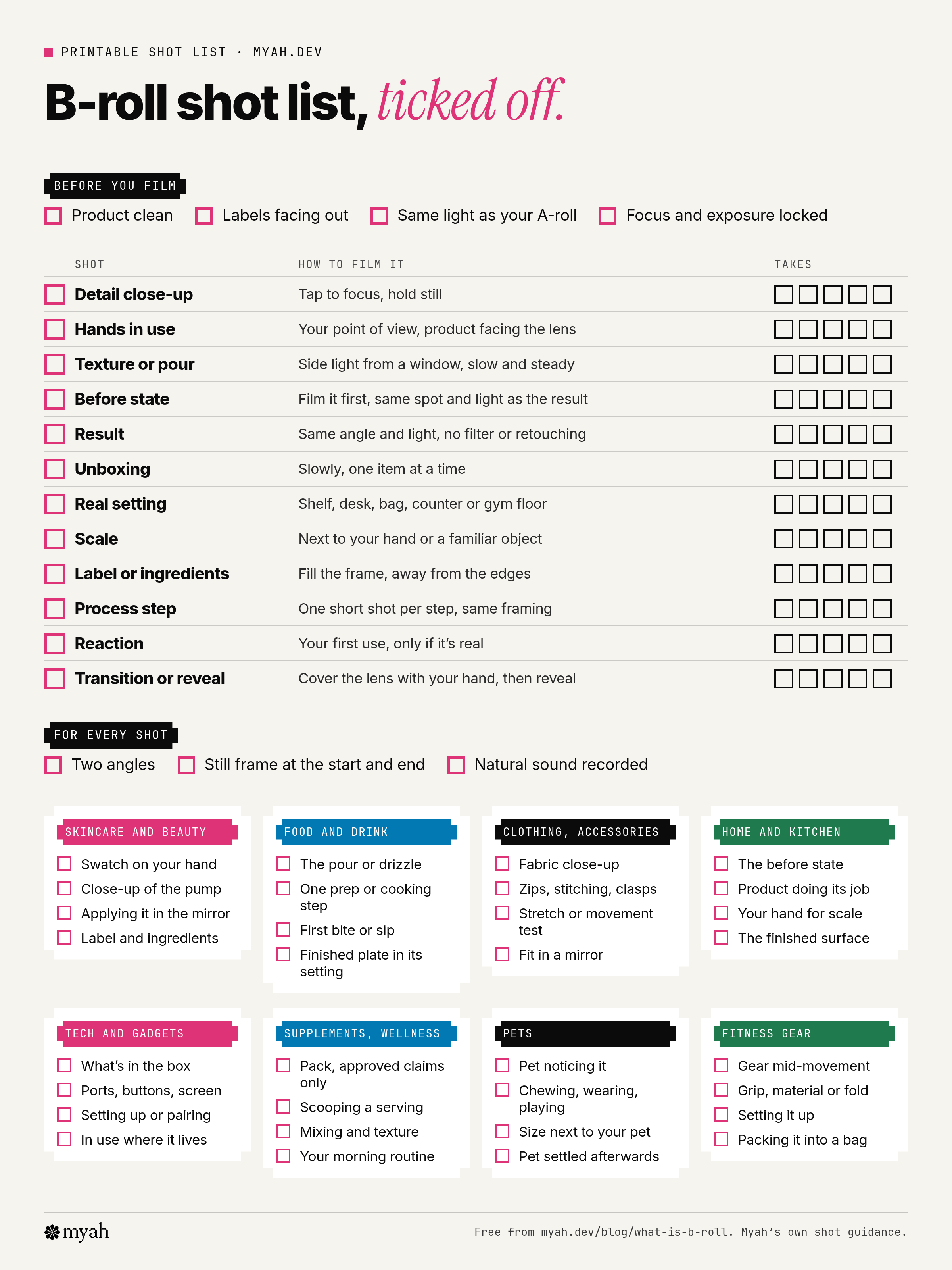
The one-page shot list has the 12 general shots with tick boxes, a short checklist for each product category and a column to count your takes. Download the B-roll shot list (PDF), print it and tick it off as you film. The general checklist is below; the PDF's category blocks contain a shorter selection of shots from the table above, not the full list.
- Before you film: product clean, labels facing out, same light as your A-roll, focus and exposure locked
- Detail close-up
- Hands in use
- Texture or pour
- Before state, filmed first in the same spot and light as the result
- Result, with no filter or retouching
- Unboxing
- Real setting
- Scale, next to your hand or a familiar object
- Label or ingredients, away from the edges of the frame
- Process step, one shot per step
- Reaction, only if it's real
- Transition or reveal
- For every shot: two angles, a still frame at the start and end, natural sound recorded
- Your category's four or five shots from the table above
Common questions
What does B-roll mean?
B-roll is supporting footage cut in over or between the main footage. In a UGC video, it's the shots of the product, your hands, the result and the setting that play while you talk.
What is B-roll footage?
The clips themselves: close-ups, demos, unboxings, setting shots and reveals. They usually play without their own sound, under the A-roll voice.
What is the difference between A-roll and B-roll?
A-roll is the main footage that carries the message, usually a person speaking. B-roll is the supporting footage that shows what they're talking about. In UGC, A-roll is you to camera and B-roll is the product.
What are examples of B-roll?
A close-up of a lid clicking shut, a serum swatch on a hand, coffee being poured, an unboxing, a product on a bathroom shelf, and a before and after filmed in the same light.
Does B-roll have sound?
Often not in the final edit. It plays under the A-roll voice, sometimes with its natural sound kept low. The habit goes back to linear video editing, when the B deck supplied picture without sound.
How much B-roll should a 30-second UGC video have?
There's no fixed ratio. Cut to B-roll whenever a line names something the viewer could see, and keep your face on screen for the hook, your opinion and the call to action.
Can I use stock footage as B-roll in a UGC ad?
For mood or setting shots, if the licence allows it. Never use stock footage to show the product working, a result, or a person who seems to be using it.
Sources
- Definitions and history: Merriam-Webster, B-roll, Dictionary.com, B-roll, Dictionary.com, A-roll, Wikipedia, B-roll, Filmmakers Academy, A and B rolls, Wikipedia, split edit
- Meta: Reels ad best practices, Reels ad creative lesson, Reels safe zones
- TikTok: creative best practices for performance ads, short video best practice
- Apps and phones: CapCut, how to add overlays (vendor guide), CapCut, overlay video on video (vendor guide), Instagram Help Center, Edits tools, Apple, iPhone camera tools
- Stock licences: Pexels licence, Pixabay content licence summary
- FTC: Endorsement Guides, 16 CFR Part 255, 16 CFR 255.1, Endorsement Guides: what people are asking
Where to go next
- How to film and edit UGC on your phone: light, sound, camera settings and editing apps.
- UGC script template: write the A-roll lines and the B-roll column together.
- UGC examples by format: see where B-roll sits in common UGC formats.
- How to make UGC a brand can actually test: spare B-roll and alternative openings make recuts easy.
- How to build a UGC portfolio with no client experience: videos with varied B-roll show your filming range.
Myah is an early-access UGC marketplace where brands post paid video campaigns and creators apply with a portfolio. Creator profiles show up to five of your best videos, so a couple of B-roll-rich videos can show brands what you can film. Creators pay nothing to join or use Myah. Join creator early access. Myah is in early access, so features may change before launch, and early access does not guarantee jobs, availability or earnings.