

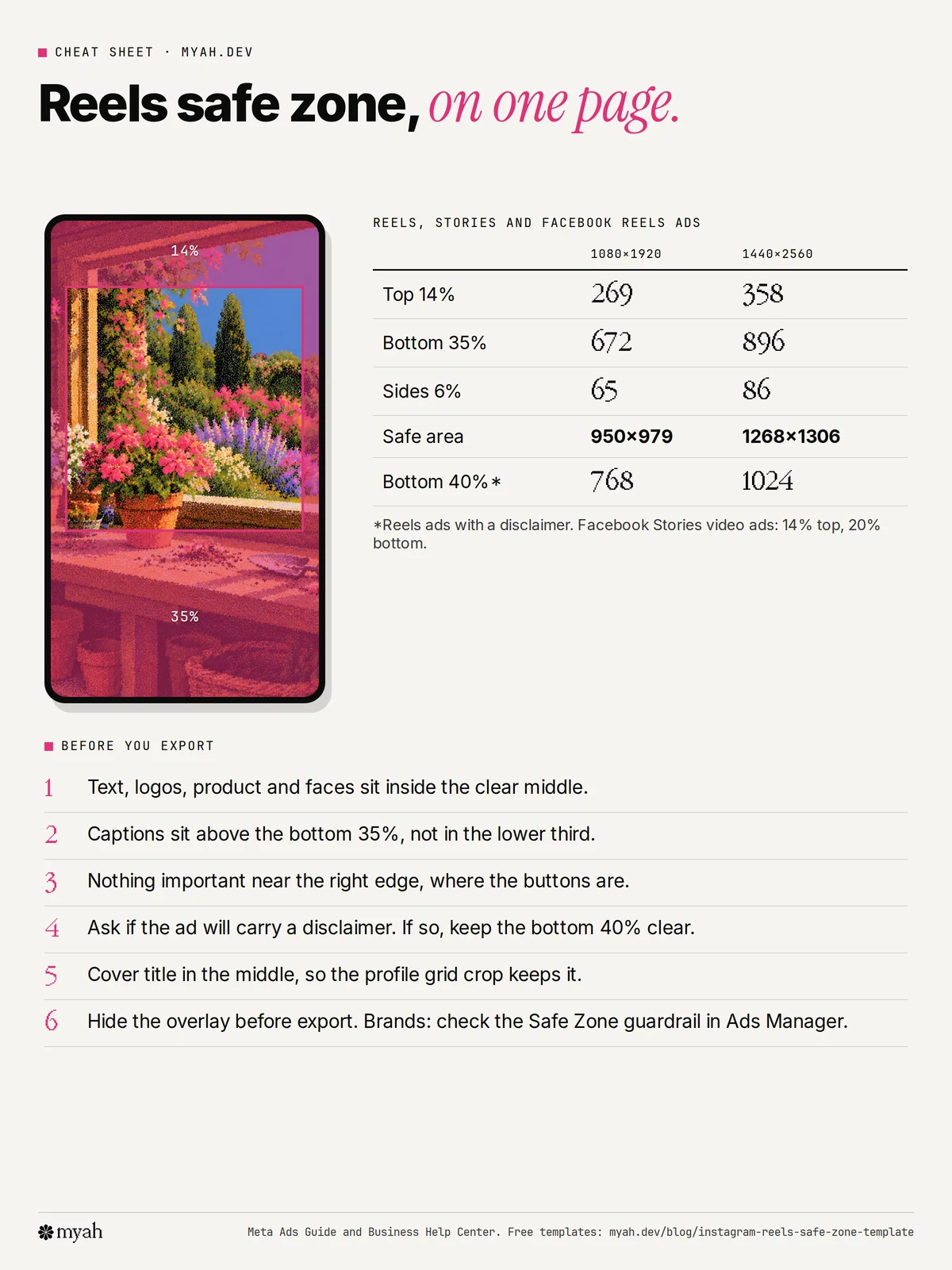
The Instagram Reels safe zone is the middle of a 9:16 video where text, logos and faces won't be covered by the app's buttons, captions or profile bar. For Reels ads, Meta's own guidance is to leave 14% of the top, 35% of the bottom and 6% on each side free of key creative elements. On a 1080×1920 video that's 269 pixels at the top, 672 at the bottom and 65 on each side, and our free Instagram Reels safe zone template marks them for you.
Below you'll find free transparent PNG templates built from those numbers, the pixel sizes for both 1080×1920 and Meta's newer 1440×2560 recommendation, and where the guidance differs between Reels, Stories and Facebook. Every number links to the Meta page it comes from, because a lot of the templates online quietly mix old and new figures.
Download the free Instagram Reels safe zone template
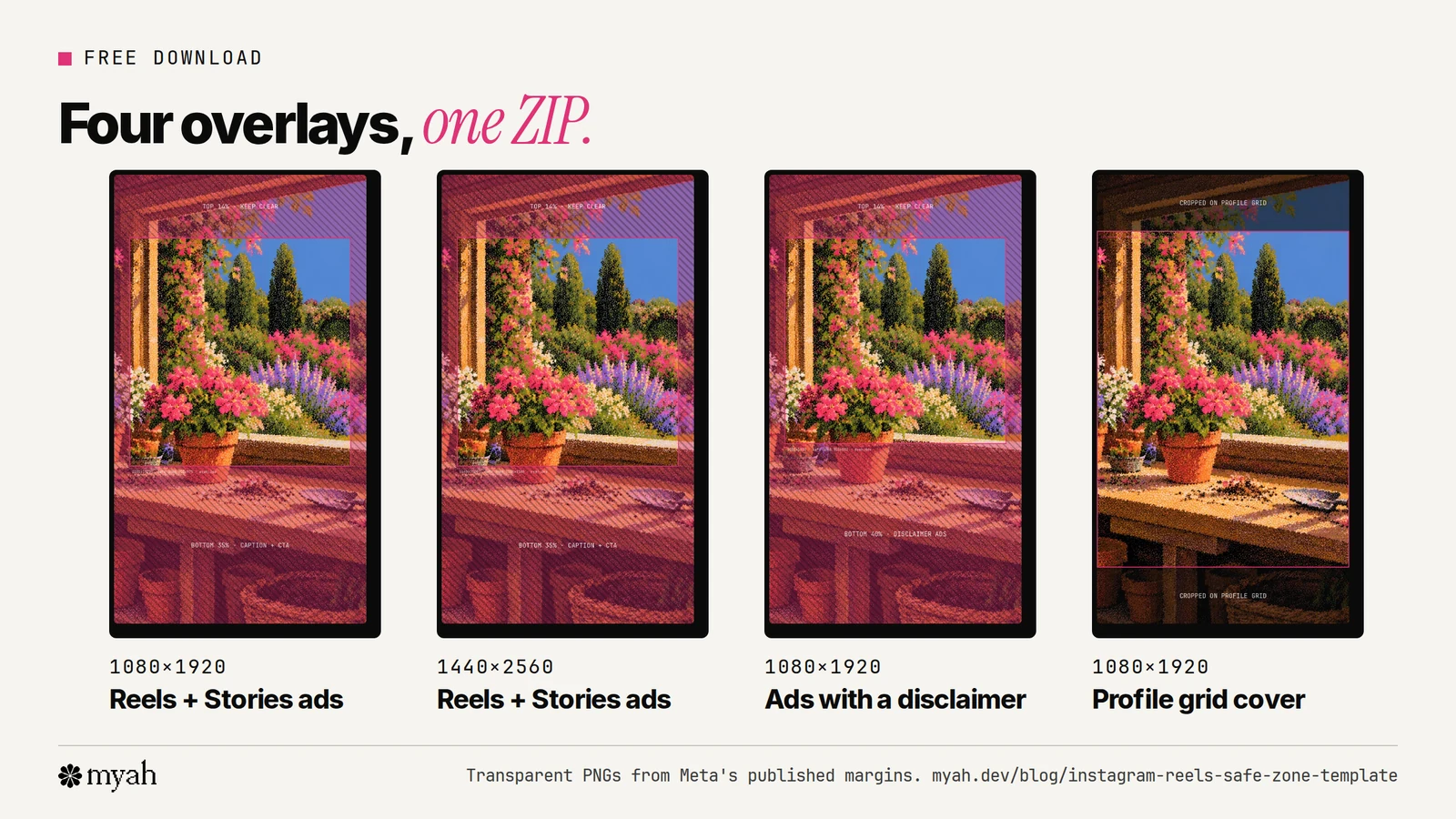
The pack has four transparent PNG overlays and a one-page cheat sheet:
- Reels and Stories ads, 1080×1920. Meta's 14% top, 35% bottom and 6% side margins.
- Reels and Stories ads, 1440×2560. The same margins at the resolution Meta now recommends.
- Reels ads with a disclaimer, 1080×1920. The bottom 40% kept clear, as Meta asks for ads that carry disclaimers.
- Profile grid cover check, 1080×1920. Shows the centered 3:4 slice your cover is likely to keep on your profile grid.
Download the template pack (ZIP) or download the one-page cheat sheet (PDF). Both are free, and there's no sign-up.
The Instagram Reels safe zone in pixels
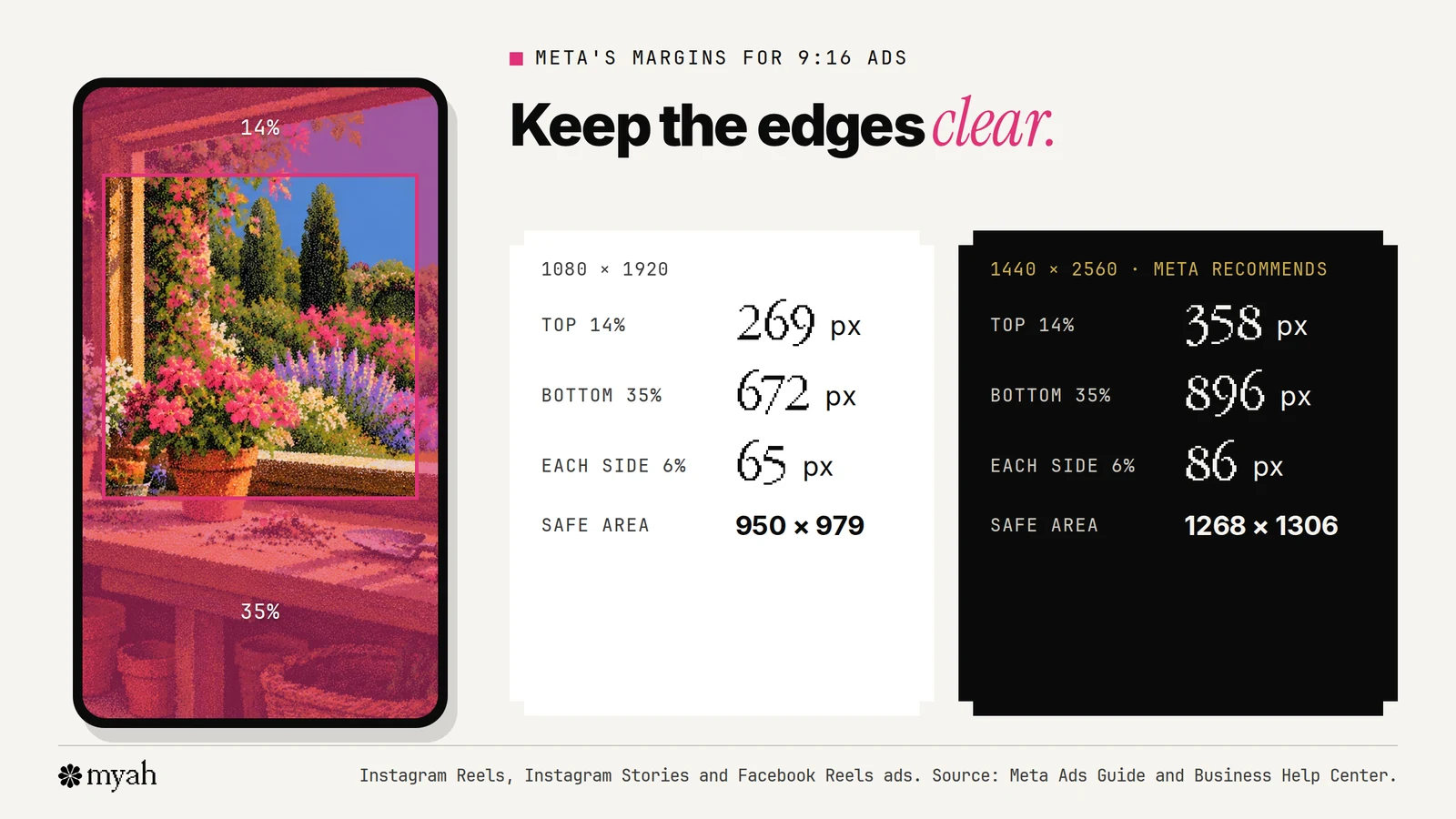
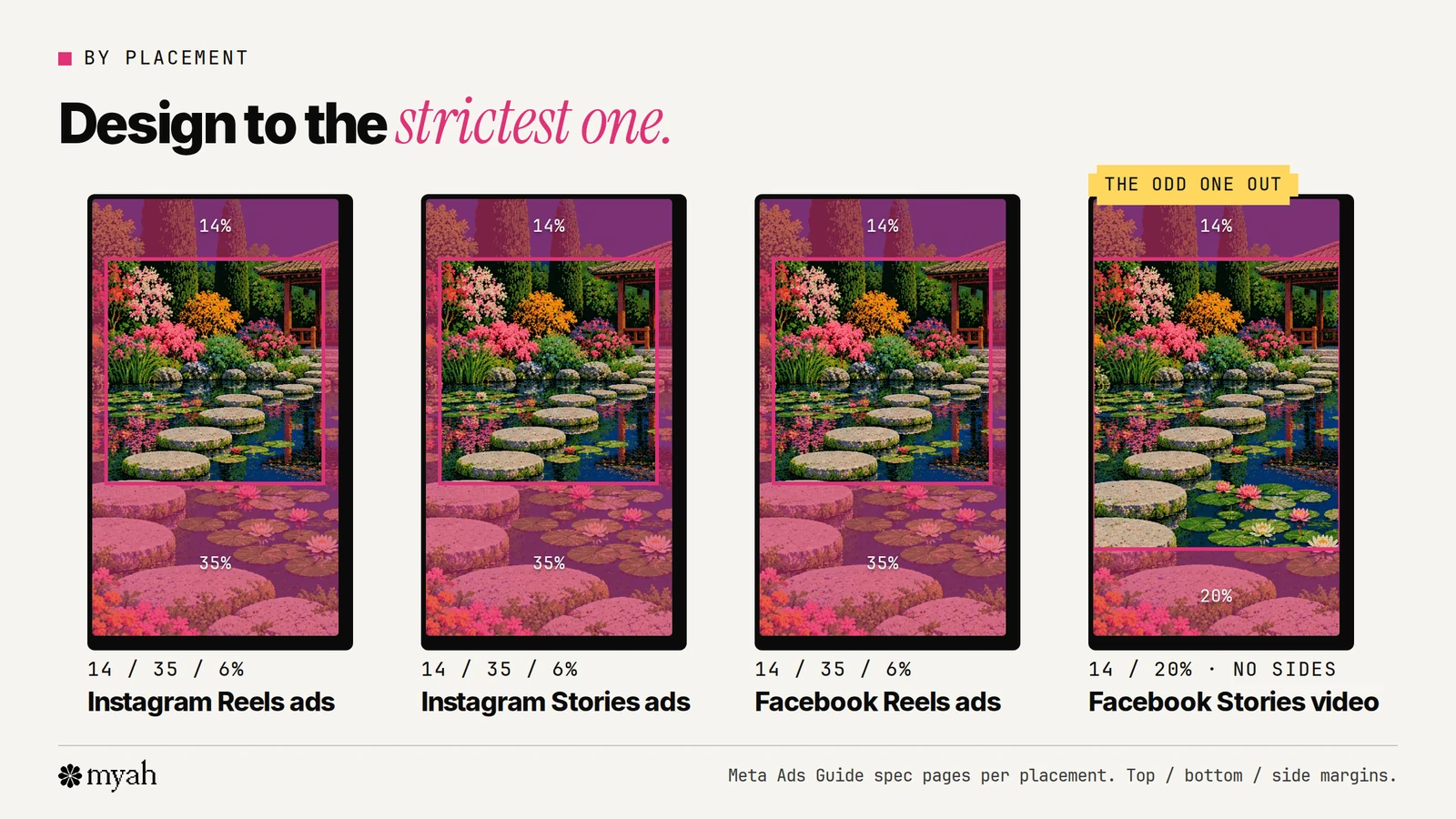
Meta's Ads Guide gives the same advice for Instagram Reels video ads, Instagram Stories video ads and Facebook Reels ads: consider leaving at least 14% of the top, 35% of the bottom and 6% on each side free from text, logos or other important creative elements. That keeps them from being cropped, covered by the profile icon or call-to-action, or pushed too close to the edge of taller phone screens.
Here's what those percentages come to in pixels, rounded to the nearest pixel:
| Keep clear (pixels) | 1080×1920 | 1440×2560 |
|---|---|---|
| Top 14% | 269 | 358 |
| Bottom 35% | 672 | 896 |
| Each side 6% | 65 | 86 |
| Safe area left in the middle | 950×979 | 1268×1306 |
Two details are easy to miss:
- Meta now recommends 1440×2560. The Reels and Stories ad specs list a resolution of 1440×2560 pixels, not the 1080×1920 most templates assume. Both are 9:16, so the percentages work at either size. Only the pixel numbers change.
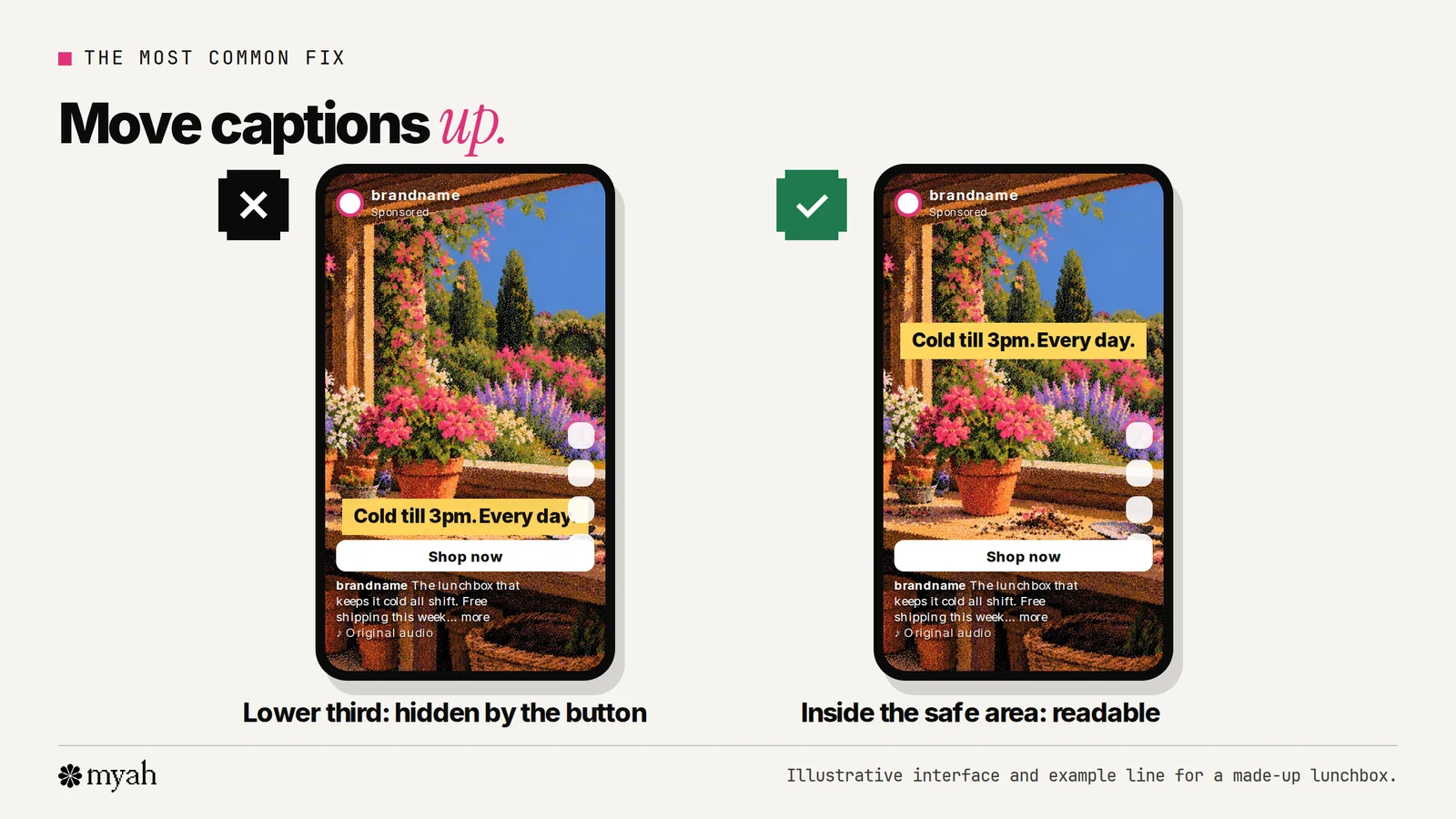
- The bottom is the big one. Over a third of the frame sits under the caption, the handle, the call-to-action button and the like and share buttons. Captions placed in the usual "lower third" of a video fall straight into it.
What covers each part of the screen
The margins aren't arbitrary. Each band is where part of the app sits on top of your video.
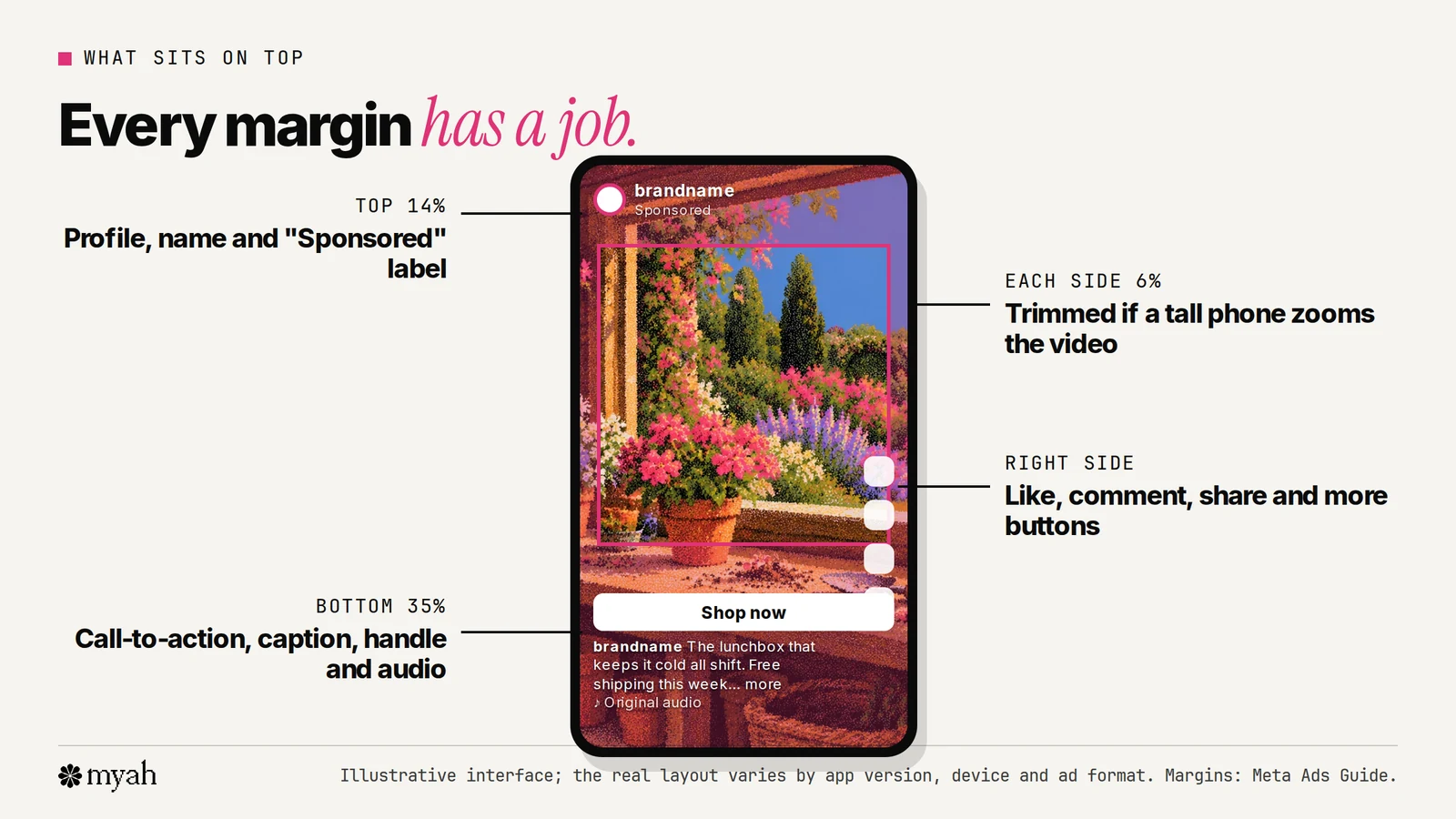
- Top 14%. The profile picture, account name and "Sponsored" or partnership label.
- Bottom 35%. The caption, the account handle, the audio label and the call-to-action button, such as "Shop now".
- Right side. The like, comment, share and more buttons run down the right edge, above the bottom band.
- Both sides 6%. Phones with screens taller than 9:16 can zoom your video to fill them, which trims the edges.
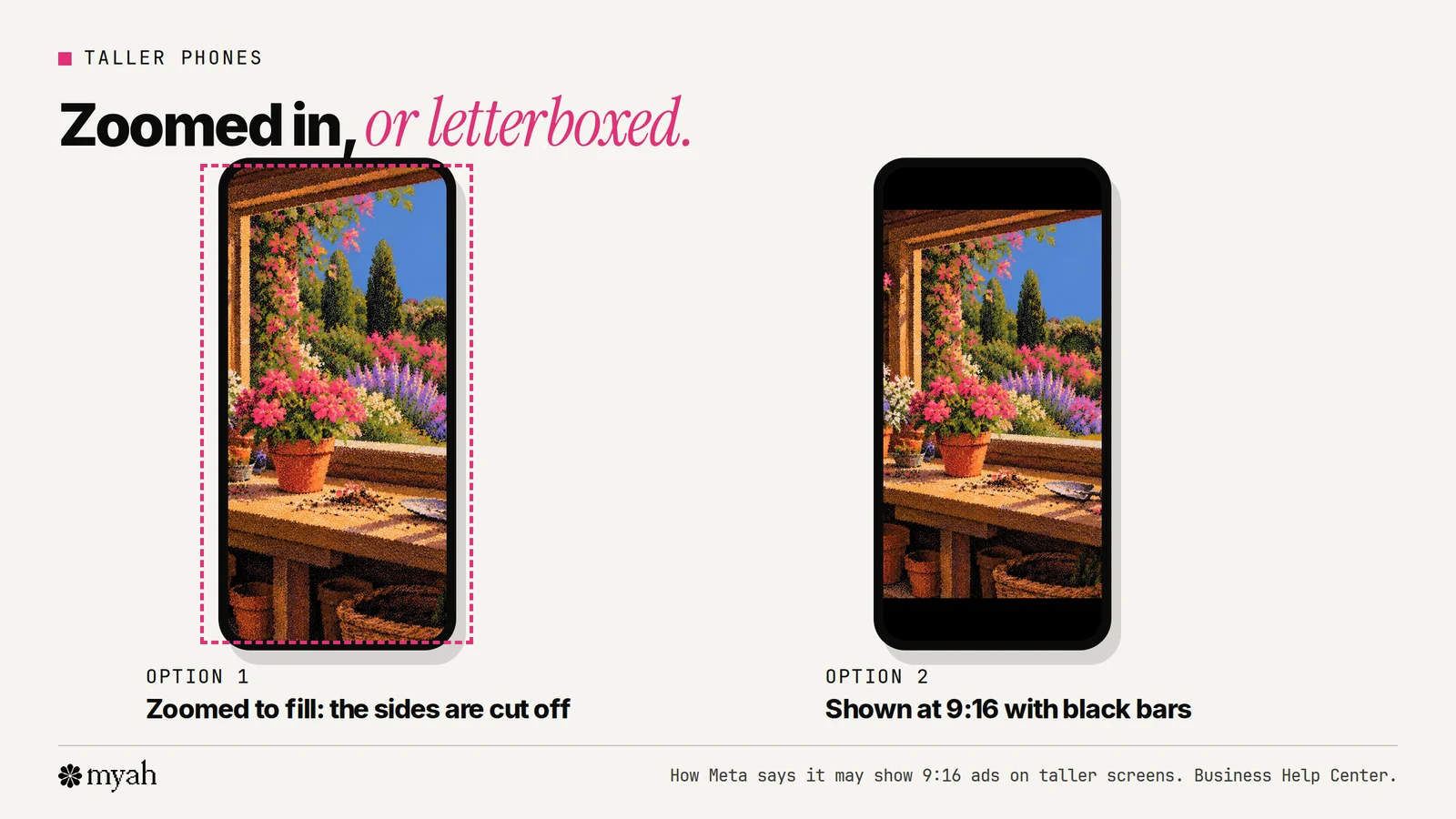
Meta's help page on text overlays and the safe zone adds two practical points. Ads Manager has a Safe Zone guardrail you can toggle on to see the safe area as a yellow overlay on your creative. And on devices taller than 9:16, Meta may either zoom the creative to fill the screen, cropping outside the safe zone, or show it at 9:16 with black bars.
Reels vs Stories vs Facebook: where the guidance differs
For most 9:16 placements, Meta now gives one set of margins. Its help page says the safe zone guidance for 9:16 ads applies across Stories, Reels, Feed and Facebook in-stream reels, and that 9:16 video ads in Instagram Feed use the same guidance as Reels and Stories.
The individual spec pages don't all match, though:
| Placement | What Meta's spec page says | Source |
|---|---|---|
| Instagram Reels ads | 14% top, 35% bottom, 6% each side | Meta Ads Guide |
| Instagram Stories ads | 14% top, 35% bottom, 6% each side | Meta Ads Guide |
| Facebook Reels ads | 14% top, 35% bottom, 6% each side | Meta Ads Guide |
| Facebook Stories video ads | 14% (250 px) top, 20% (340 px) bottom | Meta Ads Guide |
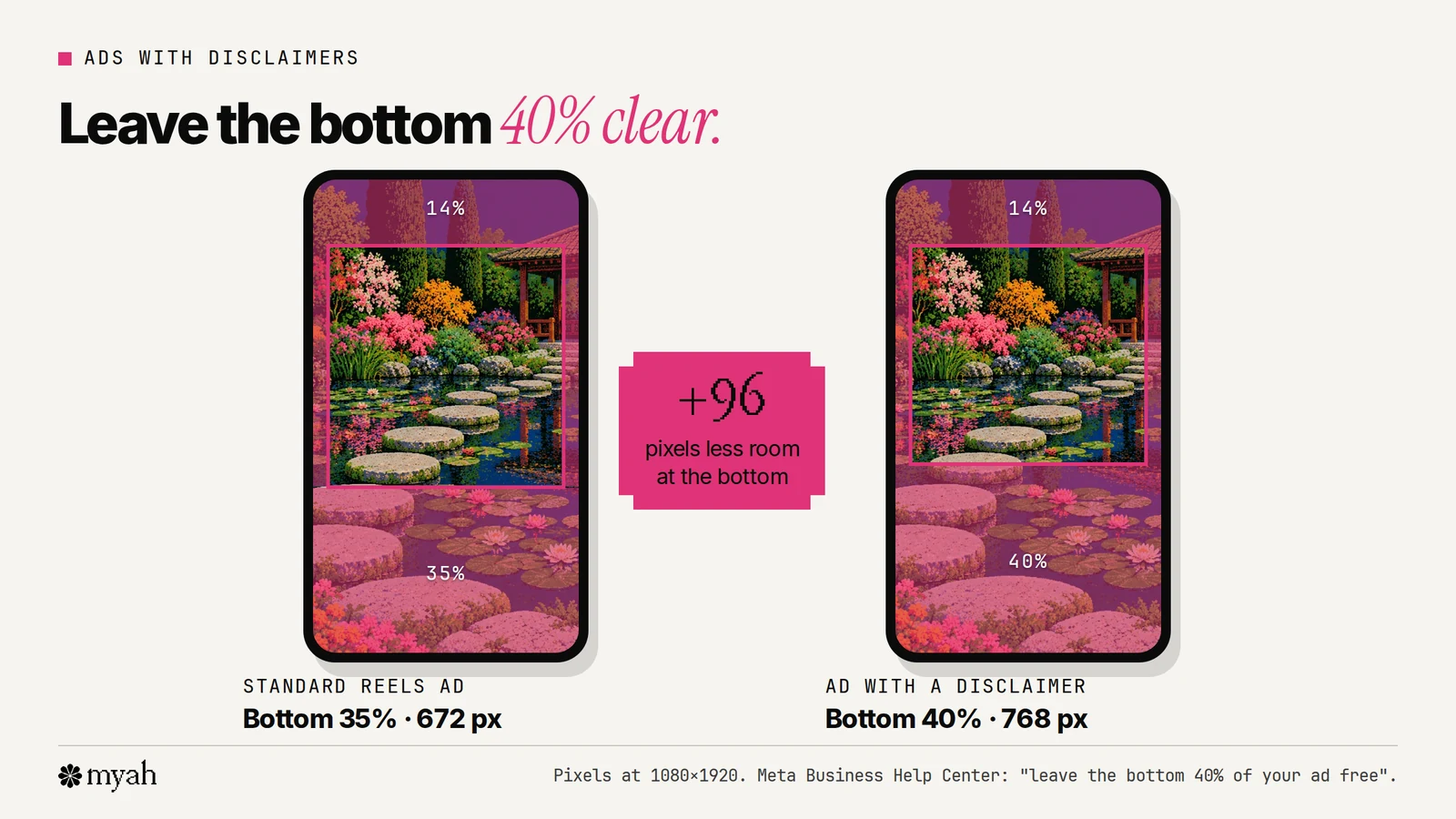
| Any Reels ad with a disclaimer | Keep the bottom 40% clear | Meta Business Help Center |
So the Facebook Stories video page is the odd one out, with a smaller bottom margin. That's why you'll see "20% bottom" on some templates and "35% bottom" on others. They're quoting different Meta pages.
The practical answer is to design to the strictest version. One video often runs in several placements at once, so if your text clears 14% at the top, 35% at the bottom and 6% at the sides, it clears every one of them.
Ads with disclaimers: keep the bottom 40% clear
If a Reels ad includes a disclaimer, Meta says to leave the bottom 40% of your ad free from text, logos and other key creative elements. That's 768 pixels on a 1080×1920 video, or 1,024 on a 1440×2560 one.
This matters for products that commonly carry disclaimers, such as supplements, finance or some skincare claims. Check with the brand whether the ad will carry one before you place your on-screen text, because it moves your safe area up by almost 100 pixels.
What about organic Reels?
Instagram's help center gives the basic specs for regular Reels: an aspect ratio between 1.91:1 and 9:16, at least 720 pixels and at least 30 frames per second. It doesn't publish safe zone percentages for organic posts. The numbers above are from Meta's ad specs.
For organic Reels, the ad margins are still a sensible, slightly cautious guide. The same caption, handle and buttons sit over the bottom and right of the screen. An organic Reel has no call-to-action button, so you have a little more room at the bottom in practice, but text that clears the ad margins works in both. That's useful for creators, because a video made for your own feed may later be run as an ad.
Your profile grid crops the cover
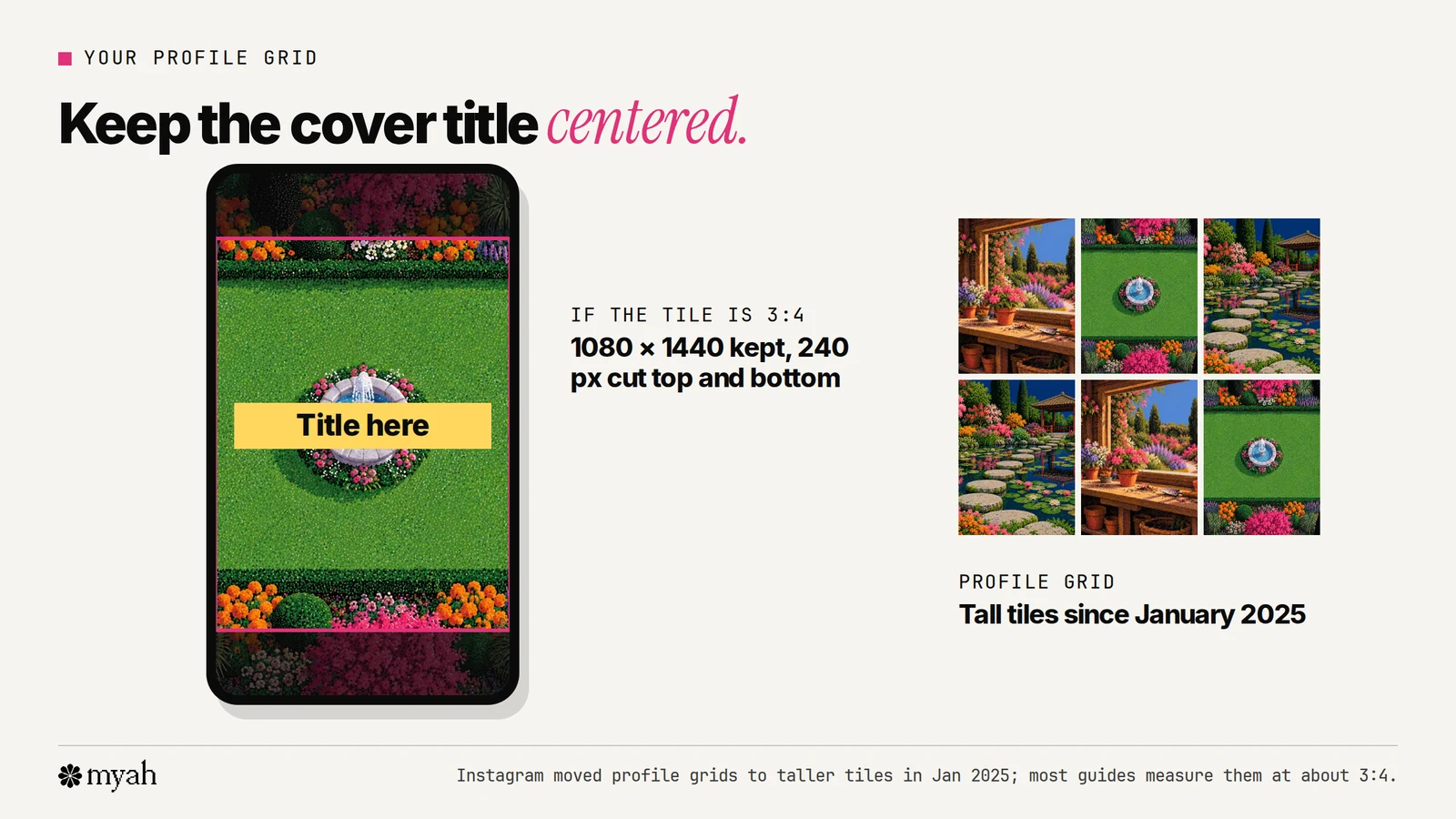
In January 2025 Instagram switched profile grids from squares to taller rectangles, because most photos and videos uploaded are now vertical. Most guides measure the new tiles at about 3:4. Your Reel still plays at 9:16, but its cover shows as a shorter slice on your profile. If that slice is 3:4 and centered, it keeps 1080×1440 of a 1080×1920 frame, cutting 240 pixels from the top and bottom. Instagram's head, Adam Mosseri, said it would make these previews easier to adjust, but the simplest fix is to keep your cover title in the middle.
How to use the templates
The templates work in any editor that lets you put an image on top of your video:
- Start a 9:16 project at 1080×1920 or 1440×2560, matching the template you picked.
- Add the PNG as the top layer, above your footage and text, and stretch it to fill the frame.
- Place your key text, captions, product shots and faces inside the clear middle. Keep captions above the pink bottom band, not in the traditional lower third.
- Check the right-hand side. Keep words away from the right edge above the bottom band, where the like and share buttons sit.
- Delete or hide the overlay before you export. It's a guide, not part of the video.
- Brands: check again in Ads Manager. Turn on the Safe Zone guardrail to see the safe area over your creative, and preview each placement the ad will run in.
For creators: assume the video might run as an ad
Brands increasingly take creator videos and run them as ads, for example as Meta partnership ads, where your handle shows next to theirs. When that happens, a call-to-action button and a longer caption land on top of the bottom of your video.
So if a brand might use your video in ads, build it to the ad margins from the start. Ask whether the ad will carry a disclaimer. Keep your opening line in the top half, which also helps your hook rate. And deliver a version without burned-in captions if the brief asks for one, so the brand can add its own. Our UGC brief template has space to agree all of this before you film.
Free cheat sheet
Print or save this one-page summary of the margins, the pixel sizes and the checks to run before you send or launch a video. Download the PDF.
Common questions
What is the Instagram Reels safe zone?
It's the middle part of a 9:16 video where text and key visuals won't be covered by Instagram's interface. For Reels ads, Meta says to leave about 14% of the top, 35% of the bottom and 6% on each side free of key elements.
What is the Instagram Reels safe zone size in pixels?
On a 1080×1920 video, keep 269 pixels clear at the top, 672 at the bottom and 65 on each side, which leaves a safe area of 950×979 pixels. On a 1440×2560 video, it's 358 at the top, 896 at the bottom and 86 on each side.
Is the safe zone different for Instagram Stories?
Not for ads any more. Meta's Instagram Stories ad spec now gives the same 14% top, 35% bottom and 6% side margins as Reels. Facebook Stories video ads are the exception, with 14% at the top and 20% at the bottom.
Where should captions go on a Reel?
Above the bottom 35% of the frame, and away from the right edge where the buttons sit. On a 1080×1920 video, that means keeping captions above roughly 1,248 pixels from the top. Move them higher still if the ad will carry a disclaimer.
Should I make Reels at 1080×1920 or 1440×2560?
Both are 9:16, so either works with the same percentages. Meta's ad specs now recommend 1440×2560 for Reels and Stories ads. Instagram's minimum for regular Reels is 720 pixels.
Does the safe zone apply to Facebook Reels?
Yes. Meta's Facebook Reels ad spec uses the same 14% top, 35% bottom and 6% side margins.
Where to go next
- Meta partnership ads explained: how brands run a creator's video with both names on the ad.
- Hook rate on Meta: how to tell whether the first 3 seconds are working.
- UGC brief template for Meta ads: agree placements, captions and deliverables before filming.
Myah is building a performance-UGC marketplace for brands and creators. Brands run approved videos as ads in their own Meta Ads Manager. Join creator early access or join brand early access for updates from Myah. Early access does not guarantee campaigns, availability or earnings.