

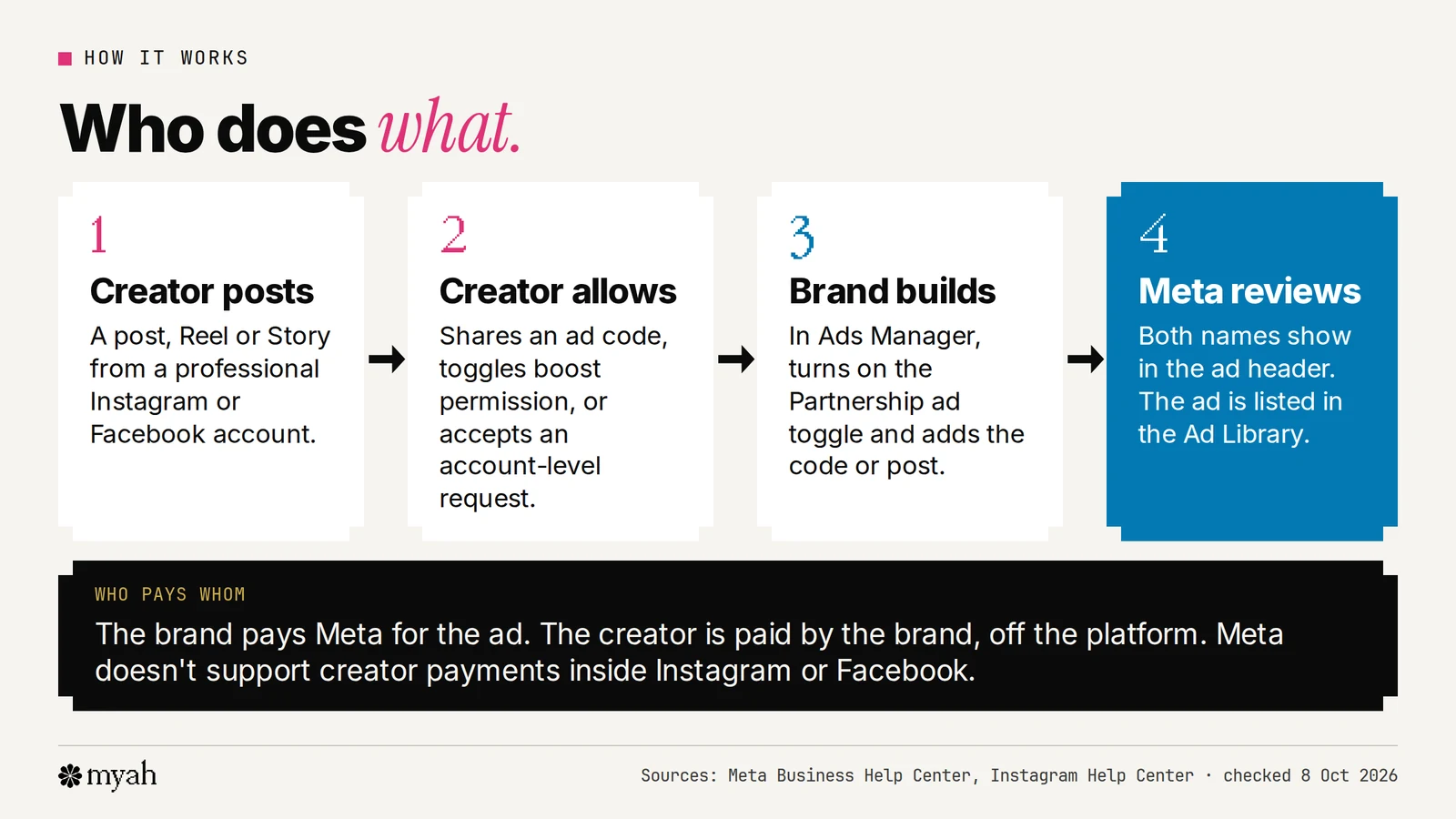
A Meta partnership ad is an ad that a brand runs with a creator's content and shows both names in the ad header. The creator has to give permission first, either by sharing a partnership ad code for one post or by accepting an ongoing account-level request. The brand then builds the ad in Meta Ads Manager and pays Meta for the delivery. The creator is paid separately, off the platform.
This guide covers how that works, the exact steps for creators and brands, how to switch it off and where people most often get confused. It uses Meta's own help pages, which change over time, so check the current page for each step before you rely on it.
What a partnership ad is
Meta says partnership ads let advertisers run ads with partners: creators, brands and other businesses. The partner's account, the advertiser's account, or both are featured in the ad's header, and the ads use signals from both accounts for ranking. Meta used to call them branded content ads, and its help pages still note the old name.
Three practical points follow from Meta's pages:
- The creator's profile stays clean. The organic post appears on the profile as usual, but the partnership ad itself won't be visible on the creator's profile.
- The ad is public. It is listed in Meta's Ad Library, which shows active, public branded content running on Instagram and Facebook.
- Creators are paid off-platform. Meta says creators whose content is used for partnership ads are paid off the platform, and that it does not support payments made through the Instagram app or on Facebook.
Who does what
Two kinds of permission
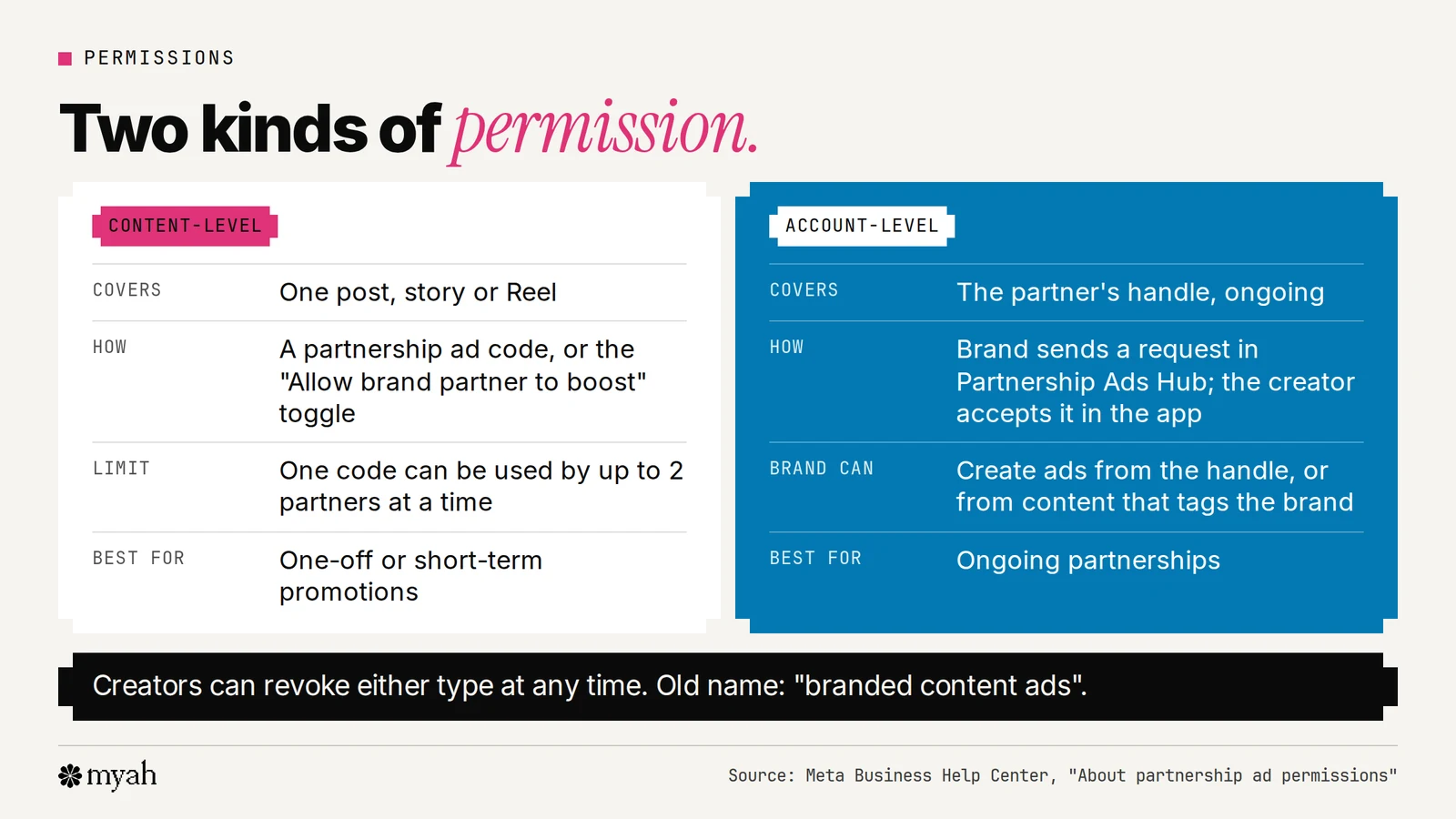
To run a partnership ad, advertisers need permission from the partner whose handle the ad will include. Meta says creators and partners can revoke these permissions at any time. There are two types.
Content-level permission
This covers an individual post, story or Reel. The creator can grant it in two ways:
- A partnership ad code. With the code, the advertiser can create an ad from any Instagram or Facebook post, story or Reel, whether or not it's branded content or the advertiser is tagged.
- The "Allow brand partner to boost" toggle. This works when the brand is tagged in the paid partnership label.
A few details from Meta's pages are easy to miss:
- A code can be used by up to 2 partners at a time.
- On Instagram only, archiving a post doesn't remove the advertiser's ability to boost it if the "Allow brand partner to boost" toggle is still on. Archived Facebook content can't be boosted into a partnership ad.
- For newly created branded content, the "Allow brand partner to boost" toggle turns on automatically for 28 days since your last branded content was posted, so you don't have to approve each post by hand while you're actively making partnership ads. Check that setting before you assume a post is off-limits.
Account-level permission
This is broader and suits ongoing partnerships. The brand sends a request from Meta's partnership tools, and the creator accepts it in the Instagram app, the Facebook app or the hub. Meta's help pages use both "Partnership Ads Hub" and "Creator Marketing Hub" for this tool, so don't be thrown if you see either name.
With account-level permission, advertisers can:
- Create partnership ads from the partner's handle without pre-existing content.
- Create ads from the partner's existing content that tags the advertiser. On Instagram, the tag can be the paid partnership label, an @mention, a people tag, a product tag or a Collab. On Facebook it has to be the paid partnership label.
- Include or exclude the partner's custom audience in the campaign.
The request steps for a brand, per Meta: in Meta Business Suite, click Creator Marketing, then Manage permissions, then Add partnership, search for the partner, choose the account you'll partner with and click Send request. The partner then accepts it.
Because this is much wider than a single post, a creator should check the business making the request, how long the partnership will last and what the brand will make before accepting. Our guide to usage rights and partnership-ad permissions covers the questions to ask.
For creators: get a partnership ad code
Before you start, you need a professional Instagram account (or a Facebook Page or profile in professional mode), content in an eligible format and to meet Meta's eligibility requirements.
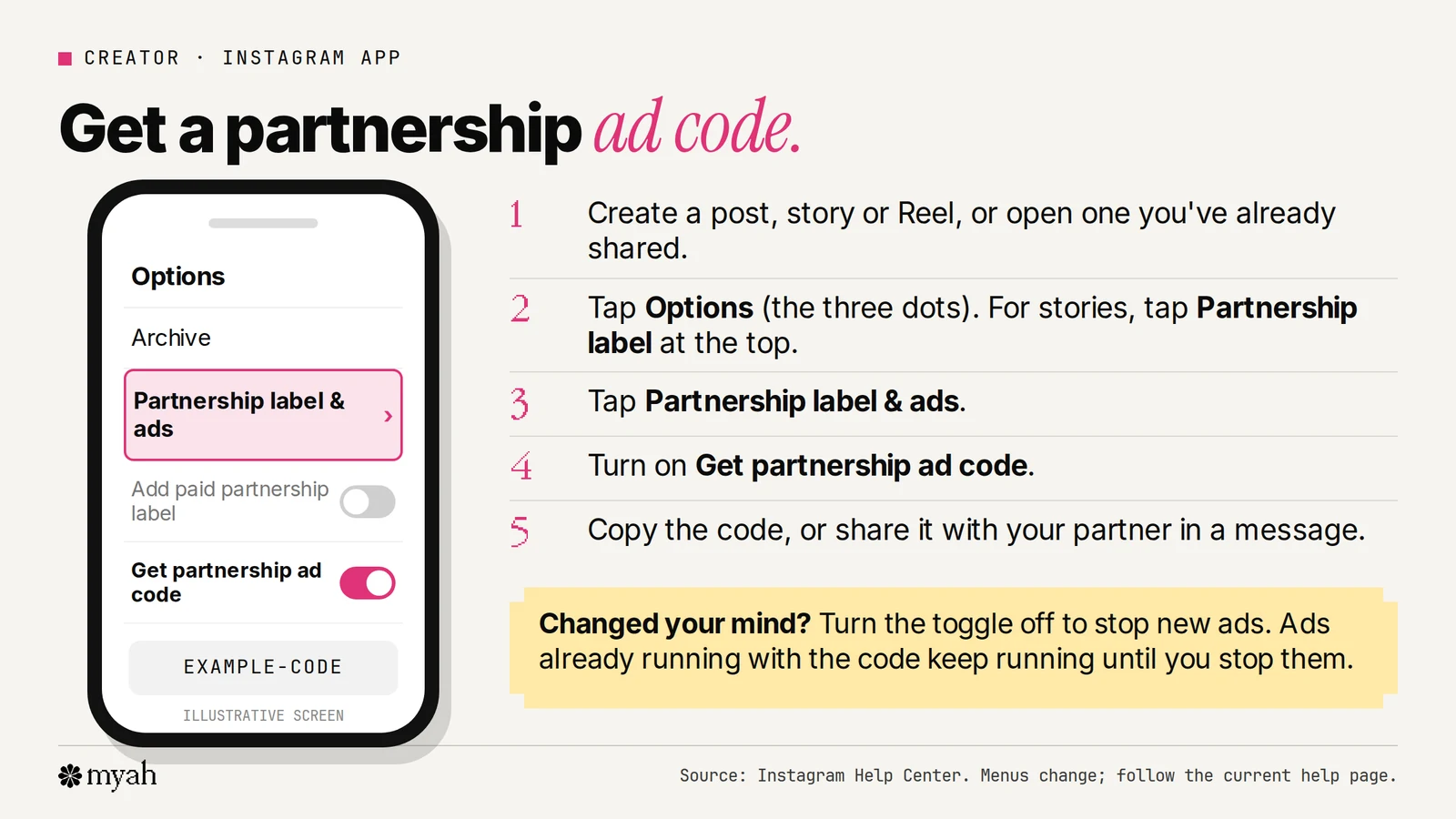
- Create a post, story or Reel, or open one you've already shared.
- Tap Options (the three dots). For stories, tap Partnership label at the top.
- Tap Partnership label & ads.
- Turn on Get partnership ad code.
- Copy the code, or share it with your partner in a message.
If the code toggle is on while you're creating content and your content isn't eligible, Meta shows a screen telling you. Content you share without fixing those problems can't be used as a partnership ad.
On Facebook, the equivalent is to find the content in your Feed or on your Page, tap Options, tap Share partnership ad code and turn the toggle on.
Only share the code itself. Don't share your password or two-factor authentication codes with anyone. The code lets a partner boost that content; it is not a login.
For brands: build the partnership ad
Meta recommends linking your Instagram and Facebook accounts first. Then, with an ad code or post details from the creator:
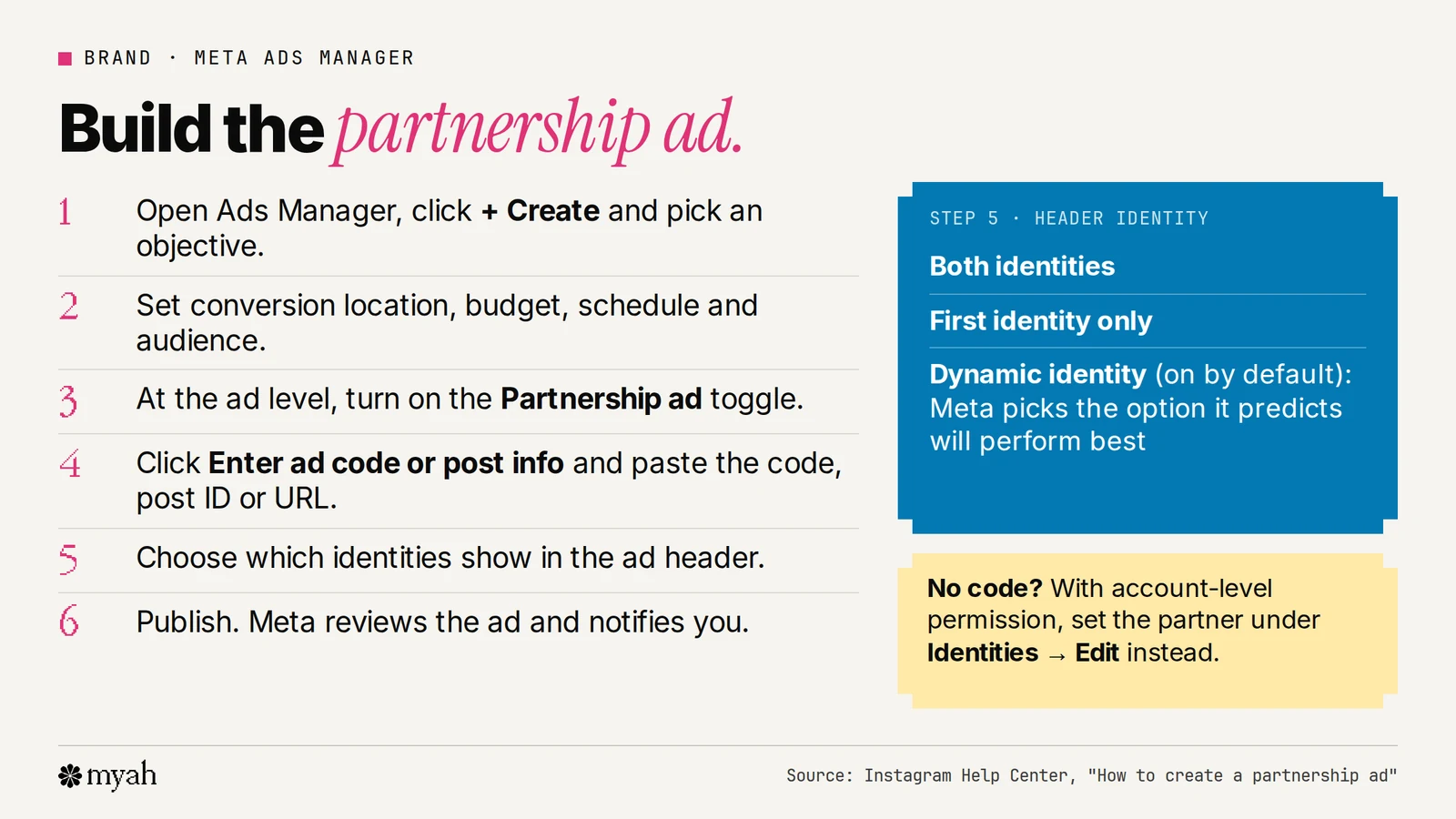
- Go to Ads Manager and click + Create.
- Select your ad objective. Not every objective supports partnership ads, so check Meta's list of supported objectives and placements.
- Complete the conversion location, budget, schedule and audience, then click Next.
- At the ad level, turn on the Partnership ad toggle.
- Click Enter ad code or post info and paste the ad code, post ID or post URL. This sets the first identity and uses the media attached to the code or post.
- Select the second identity to show in the header.
- Choose which identities to display: both, the first identity only, or dynamic identity. Dynamic identity is on by default, and Meta says it picks the option predicted to perform best. Both identities are always shown in unsupported placements.
- Click Done, finish setting up the ad and click Publish.
If you have account-level permission and no code, you turn on the partnership ad toggle and set the partner under Identities → Edit instead.
Once you've created the ad, Meta reviews it and notifies you when it's approved. Until the partnership ad is live, you can't manage or delete likes and comments that appear on a boosted post.
A related point: partnership ads are not the same as organic branded content. If you want a partner to tag your account with the paid partnership label when they post organic branded content, you need to grant permission separately.
Where partnership ads run
Meta lists these placements for partnership ads: Instagram Feed, Web Feed, Explore Feed, Explore Grid, Stories and Reels; Facebook Feed, Stories, Reels and Marketplace; and WhatsApp Status, which became available in September 2026. Meta's supported-placements page is the one to check.
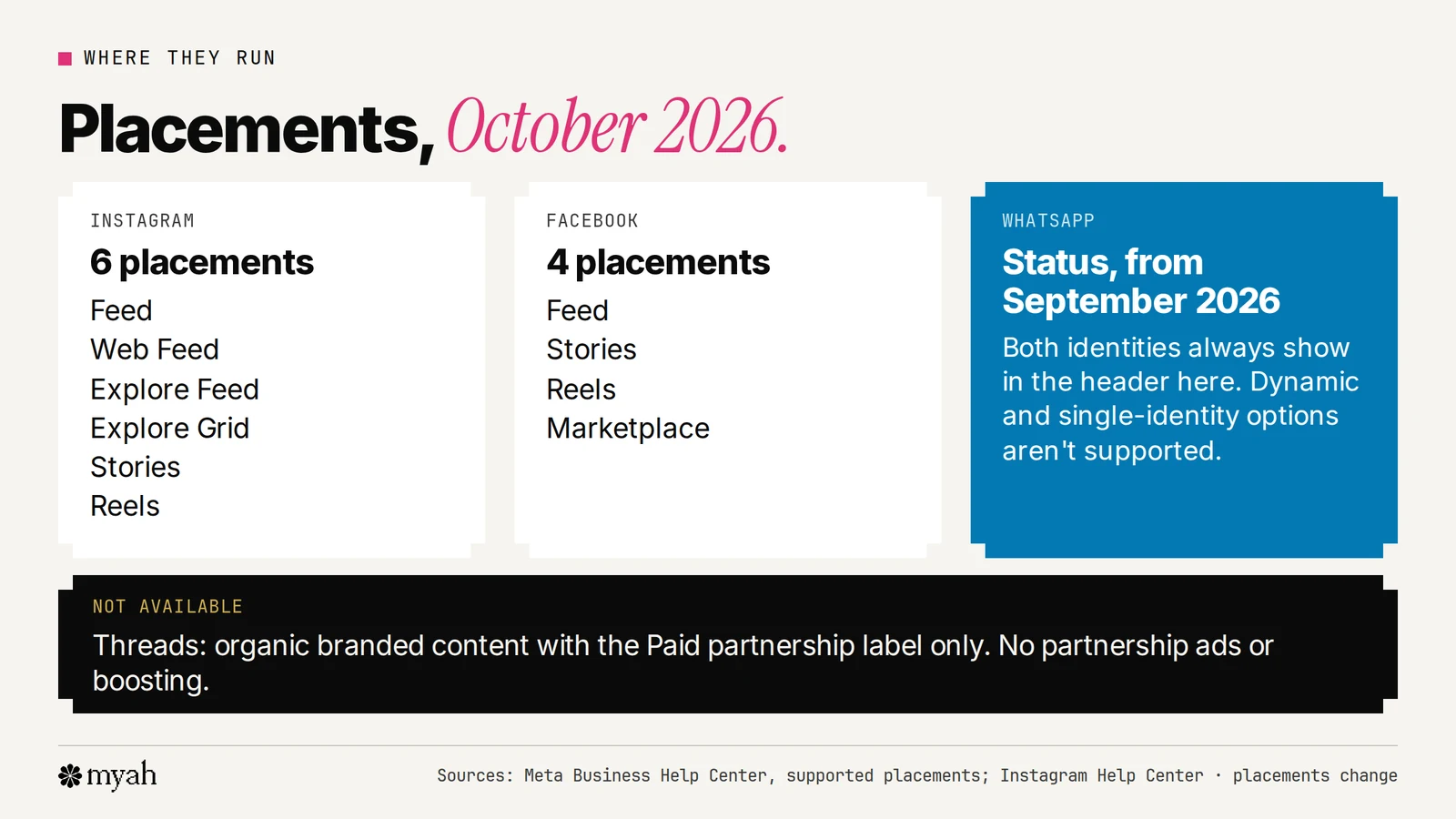
Threads is the exception. Meta says Threads supports organic branded content with the paid partnership label, but does not support partnership ads or boosting branded content.
Eligibility
Meta requires creators, advertisers, publishers and other professional accounts to pass and stay compliant with its eligibility requirements. In summary:
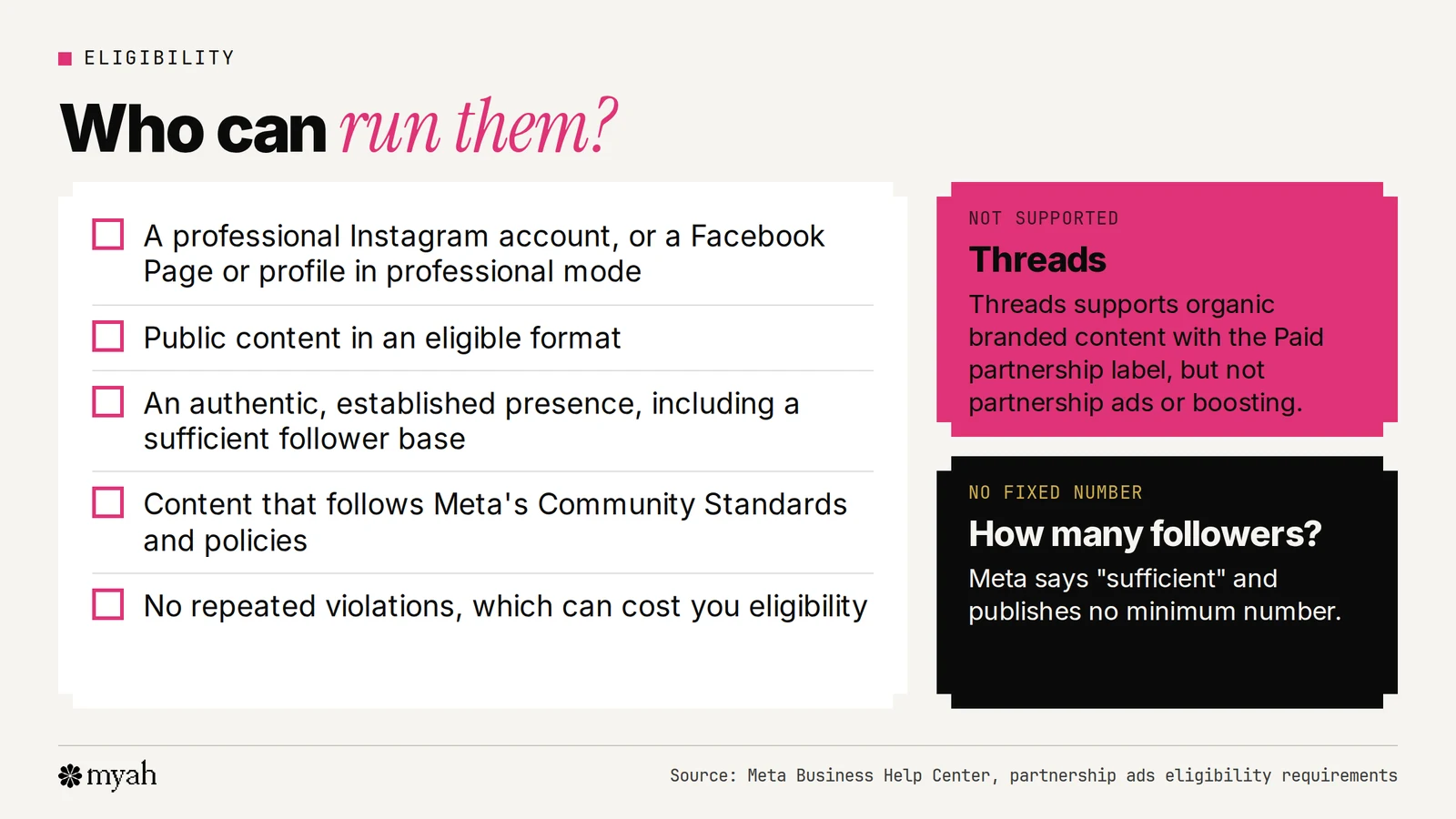
- Content on an eligible surface: public content on Facebook Pages or profiles in professional mode, or on Instagram professional accounts.
- An authentic, established presence, including a sufficient follower base.
- Content that follows Meta's Community Standards and its policies on intellectual property, authenticity and user safety.
- No repeated violations connected to the account.
Meta doesn't publish a follower minimum, so you can't tell from outside whether an account qualifies. If you're a newer creator, our guide to becoming a UGC creator without followers explains the deals that don't depend on your handle.
Keep the edges clear: safe zones
If the video will run as a 9:16 ad in Stories, Reels, Feed or Facebook in-stream Reels, Meta says to keep the top, bottom and sides free of key creative elements, text and logos, because the profile icon or a call to action can cover them.
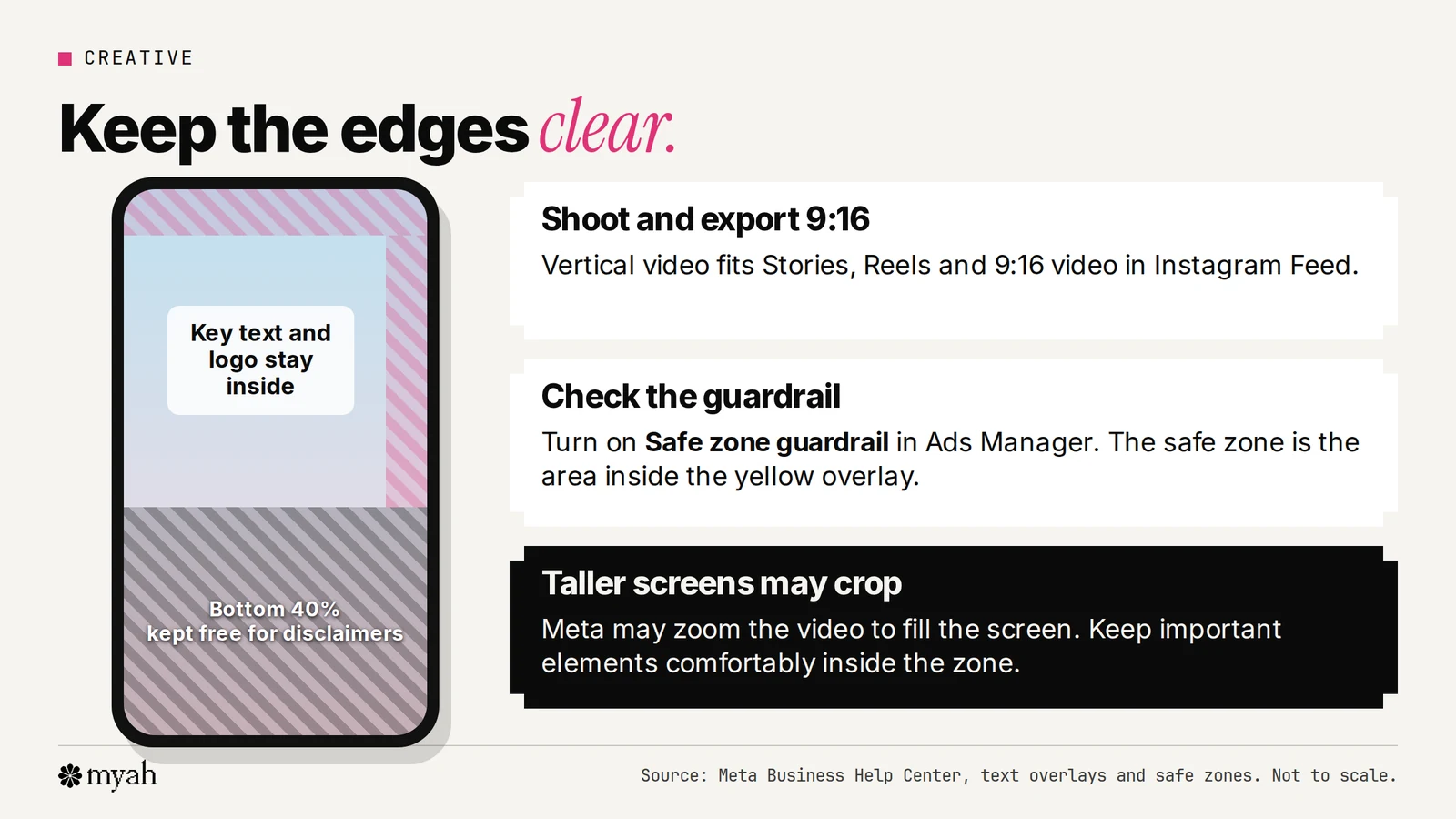
Three details from Meta's page:
- In Ads Manager you can turn on the Safe zone guardrail. The safe zone is the area inside the yellow overlay.
- On screens taller than 9:16, Meta may zoom the creative to fill the screen, which can crop areas outside the safe zone, or show it in its original ratio with black bars.
- If you're adding disclaimers to Reels ads, leave the bottom 40% of the ad free of text, logos and other key elements.
We haven't drawn exact pixel values because Meta doesn't give one universal figure. Use the guardrail on your actual creative.
How to switch it off
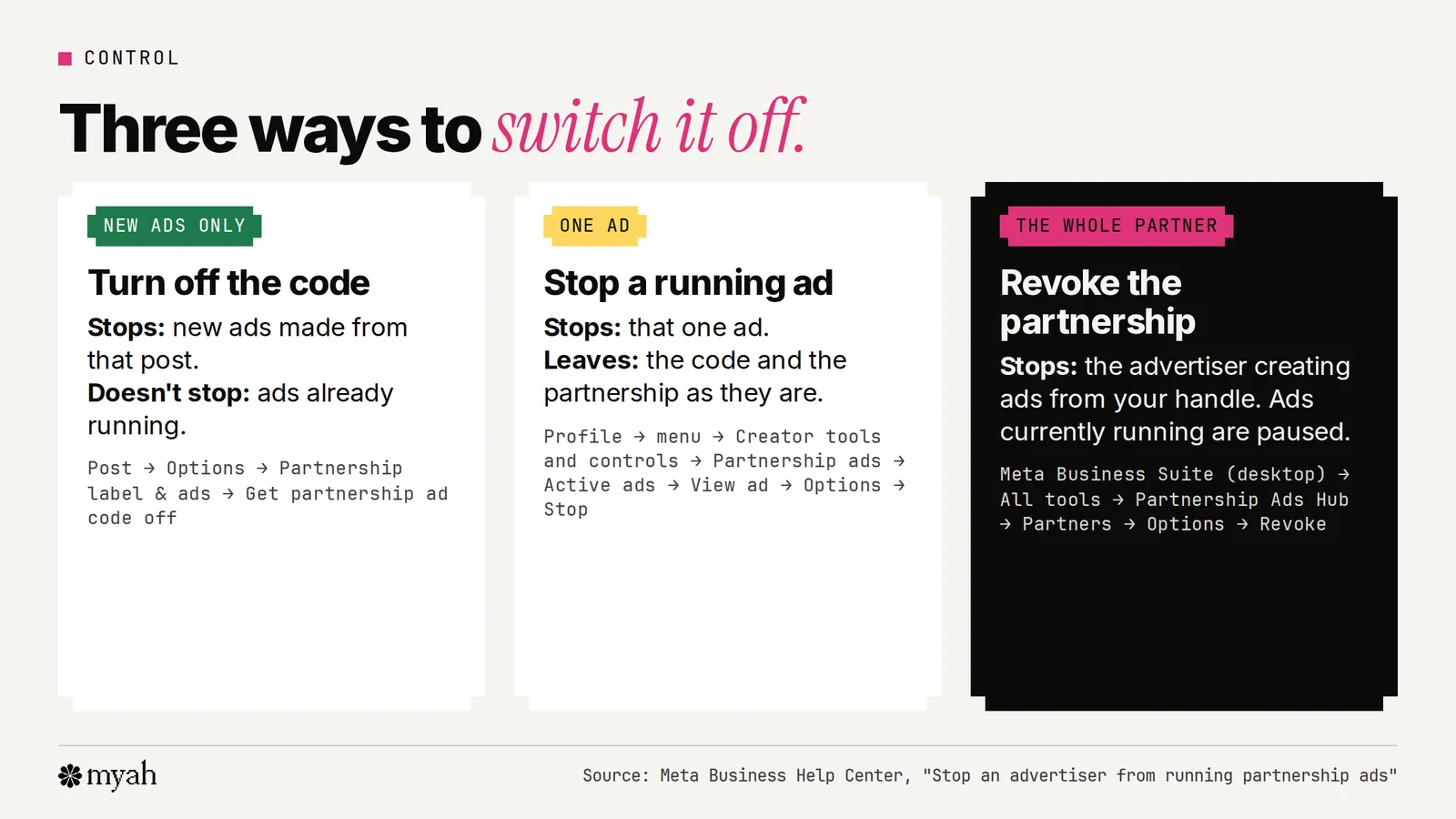
This is the part people most often get wrong. There are three separate controls.
1. Turn off the code (stops new ads only). In the Instagram app, open the post, tap Options, tap Partnership label & ads and turn off Get partnership ad code. Meta says the code can then no longer be used to create new partnership ads from that post. But turning off an ad code that has already been used will not stop active ads from running.
2. Stop a running ad (one ad). In the Instagram app, go to your profile, open the menu, tap Creator tools and controls, tap Partnership ads, then Active ads, choose the partner, tap View ad, then Options, then Stop.
3. Revoke the partnership (the whole partner). In Meta Business Suite on desktop, go to All tools, open Partnership Ads Hub, click Partners, choose the advertiser's Options and click Revoke Partnership. The advertiser can no longer create partnership ads from your handle, and Meta says any ads that are currently running will be paused.
Deleting the original post also stops an ad that's using it, and Meta says you can't edit the content while it's being used as a partnership ad. If you want a post off your profile but still running as an ad, archive it instead.
If you're a brand, agree up front what happens if a creator withdraws permission mid-run, because a platform control doesn't set price, exclusivity or renewal. Those belong in the written deal.
Partnership ads vs whitelisting vs Spark Ads
These terms get mixed up.
- Partnership ads is Meta's name for the format on Instagram and Facebook.
- Whitelisting is an older industry term that people use loosely: sometimes for the Meta format, sometimes for a broader arrangement where a creator gives a brand access to run ads through their account. When a brief says "whitelisting," ask exactly what access it means and for how long.
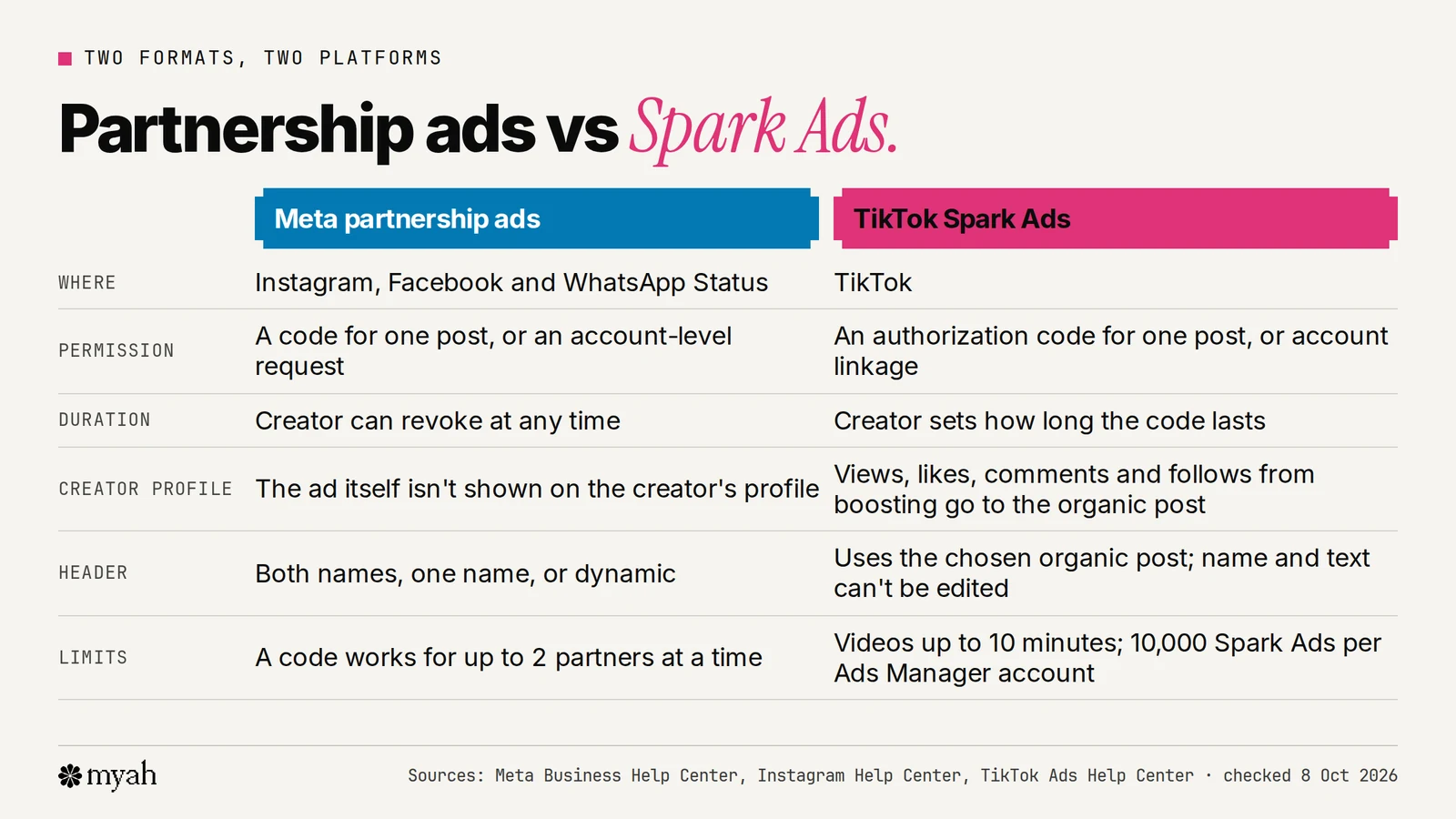
- Spark Ads is TikTok's version. It's a native ad format that uses organic TikTok posts so that views, comments, shares, likes and follows gained from boosting are attributed to the organic post. Creators can authorise a post with a code (find it via the video's three dots, then Ad settings, then Generate), and TikTok says authorisation duration can be customised.
Disclosure, rights and money
A platform permission is a technical switch, not a contract. Keep these separate:
- Disclosure. Meta's policies require creators to tag business partners in branded content when there's an exchange of value between creator and business. In the US, the FTC says material connections must be disclosed clearly and conspicuously. Ask who is responsible for what in the brief.
- Rights. Copyright, usage length, exclusivity and paid-ad use are agreed in writing. See our usage-rights guide.
- Pay. The brand pays the creator off-platform. See flat fee vs commission for ways to structure it, and our UGC rate calculator for a starting range that includes a line for ads run from your own account.
- Results. The two sides see different numbers. Meta says creators have the same insights on a partnership ad as for organic posts, while the business sees ad performance in Ads Manager. So creators usually need the brand to share results. See hook rate on Meta for how those numbers are read.
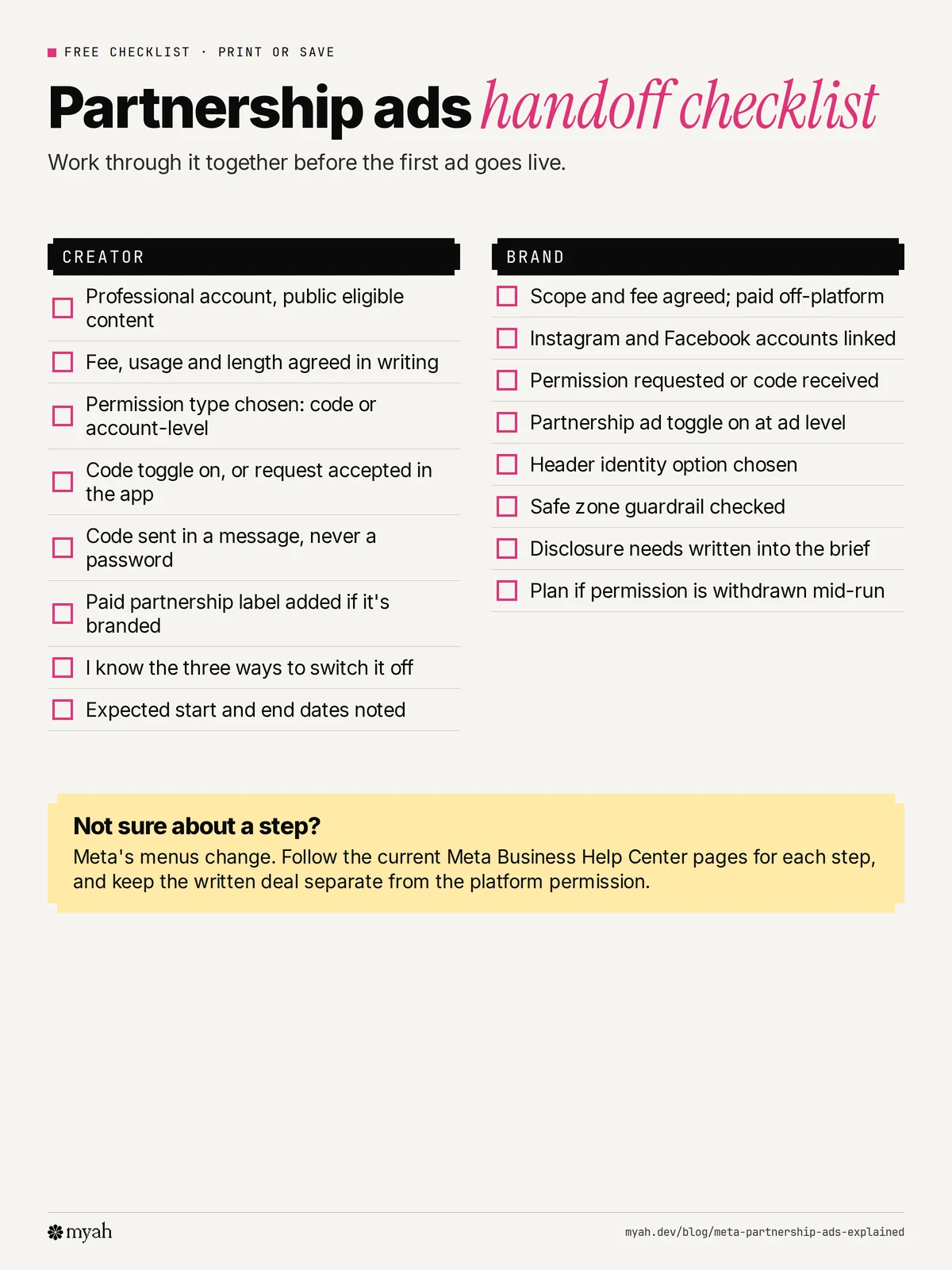
Free handoff checklist
A one-page checklist for creator and brand to work through before the first ad goes live. Download the PDF or save the image.
Common questions
What is a Meta partnership ad code?
It's a code a creator generates for a post, story or Reel and shares with an advertiser. The advertiser enters it in Ads Manager to create a partnership ad from that content. It can be used by up to two partners at a time.
Are partnership ads the same as branded content ads?
Yes. Meta says branded content ads are now called partnership ads. The paid partnership label on organic posts is a separate thing, and it needs separate permission.
Does the creator need a business account?
The creator needs a professional Instagram account, or a Facebook Page or profile in professional mode.
Can a creator take a partnership ad down?
Yes. A creator can stop a running ad, turn off the code for new ads or revoke the partnership. Each does something different, as described above.
Who pays the creator?
The brand does, off the platform. Meta does not support creator payments inside Instagram or Facebook.
Do partnership ads work on TikTok?
No. TikTok's equivalent is Spark Ads, which has its own authorisation process.
Next steps
If you're a creator, set up a professional account, read the permission screen before you accept anything and agree the usage terms in writing. If you're a brand, decide whether you need a single-post code or an ongoing account-level partnership, then use the checklist above.
Myah is building a performance-UGC marketplace for brands and creators. Brands run approved videos as partnership ads in their own Meta Ads Manager. Join brand early access or join creator early access for updates from Myah. Early access does not guarantee campaigns, availability or earnings.