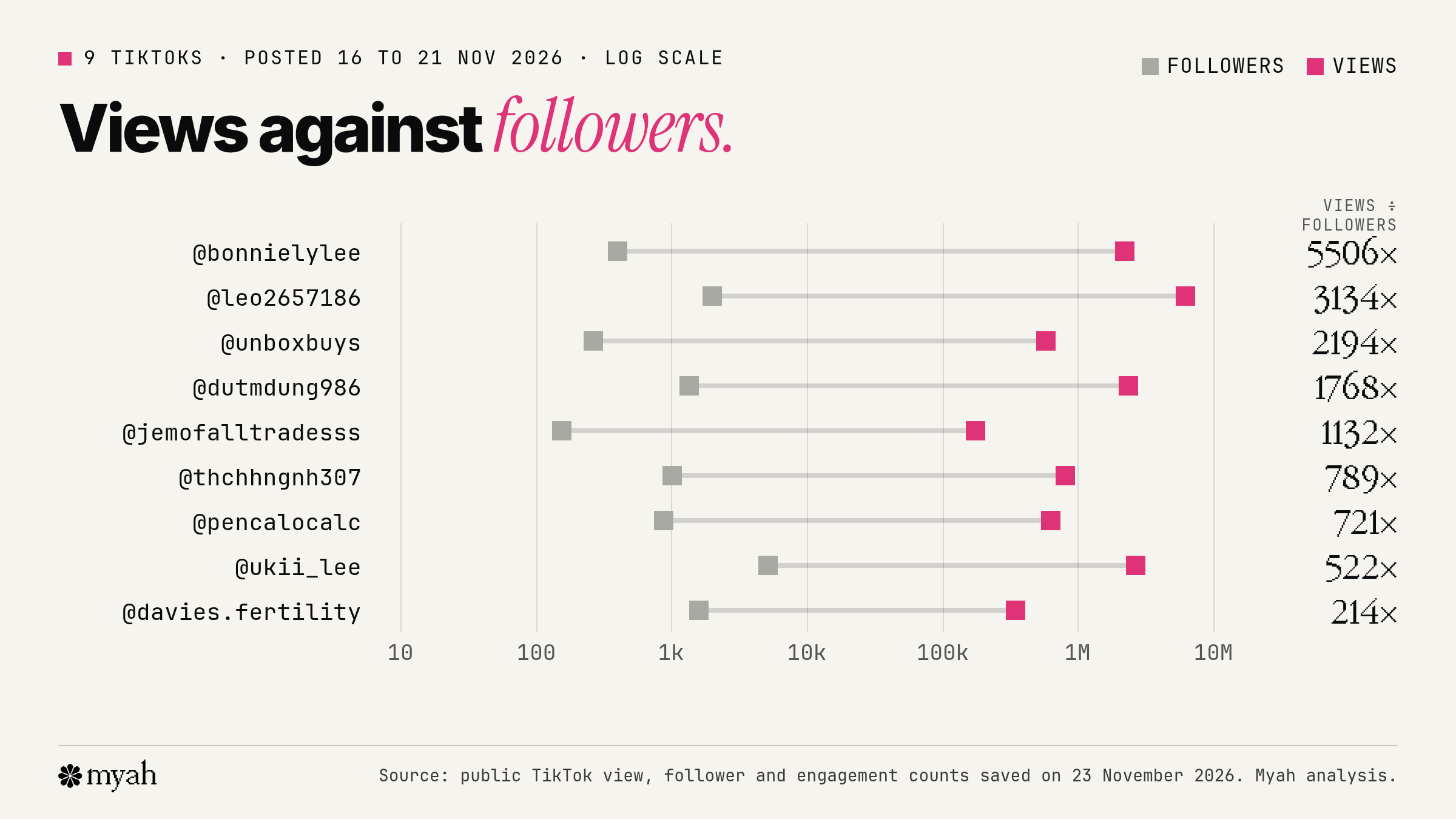
These are 9 viral TikTok examples posted 16 to 21 Nov 2026, picked because each one got far more views than its account has followers. Eight of the nine came from accounts under 2,000 followers, six had no voiceover or conversation, and the top two each got more than 3,100 times their follower count. Here is what each video does and what you can try in your own.
We look for videos that outperformed the account that posted them, not the biggest videos of the week. A celebrity getting millions of views tells you little. A 403-follower account getting 2,219,039 views, about 5,506 times its follower count, is a video that clearly reached beyond its own audience. Press play on any video to watch it here in TikTok's own player.
This week's viral TikTok examples at a glance
Ranked by views divided by followers. Every video was posted between 16 and 21 November 2026, and the numbers are as of 23 November 2026.
| # | Account | Hook | Length | Followers | Views | Views ÷ followers |
|---|---|---|---|---|---|---|
| 1 | @bonnielylee | Everyday routine friction | 6 s | 403 | 2,219,039 | 5,506× |
| 2 | @leo2657186 | Literal visual joke | 6 s | 1,984 | 6,218,237 | 3,134× |
| 3 | @unboxbuys | Hands-on setup demo | 15 s | 264 | 579,176 | 2,194× |
| 4 | @dutmdung986 | POV room tour | 19 s | 1,344 | 2,375,644 | 1,768× |
| 5 | @jemofalltradesss | Reaction switch | 7 s | 156 | 176,627 | 1,132× |
| 6 | @thchhngnh307 | Light-up reveal | 22 s | 1,021 | 805,540 | 789× |
| 7 | @pencalocalc | Past versus future | 21 s | 871 | 628,028 | 721× |
| 8 | @ukii_lee | Expectation reversal | 6 s | 5,136 | 2,681,931 | 522× |
| 9 | @davies.fertility | Direct question and answer | 60 s | 1,611 | 344,444 | 214× |
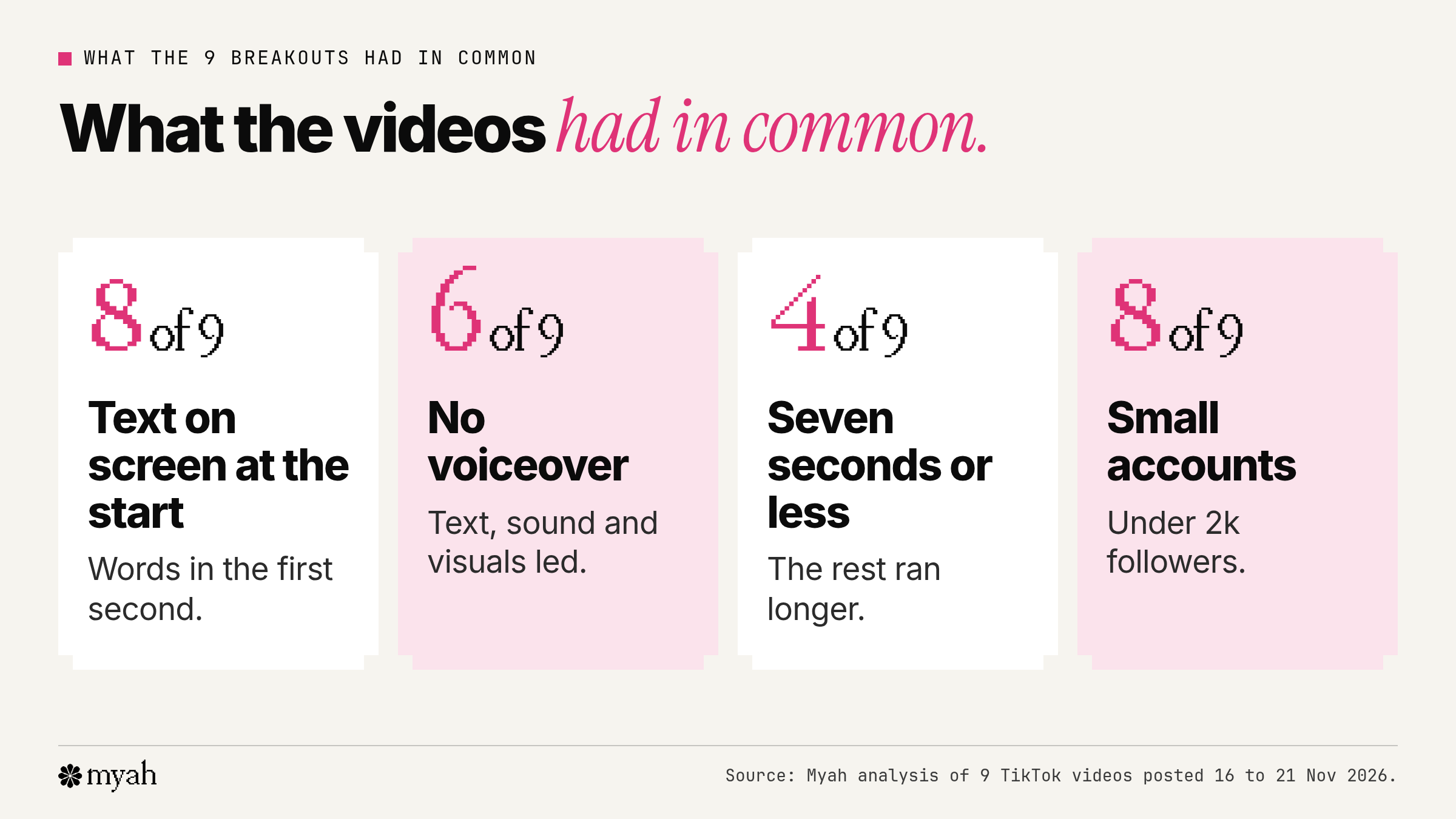
What the 9 breakouts had in common
- Eight opened with text on screen. The hook was readable in the first second.
- Six had no voiceover or conversation. They leaned on text, sound and what the camera showed.
- Four were seven seconds or shorter. The rest ran longer, so short is not the only way in.
- Eight came from accounts under 2,000 followers. You do not need a big audience to get big views.
The 9 videos, broken down
1. @bonnielylee: Make a tiny inconvenience the whole joke
2,219,039 views on 403 followers, 5,506 times their follower count. 6 seconds, posted 20 November 2026.
- What happens: The creator rinses a washcloth under the tap, wipes their face and glances away from the sink. The text explains that they usually wash in the shower, so doing it here feels wrong.
- Why it worked: The text turns an ordinary bathroom routine into a small, specific complaint. The glances and pauses carry the joke without an explanation.
- Try this, creators: Film an everyday task you find annoying and put the exact annoyance in the opening text.
- Try this, brands: Open an app demo with the fiddly task your user wants to stop doing, then show the shortcut.
2. @leo2657186: Wrap the punchline as a present
6,218,237 views on 1,984 followers, 3,134 times their follower count. 6 seconds, posted 16 November 2026.
- What happens: Text says, "Just wrapping my sister's Christmas present", while the person puts a fist between slices of bread. They fold Christmas wrapping paper around the bread and their hand as a festive song plays.
- Why it worked: The ordinary gift-wrapping setup clashes with the absurd filling. A straight-faced delivery leaves the visual joke to do the work.
- Try this, creators: Turn a familiar expression into a harmless prop joke and play it completely straight.
- Try this, brands: Stage a harmless literal version of a phrase your app users say, then reveal the relevant feature.
- Note: The caption promotes NICETOWN curtains.
3. @unboxbuys: Peel, stick, show the payoff
579,176 views on 264 followers, 2,194 times their follower count. 15 seconds, posted 20 November 2026.
- What happens: Hands peel the backing from a dock and attach it behind a monitor as the narration describes the action. A phone goes onto the mount below the screen. Close-ups show the phone displaying a clock, a calendar and music controls.
- Why it worked: The demo starts with an action instead of an introduction. Each cut moves from setup toward a clear picture of the finished desk.
- Try this, creators: Start filming with your hands already doing the setup, then cut straight to the finished result.
- Try this, brands: Show the taps needed to set up an app feature, followed by the useful screen those taps produce.
4. @dutmdung986: Let the room tell the story
2,375,644 views on 1,344 followers, 1,768 times their follower count. 19 seconds, posted 20 November 2026.
- What happens: Opening text sets up a Christmas visit while the camera pans past cards and a wall clock. The camera moves along rows of framed portraits around a doorway, then moves closer to individual pictures.
- Why it worked: The pan turns the room into a gradual reveal. Moving from the full display to individual pictures gives the viewer details to explore.
- Try this, creators: Film a meaningful collection from across the room, then move closer to the objects that tell its story.
- Try this, brands: Show a finished collection in your app, then open an item to reveal the detail inside.
- Note: The caption promotes NICETOWN curtains.
5. @jemofalltradesss: Go from stillness to celebration
176,627 views on 156 followers, 1,132 times their follower count. 7 seconds, posted 17 November 2026.
Open @jemofalltradesss on TikTok
- What happens: The creator starts with clasped hands, then breaks into a grin and animated gestures toward the camera. A block of text stays on screen while a spoken audio clip includes repeated apologies to Miss Miller.
- Why it worked: The jump from stillness to celebration gives the shot a clear turn. The fixed text holds the setup while the performance supplies the energy.
- Try this, creators: Act out your reaction to finishing a frustrating task, starting still and ending with a clear celebration.
- Try this, brands: Pair a real app completion screen with the user's reaction rather than a list of features.
- Note: The on-screen health claim is the creator's own.
6. @thchhngnh307: Put the controls beside the result
805,540 views on 1,021 followers, 789 times their follower count. 22 seconds, posted 17 November 2026.
- What happens: Hanging light strands across a porch light up with Christmas pictures. The video cuts to the installation, then shows a phone in front of the display. Taps on the phone accompany changing pictures, including a smiley face and snowmen.
- Why it worked: The dark porch gives the light-up reveal a clear before and after. Showing the phone beside the display connects the controls to a visible result.
- Try this, creators: Keep the control and its visible effect in the same shot when demonstrating a feature.
- Try this, brands: Film an app interaction beside the real-world result it changes, with both easy to see.
- Note: The caption includes #tiktokshop.
7. @pencalocalc: Make the old way deliberately ridiculous
628,028 views on 871 followers, 721 times its follower count. 21 seconds, posted 16 November 2026.
- What happens: Under "THE PAST...", classroom clips show concealed notes and elaborate distractions. The video switches to "THE FUTURE" and close-ups of a calculator uploading question photos. It then shows a camera close-up and text answers on the calculator screen.
- Why it worked: The exaggerated opening makes a clean contrast with the close-up demonstration. Matching labels make the switch from the joke to the device easy to follow.
- Try this, creators: Exaggerate a harmless manual chore, then cut to a close-up of the shortcut you actually use.
- Try this, brands: Contrast an awkward manual task with the same task completed in your app, keeping the result visible.
- Note: The caption promotes a Pencalo calculator; borrow the contrast, not the exam-cheating setup.
8. @ukii_lee: Let the text challenge the routine
2,681,931 views on 5,136 followers, 522 times their follower count. 6 seconds, posted 21 November 2026.
- What happens: A hand takes the clear cap off a pump bottle, lifts it and rests a finger over the pump. The text questions a familiar routine while the close-up stays on the bottle.
- Why it worked: The simple bottle close-up leaves room to read the text. The routine action and the unexpected statement pull in opposite directions.
- Try this, creators: Film a familiar task and add a specific, truthful observation that challenges how you used to do it.
- Try this, brands: Show an app task with an opening line that challenges a common workflow habit, then demonstrate the alternative.
- Note: The on-screen health claim is the creator's own.
9. @davies.fertility: Ask the question your audience would ask
344,444 views on 1,611 followers, 214 times its follower count. 60 seconds, posted 20 November 2026.
Open @davies.fertility on TikTok
- What happens: An off-camera interviewer asks Dr. Davies what to do before trying to conceive. Seated beside a microscope, the speaker answers with recommendations about supplements and daily habits. Subtitles follow the answer, which ends with reassurance that perfection is not the goal.
- Why it worked: The opening question tells viewers exactly what the conversation covers. The steady shot and subtitles keep attention on the answer instead of decorative edits.
- Try this, creators: Have someone ask you a real question about your creative process and answer it directly with subtitles.
- Try this, brands: Ask a teammate a common app setup question on camera and subtitle the answer.
- Note: The account identifies itself as a fertility practice. The health recommendations are the speaker's own, not advice from this article.
Shares, saves or likes: what the engagement says
Views tell you a video reached people. What they did next tells you more. A share can mean someone sent it to a friend, a save can mean they wanted to come back to it, and a like on its own is a quick thumbs-up. These rates show what people did, not why, and each one is a share of that video's views.
| Account | Likes ÷ views | Shares ÷ views | Saves ÷ views |
|---|---|---|---|
| @bonnielylee | 3.4% | 0.02% | 0.05% |
| @leo2657186 | 4.2% | 3.55% | 0.25% |
| @unboxbuys | 2.7% | 0.48% | 1.07% |
| @dutmdung986 | 8.0% | 0.02% | 0.08% |
| @jemofalltradesss | 20.9% | 0.77% | 1.49% |
| @thchhngnh307 | 0.3% | 0.14% | 0.07% |
| @pencalocalc | 2.3% | 0.28% | 0.49% |
| @ukii_lee | 8.4% | 0.08% | 0.33% |
| @davies.fertility | 9.0% | 1.22% | 6.04% |
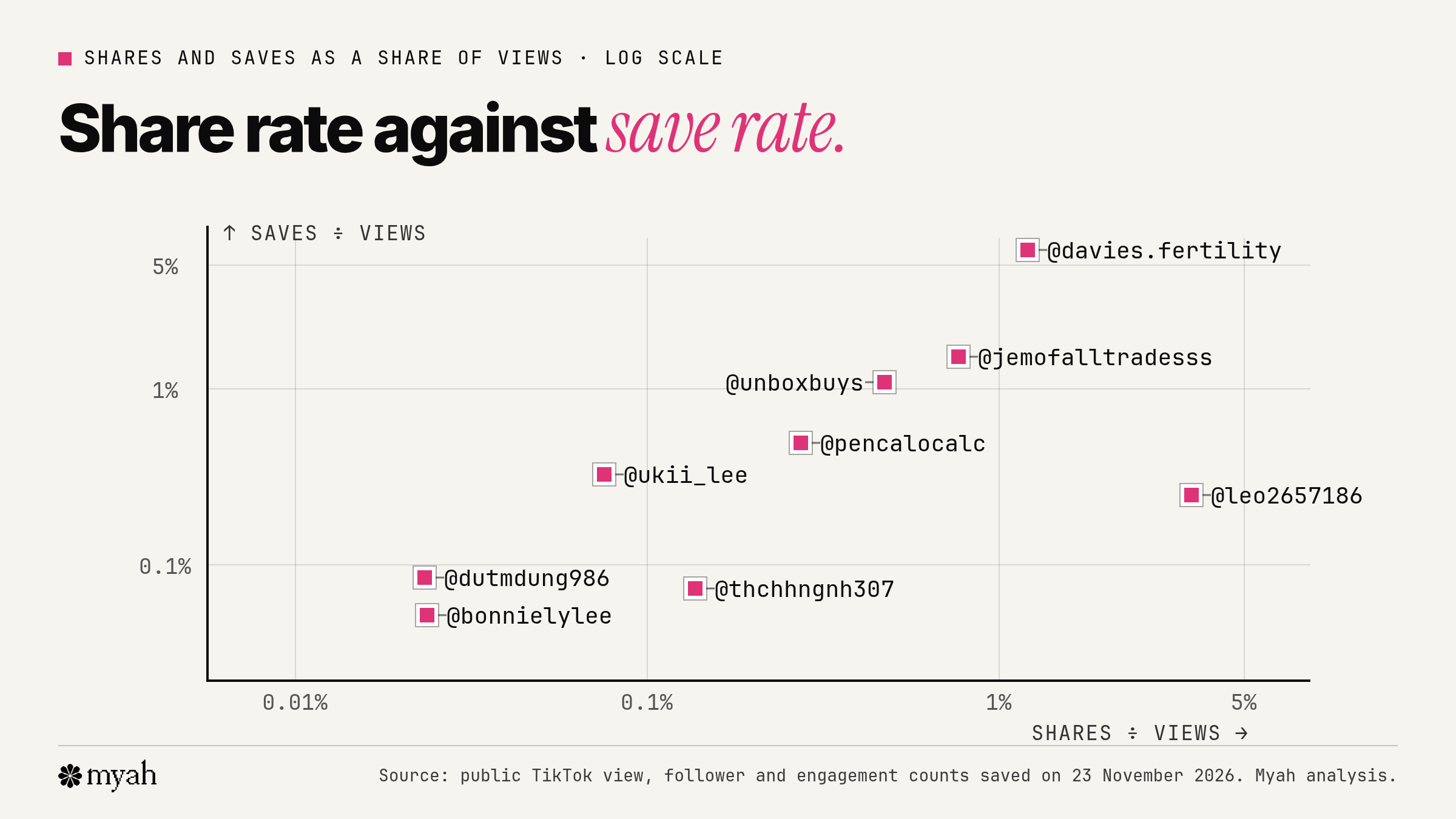
@jemofalltradesss (20.9%) had the highest like rate, @leo2657186 (3.55%) the highest share rate and @davies.fertility (6.04%) the highest save rate. Every rate is in the table above.
How to use this week's breakouts
If you're a brand
- Brief the hook, not the script. Eight of the nine showed a text hook in the first second. Our UGC brief template has room for it.
- Ask for the product already working. Showing the product in use straight away is one format worth briefing. Our UGC examples guide covers problem-and-solution and demo formats in more detail.
- Look at the portfolio as well as the audience. Eight of these nine came from small accounts. When commissioning videos, assess a creator's portfolio rather than follower count alone. See how to hire UGC creators.
- Agree usage rights before running a creator's video as an ad. Our guide to UGC usage rights for paid ads explains what to cover.
If you're a creator
- Write the hook as on-screen text. Eight of the nine had one. Test a few versions, and use the UGC script timer to check how long the spoken line takes.
- Try a short video as an experiment. Four of the nine were seven seconds or shorter.
- You can start without a large following. Eight of these accounts had fewer than 5,000 followers. Our guide to UGC with no followers covers how to get paid work anyway.
How we pick these videos
Each Monday we look at TikToks posted in the past week and rank them by views compared with followers, so small accounts that took off rise to the top. We watch how each one opens and what happens on screen. The numbers are a snapshot, so they will have moved by the time you read this. TikTok does not always show whether a post was paid for, so we only call something an ad when it says so.
Want creators making videos like these?
Myah is a UGC marketplace where apps pay creators to post about them. Apps post paid jobs with the pay shown upfront, and you post approved videos on your own TikTok or Instagram.
Join Myah as a creator or post a campaign for your app.
Previous weeks: