

To screen for UGC scams, verify the company and sender independently before sharing details or filming. Stop if an offer requires you to pay to unlock work, forward an overpayment or reveal a password. If identity, pay or video-use terms are unclear, pause and get answers in writing. A polished offer is not proof.
How can you tell if a creator brand deal is a scam?
Judge the request, not just the presentation. Don't treat a contract as a substitute for verifying who sent it. The IC3 warning about fake work-from-home jobs describes scammers posing as legitimate businesses. The screening approach below applies its general warnings to paid app-video offers.
Use this decision rule:
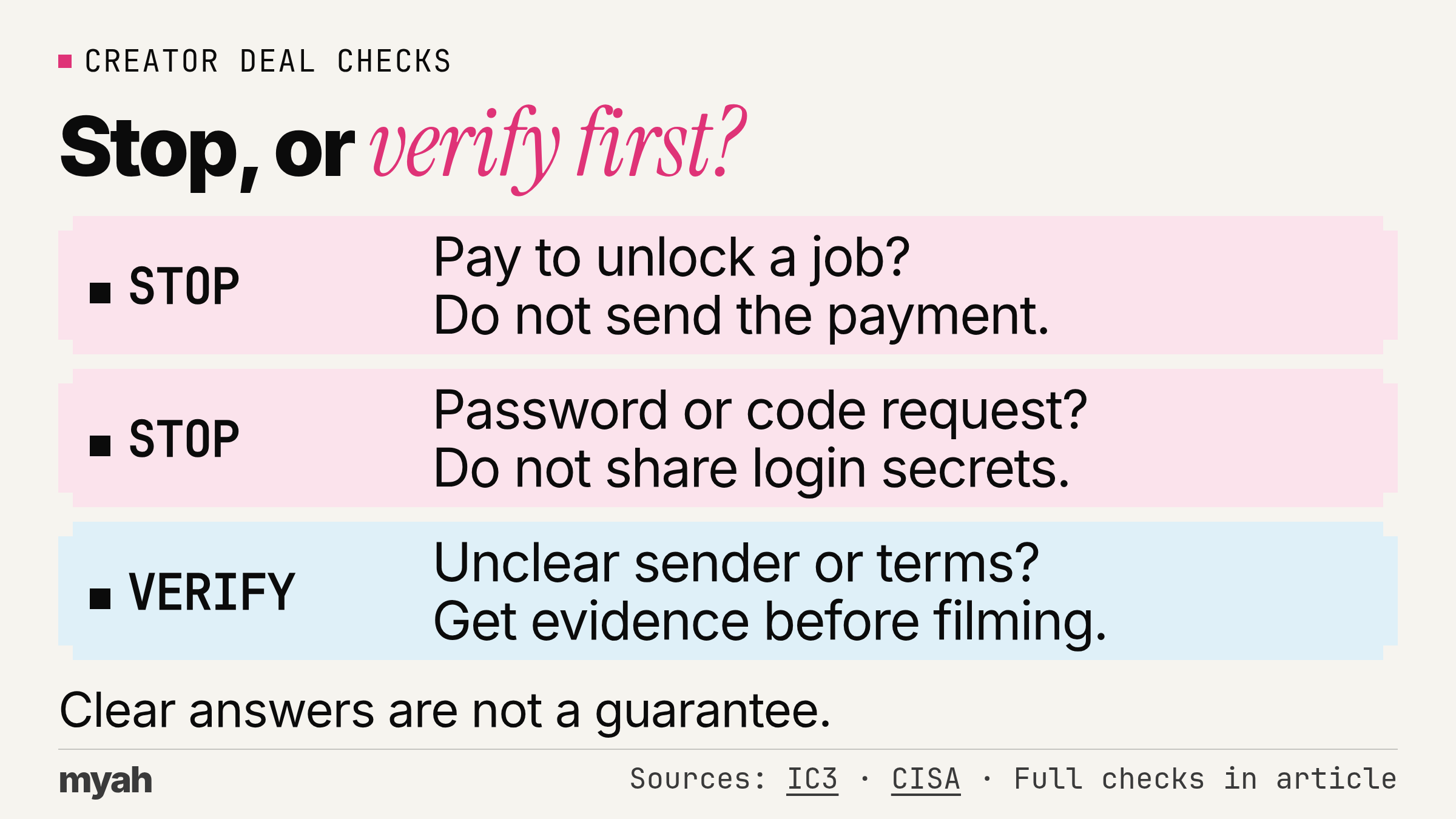
- Stop at requests to send money to unlock work, move someone else's money or share login secrets.
- Pause and verify when the sender, brief, approval process or payment conditions are unclear.
- Consider proceeding only after independent identity checks and written terms you understand and accept.
These are screening recommendations, not a fraud score or a guarantee. You can decline an offer without proving a crime. This guide is general information, not legal advice.
Which red flags suggest UGC scams, and when should you pause?
Separate requests that put your money or account at risk from terms that need clarification. Use the table to choose your next action, not to label a person or company publicly.
| Request or signal | Why it matters | Next action |
|---|---|---|
| Pay to unlock a promised job or release supposed earnings. | Government warnings describe pay-first job offers and inaccessible earnings. | Stop. Do not send the requested payment. |
| Deposit a check, then send the excess elsewhere. | The check may be counterfeit, leaving you responsible for money sent onward. | Stop the transfer. Contact your bank through its official channel. |
| Share a password or verification code. | This puts account access in someone else's hands. | Stop. Do not send login secrets to a recruiter. |
| A lookalike domain or a sender you cannot verify. | Impersonators can copy a real company's identity. | Pause. Ask the company to confirm the person and job independently. |
| Pressure to open a new login link or download. | An unsolicited job message is not a reason to trust its files. | Pause. Reach the company or platform without that link. |
| No clear pay, posting or reuse terms. | You cannot assess the offer without knowing your obligations. | Pause. Request written answers before filming. |
The IC3 alert warns against opening links, downloads or attachments in unsolicited job offers. Do not share passwords or verification codes with a recruiter. CISA recommends reporting suspicious messages rather than opening their links or attachments. See its phishing guidance.
Don't treat a small app, personal email address, unsolicited DM or attractive fee alone as a verdict. An unpaid test or vague brief may be enough for you to decline, but neither alone establishes criminal fraud. Ask for evidence, not reassurance that you should “just trust” the sender.
How do you verify the app and the person contacting you?
Look up the company independently rather than relying on the recruiter's link. Compare the exact website and email address, not just the company name or logo.
For an app-video offer, use this sequence:
- Find the app company's website yourself. Compare its identity and contact details with the developer listed in the app store.
- Contact the company through a route you find independently, not the contact details in the suspicious message. This follows CISA's independent-contact advice.
- Ask the company to confirm the representative, any agency relationship and the specific video job. A real app listing does not answer who authorized the message.
- Ask how you will get demo access before accepting. Use non-sensitive demonstration data, not your private messages, contacts or financial details, when planning the screen recording.
Treat the app-listing comparison and demo-data steps as practical precautions, not proof of legitimacy. Don't use a matching logo, video call or lack of complaints as a substitute for confirmation.
Payment details and login secrets are different. The IC3 alert advises against sending financial or personal information to people making unsolicited job offers. For creator work, confirm the recipient and the official onboarding process before supplying sensitive information; don't send it in reply to an unsolicited request.
Is it normal to pay before you can get creator work?
A supposed client asking you to pay to unlock a promised job is a stop signal. The IC3 job-scam alert advises never sending money to an alleged employer. That is different from independently choosing a business tool, course or service with documented charges. Judge what the payment is for and who is asking.
Illustrative example: A recruiter offers a paid app-video job but requires an activation transfer before sending the brief. Do not send the transfer; verify the offer through an independently found company contact.
For paid app access, agree the access arrangements before accepting the job. Don't spend money on an unverified sender's promise to reimburse you later.
Be equally cautious about money arriving with instructions to send some onward. In a fake-check scam, someone asks you to send money back before the bank discovers that the deposited check is counterfeit. The FDIC warns that you may be held responsible for money sent to the scammer when the check turns out to be counterfeit. Read its fake-check explanation.
Don't treat a visible balance as permission to forward the excess. Ask your bank about the suspicious check rather than following the sender's instructions.
Should you accept payment outside a platform?
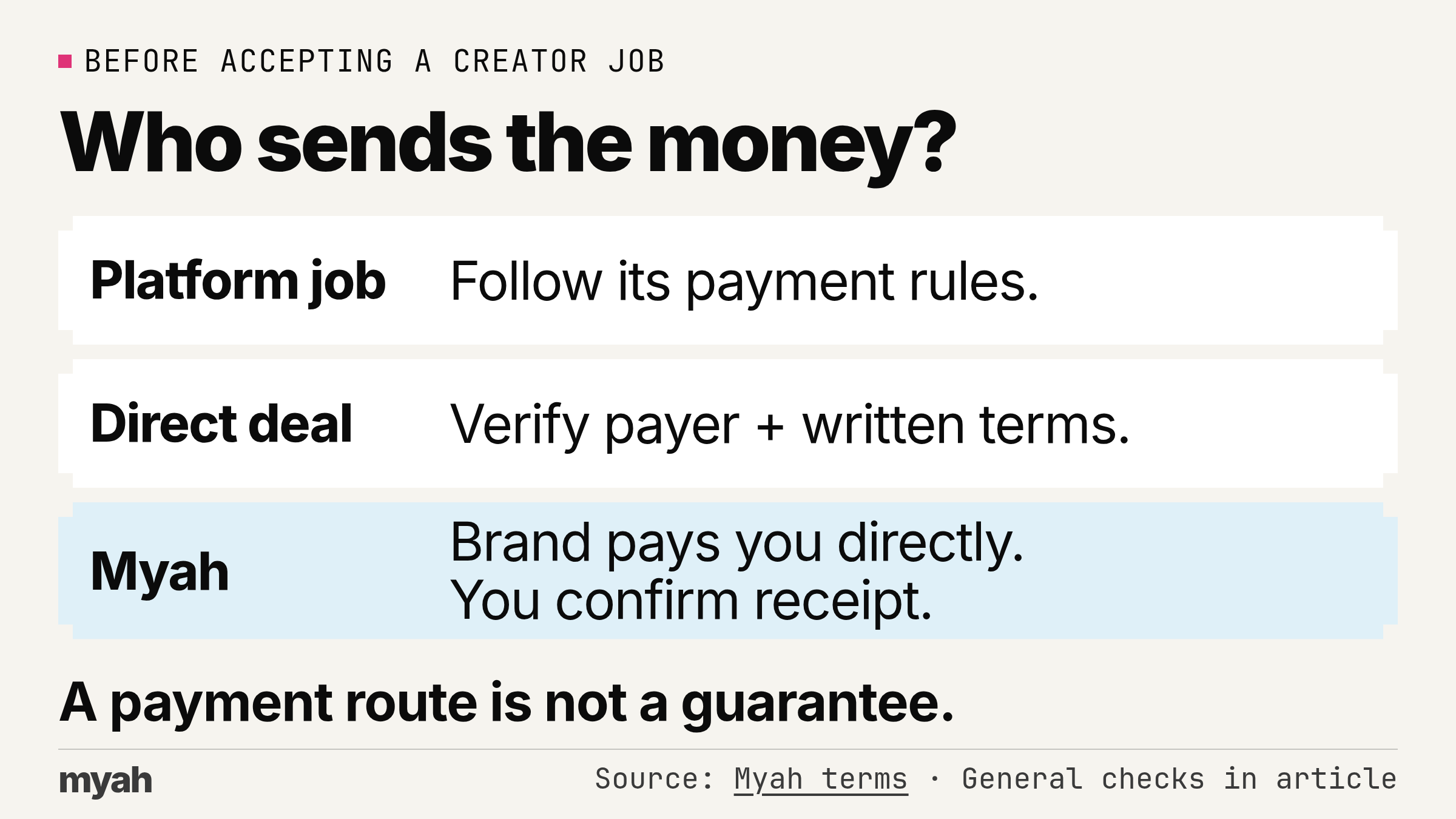
It depends on the platform's actual rules. Direct payment is not automatically fraudulent, and a platform payment is not automatically guaranteed. Separate where the conversation happens, who sends the money and what support applies if something goes wrong.
| Where the relationship starts | Payment rule or check | What to do |
|---|---|---|
| A marketplace you found the job on | Follow that platform's own payment rules. | Check whether moving payment off-platform would break those rules before agreeing. |
| A directly negotiated deal | Verify the payer and agree the amount, currency, payment trigger, due date and method. | Read the payment provider's applicable terms. Do not assume a transfer comes with protection. |
| Myah | On Myah, the brand pays the creator directly, Myah records what is owed, and the creator confirms receipt. | Follow the documented workflow. Keep campaign messages and records in the app. |
Creator pay does not pass through Myah. Its terms describe direct brand payment, not a funded balance held for you. Do not infer escrow or guaranteed payment from a record of what is owed.
For any offer, ask who will pay you and what event makes payment due. Keep those answers with the agreed brief. If you are choosing where to find work, you can also compare creator platforms and their payment models.
What should you get in writing before you film?
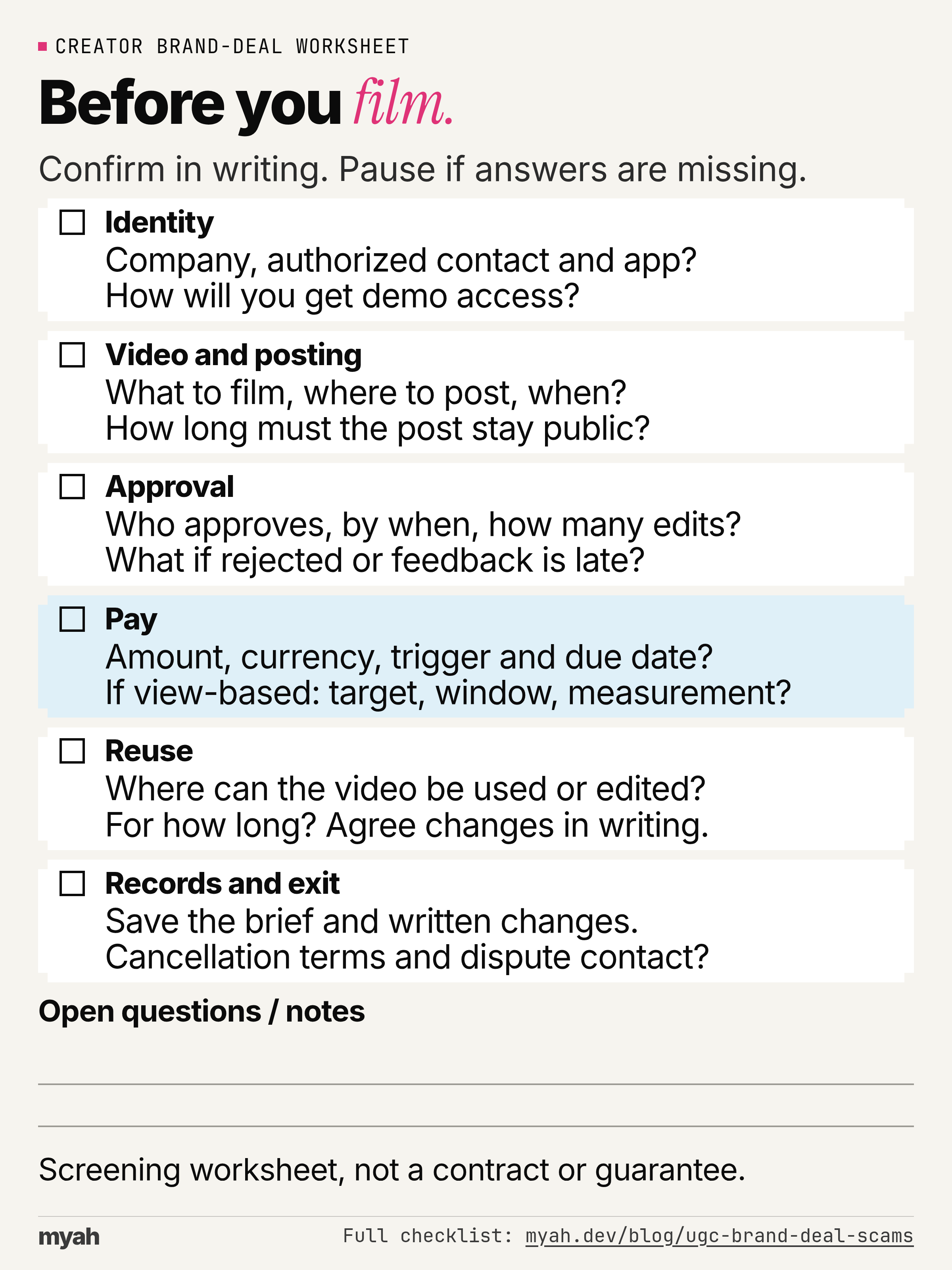
Get enough detail to decide whether the work and payment conditions are acceptable before you record. This checklist is a screening worksheet, not a contract or a list of legally required clauses. A clear answer helps you assess an offer; it does not certify the sender.
- Identity: What is the company name? Who is authorized to agree the job, and can the company confirm any agency relationship? Which app will you show, and how will demo access be supplied?
- Video and posting: What exactly must you deliver? Confirm the video format, length and quantity, the account and platform you will post on, the posting deadline and how long the post must stay public.
- Approval: Who approves the video, by when, and what revisions are included? What happens if the video is rejected or feedback arrives late?
- Pay: Confirm the amount, currency, payer, payment method, due date and event that makes payment owed. If pay depends on views, agree the target, measurement source, time window and what happens if the target is missed.
- Reuse: Where may the company use the video, may it edit it, and for how long? Ask how any change in permission or scope will be agreed in writing.
- Records and exit: Save the agreed brief and written changes. Confirm cancellation terms and who handles a payment or delivery dispute.
Don't assume completing the filming earns the advertised amount. Ask which conditions attach to fixed pay and which attach to view-based pay. If an answer is “we'll decide later,” pause rather than fill in the gap yourself.
For a concrete platform example, Myah's terms say a set fee is owed once the video is approved and posted as required; view-target pay is owed once Myah records that the post reached the target. See the pay rules. Ask equivalent questions wherever you work; don't assume another platform uses those conditions.
What can you send before accepting?
Adapt this original request message. It is a template, not a real creator conversation:
Before I film, please confirm the company and authorized contact, app access, video and posting brief, approval deadline and revision scope, pay amount and trigger, payment method and due date, and permitted reuse. If pay depends on views, please confirm how they are measured and what happens if the target is missed. Please also confirm cancellation terms and the dispute contact.
For deeper negotiation, read the questions to ask about video usage rights. Keep the screening decision simple: if the sender refuses to identify the payer or put the offer in writing, decline or wait for a clear answer.
Download the brand-deal vetting checklist (PDF). The checklist is also available in full on this page.
What if you already sent money or shared account details?
Stop further transfers and focus on the next action, not on blaming yourself. Do not keep paying to unlock money you have already sent.
- Contact the payment company promptly. Tell the bank or company you used that you suspect a scam and ask whether the transaction can be stopped or reversed. Recovery is not assured. Use an independently found official contact route; IC3's victim resources advise contacting your financial institution immediately about suspected fraud.
- Preserve the evidence privately. Save original messages, email headers, domains, briefs and transaction records in a secure location. The IC3 evidence guidance explains what to retain. Avoid posting personal details or financial records publicly.
- Report the offer. Report the suspicious job to the website where it appeared. Consider notifying the impersonated company too. USAGov's reporting tool helps you find the appropriate U.S. agency or organization to report a scam. After preserving the records, block further unwanted contact.
- Address account access. Use the platform's official help to report suspected compromise and secure the account. Reach it yourself, not through the suspicious message. CISA recommends turning on multifactor authentication for extra account security. See its MFA guide.
In the U.S., the FBI's Internet Crime Complaint Center accepts reports of cyber-enabled crime. File through IC3; it says it cannot guarantee a response to every complaint. Elsewhere, also seek your local reporting authority. Reporting does not promise that your money will be recovered.
Looking for paid app-video jobs?
Myah is a UGC marketplace where apps pay creators to post about them. Apps post paid jobs with the pay shown upfront, and you post approved videos on your own TikTok or Instagram. See how creator jobs work.
Creators pay Myah nothing to join, apply or get paid. Read the terms, review the brief and payment conditions, and use the same pre-filming checks before committing to a job.
Join as a creator, or read the guide to getting started as a creator if you are still building your portfolio.