

To track app installs from creators, give each creator and post a distinct campaign identifier, then measure through the appropriate store or app integration. Start with App Store Connect campaign links on iOS and a verified Google Play referrer integration on Android. Use optional creator codes and signup surveys as supporting evidence, not extra installs. A tagged web link alone is not a complete install-tracking setup, and none of these methods promises to identify every viewer who later searches for your app.
What should you count as an install from a creator?
Choose the event before making the link. A store download, an app first open and a paying customer are different outcomes. Label your report with the event you actually measured.
Attribution assigns credit for an action under a stated rule or model. Google's definition describes credit assignment, not proof that a creator caused an acquisition. Your report should name the rule, including any attribution window: the time allowed between the qualifying interaction and the outcome.
Google Analytics reports app installs as first opens because its Firebase SDK does not run until the app opens. See its app attribution documentation. The first_open event can fire after installation or reinstallation, so do not automatically label it a new person. Google documents that distinction in its event definitions.
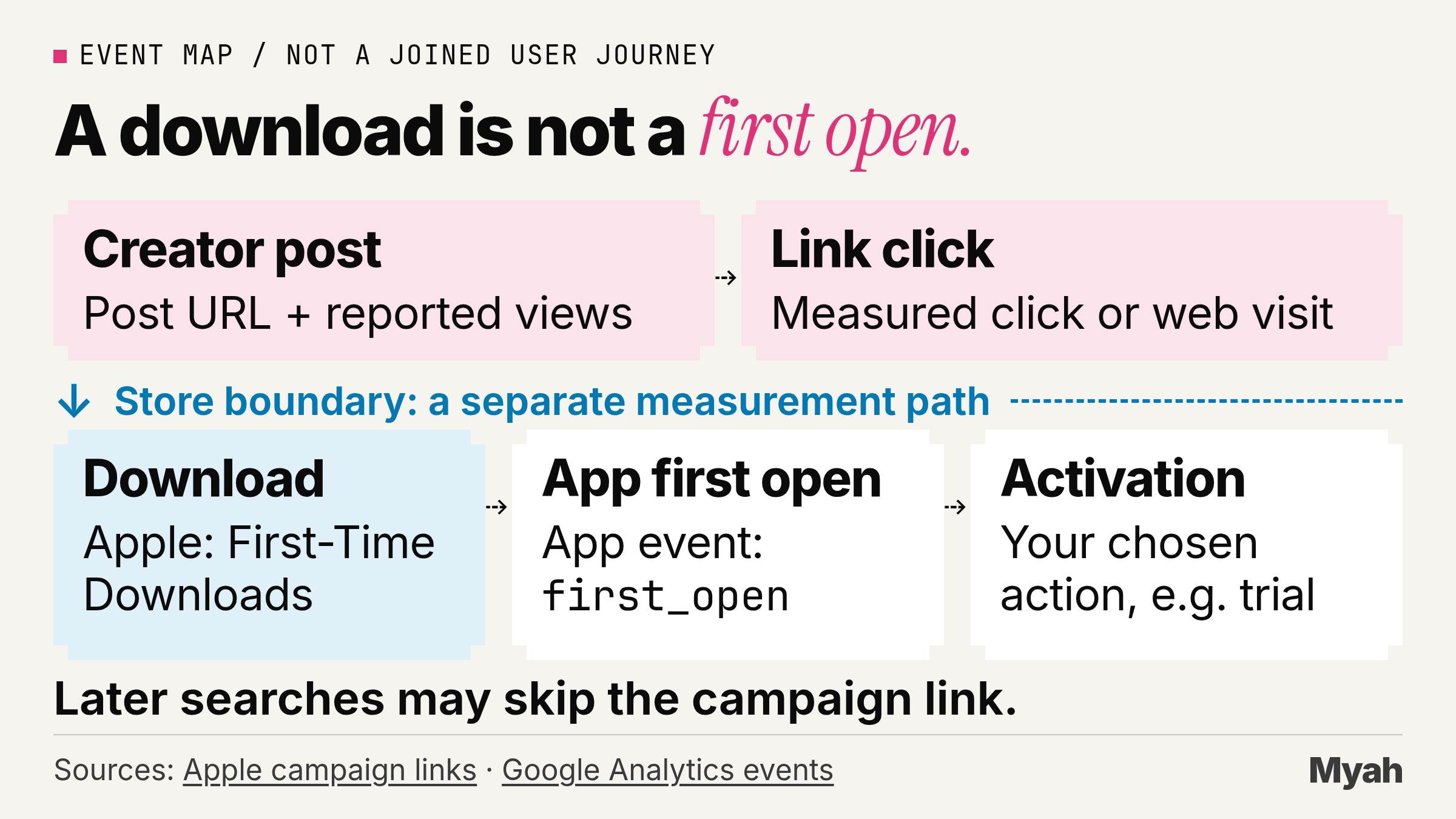
Use this proposed measurement map:
- Creator post: record the post URL and its reported views, separately from acquisition events.
- Link click: record the click or tagged website visit where your tools measure it.
- Store download: use the store's actual metric, such as Apple's campaign First-Time Downloads.
- App first open: record the app event through your implemented analytics.
- Activation: measure your chosen action, such as starting a trial, separately.
The store boundary needs its own measurement path. A viewer who searches later can skip the campaign link entirely. Do not draw a joined user journey where your records cannot establish one.
Which tracking method fits your platform and team?
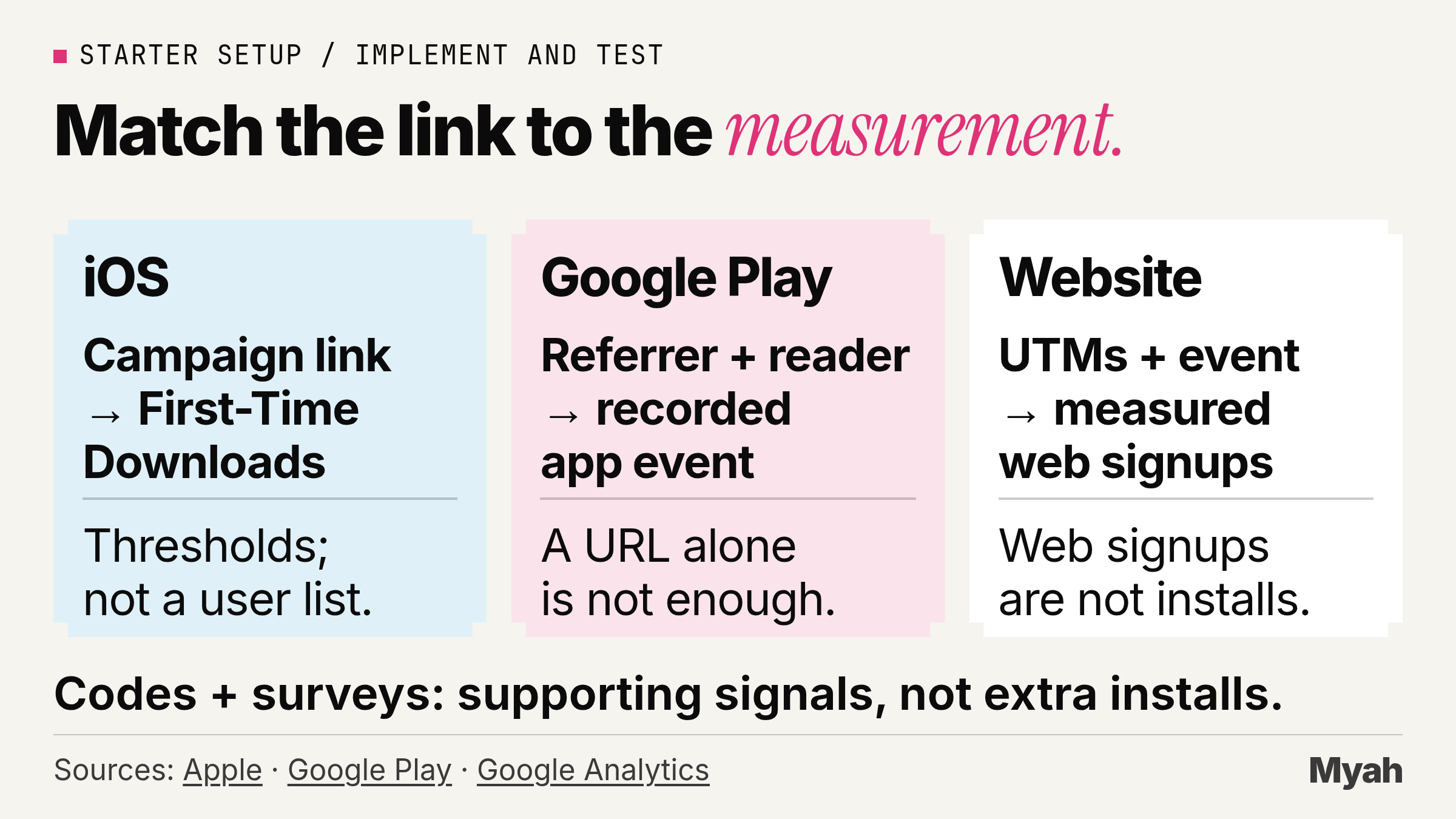
Choose by destination and implementation capacity, not an arbitrary creator-count cutoff. The following is a recommended starter decision table, not a promise of complete attribution.
| Destination | Starter setup | What to report | Blind spot | When to add engineering support |
|---|---|---|---|---|
| iOS App Store | Generated campaign link per creator and post, once available. | Campaign First-Time Downloads under Apple's rules. | Thresholds, delayed or withheld data; no named-user join in this workflow. | When you need downstream app events connected to acquisition sources. |
| Android through Google Play | Referrer campaign URL plus an implemented reader or tested analytics integration. | The actual app event recorded with referral information. | A URL alone is not an integration; Play does not cover every Android store. | To verify referrer retrieval, event association, reinstall handling and failures. |
| Website or web signup | UTMs plus a measured website signup event. | Campaign website traffic and website signups. | Neither event establishes a store download or app first open. | When you need to preserve creator identity through store buttons and into app reporting. |
The platform facts come from Apple's campaign guide, Google's referrer integration guide and Google Analytics' URL guide.
Without an app integration, an Android founder can still inspect store-listing performance. Play Console's Listing conversion analysis shows visitors, clicks and click-through rate, with filters including UTM source and campaign. Google's reporting guide distinguishes these from completed acquisitions, which are available in other reports. Do not relabel listing clicks as installs or assume another report retains the same creator breakdown.
Can a UTM link track an app install?
Not by itself. UTMs identify campaign traffic when the receiving analytics system captures them. An app measurement integration must connect the relevant campaign information to the app event you intend to count.
Google Analytics explains how tagged referral links populate campaign reporting. Here is an illustrative website URL, not a working app-store attribution link:
https://example.com/app?utm_source=tiktok&utm_medium=creator&utm_campaign=app_launch&utm_content=creator_a_demo
These are proposed names: the social platform is the source, the campaign is app_launch, and the content value identifies the creator's post. The custom medium creator is not a promise about a default analytics channel classification.
Use the store-specific route after that. Copy Apple's generated campaign link rather than inventing account tokens. Google links to a separate Play Campaign URL Builder for Android-app campaign URLs. Test its output with your app's actual integration.
Nor does opening an installed app prove that attribution survives a fresh install. If the app is not installed, an Apple universal link opens in the person's default browser for the website to handle. That documented fallback is not a verified download-to-first-open connection.
What changes on iOS and Android?
iOS: campaign reports have display conditions
Apple's campaign links measure campaign traffic, including social promotions. Link creation requires the app to have analytics data. Its campaign documentation specifies several separate conditions:
| Rule | Documented condition |
|---|---|
| First-Time Download credit | The first download must occur within 24 hours of using the campaign link or token. |
| Campaign visibility | Campaign data appears after first-time downloads from at least five individual users. |
| Metric visibility | Each metric must reach a minimum of 5 in the selected date range. |
| Minimum delay | Campaigns appear only after a minimum of 24 hours since launch. |
These are not a guarantee that all data will arrive when the minimum delay ends. Apple's detailed campaign reports can withhold or combine rows for very small groups to protect privacy. Missing data is not necessarily zero.
App Tracking Transparency, or ATT, addresses tracking as Apple defines it. That includes linking app user or device data with other companies' data for targeted advertising or advertising measurement. ATT permission is required to track users as Apple defines it or access their device's advertising identifier. Read Apple's privacy guidance against your actual data flows. Do not assume every campaign report requires ATT consent, or that a measurement vendor bypasses it.
Android: the referrer needs a reader
Google Play's Install Referrer API returns referral information, including the referrer URL and timestamps for the referral click and the start of installation. It is exposed by the Google Play Store app, not every Android store. See Google's API overview.
Reading a Play referrer requires an integration that connects to the Play Store app and retrieves the referrer details; creating a URL alone does not implement that reader. Follow the integration documentation, or verify that your existing analytics handles it. An install-begin timestamp is not, by itself, your completed acquisition event.
How do you set up tracking for one creator?
The following is a proposed workflow, not a tested campaign. Illustrative setup: fictional app Garden Notes, Creator A, campaign app_launch, creator ID creator_a, and post ID creator_a_demo.
- Name the outcome and source. Decide whether the report will count Apple campaign First-Time Downloads, app first opens, trials or web signups. Write down the actual report and event name.
- Allocate stable identifiers. Assign campaign, creator and post IDs before building links. Keep personal user data out of URL tags.
- Create destination-specific links. Copy the generated Apple link. For Play, verify that your integration reads the generated referrer. If you use a landing page, configure its store buttons to preserve creator and post identity rather than assuming tags forward automatically.
- Agree the clickable placement. Ask the creator to show the real path from their post to the destination. Check their actual account rather than promising that any caption or profile supports the link you want.
- Add optional supporting signals. Only include a source-code field or signup survey if your team can implement it. Keep both separate from the install event.
- Set reporting rules before posting. Record the period, timezone, attribution window, and treatment of existing users, reinstalls and test activity. Confirm which exclusions your data can enforce. Decide how conflicting creator signals will be shown.
- Test the real journey. Check the social-app browser, redirects, store buttons, fresh-install path and already-installed path on each supported operating system. Inspect the expected referrer or event where available, not just whether the page opens. Apple's aggregate report may not show an individual test.
- Save the post and review. Record the actual post URL and time, failed checks and missing data. Review on the agreed schedule without assuming every source finalizes together.
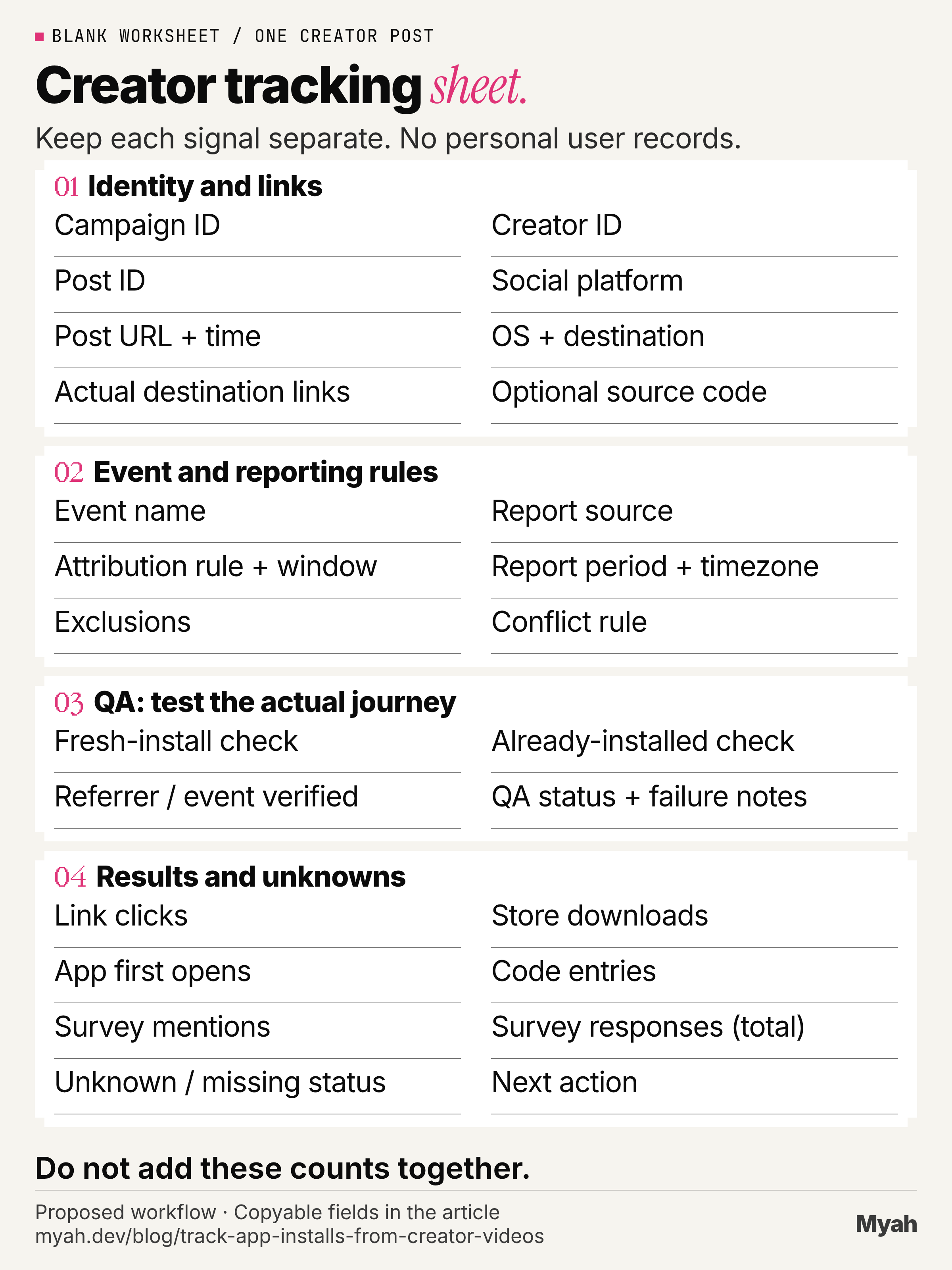
Copy these fields into your tracking document. Keep user-level records out of this campaign worksheet.
- Identity and links: campaign ID; creator ID; post ID; social platform; post URL and time; operating system and destination; actual destination links; optional source code.
- Event and reporting rules: event name; report source; attribution rule and window; report period and timezone; exclusions; conflict rule.
- QA: fresh-install and already-installed checks; referrer or event verification; status; failure notes.
- Results and unknowns: link clicks; store downloads; app first opens; code entries; survey mentions; survey-response denominator; unknown or missing status; next action. Do not add these counts together.
Download the creator tracking sheet (PDF).
How should you use creator codes and signup surveys?
Use codes and surveys to record supporting associations, not to manufacture an install total.
In this proposed workflow, a source code entered after signup records the code associated with that account. It does not establish a fresh install or first discovery: someone could receive a shared code, skip the field or already use the app. This is an optional source field your team implements, not an App Store offer code or a way to unlock paid features.
A survey asks what someone remembers. Make it skippable and avoid suggesting that a creator must have introduced them. Pew recommends response options that cover reasonable answers without overlapping; it also notes that option wording and order can influence answers.
Proposed survey template, not a validated research instrument: Where did you first hear about this app?
- A creator's social post
- The app's own social post
- Another social post or social ad
- A message from someone I know
- App Store or Google Play browsing or search
- A web search
- Other
- I don't remember
Offer an optional “Which creator?” follow-up when relevant. Test the wording with your users. Survey mentions describe respondents' answers, not verified installs. If you report a rate, show its response denominator rather than silently treating respondents as all installers.
How do you read the results, and when do you need an MMP?
Keep each signal in its own column and compare like-for-like event definitions and attribution windows. A common spreadsheet date range does not change a store's attribution rules.
| Record | Campaign association | Code entry | Survey mention | Interpretation |
|---|---|---|---|---|
| Hypothetical new account | Recorded by the app's implemented measurement. | Associated with the same account. | Associated with the same account. | One account with three signals, not three installs, only where your own records establish that overlap. |
This example does not join Apple's aggregate download reports to an individual account. Keep those reports separate. Beside each count, preserve its source, event, reporting period, attribution window and limitations.
Use explicit statuses: reported zero, pending, not measured, or withheld when the source confirms withholding. If the reason is unknown, say so. A post-day rise is a clue to investigate, not proof of additional users caused by the post.
Do you need an MMP for a few creators? Not automatically. AppsFlyer describes a mobile measurement partner, or MMP, as a company that helps apps measure campaign performance across channels, media sources and ad networks. That is a vendor's category description, not evidence that every app needs one.
Consider evaluating an MMP when decisions require cross-platform event reporting, overlapping-channel reconciliation, downstream revenue cohorts or an auditable basis for outcome-based pay. Ask about organic creator-link support, integration work, privacy, attribution windows, reinstalls, missing data, exports and cost. Request a demonstration with your actual journey, not a promise of complete coverage.
For the commercial decision, compare creator pay models for apps. For sourcing, compare creator marketplaces for apps.
Where does Myah fit in a measured creator campaign?
Keep the app team's measurement setup separate from the marketplace workflow. Myah tracks the views on each creator post from its link. Pay per install on Myah is coming and is not available today. The links, integrations and survey proposed here are work for your app team, not a claim of current Myah install attribution.
Myah is a UGC marketplace where apps get creators posting about them. Post one campaign, approve every video, and pay per video or at view targets.