

Before filming a paid app video, use your UGC contract to agree who is hiring you, what you will make and post, how approval and revisions work, what triggers payment, which uses are permitted, and what happens if the job changes or stops. Separate delivering a video from publishing it on your own account.
Written for US creators and app teams, this is a discussion checklist, not legal advice or a ready-to-sign contract. Use it to find gaps, then get qualified advice for your deal and applicable law. It does not replace any platform terms you accept.
What should a UGC contract include?
Start with the hiring party, scope, timetable, payment and rights. Then resolve changes, cancellation and responsibilities that continue after the job ends.
The Freelancers Union Contract Creator includes fields for scope, payment, revisions, cancellation and dispute resolution. The checklist below is our practical set of discussion prompts for app-video work, not a list of legal requirements.
| Topic | What to record | Question to resolve |
|---|---|---|
| Parties | Legal names, contact details and authorised approver. | Who is hiring and paying you? |
| Deliverables | Brief version, videos, formats, captions and exclusions. | Does the price include raw footage? |
| Access and schedule | App build, test account, feature access and deadlines. | What if access arrives late? |
| Review and revisions | Approval criteria, included rounds and feedback deadlines. | When does a change need a new quote? |
| Posting | Platform, account, publication window and public-live period. | What must happen after approval? |
| Payment | Fee, currency, trigger, invoice, due date and expenses. | Which event makes payment due? |
| View-linked conditions | Qualifying post, metric, record and measurement window. | What is owed if the target is not reached? |
| Ownership and use | Ownership, permitted assets, channels, edits and duration. | What reuse is being requested? |
| Exclusivity and portfolio | Any competitor restriction and permission to display work. | Which other jobs or portfolio uses are affected? |
| Claims and disclosure | Review of app claims, disclosures and third-party material. | Who checks before publication? |
| Cancellation | Triggers, notice, completed work, expenses and unused footage. | What happens if the launch stops? |
| Specialist review | Confidentiality, liability, governing law and dispute terms. | What needs qualified advice before signing? |
For a quick pre-filming conversation, the printable checklist groups these prompts as follows:
- Scope and access: What will you make, and can you use the app?
- Review and changes: Who approves, and what is included?
- Posting and disclosure: Where will it go, and what must be disclosed?
- Fee and payment: What earns payment, and when is it due?
- Ownership and reuse: What can each party do with the work?
- Cancellation and specialist review: What remains unresolved if the job stops?
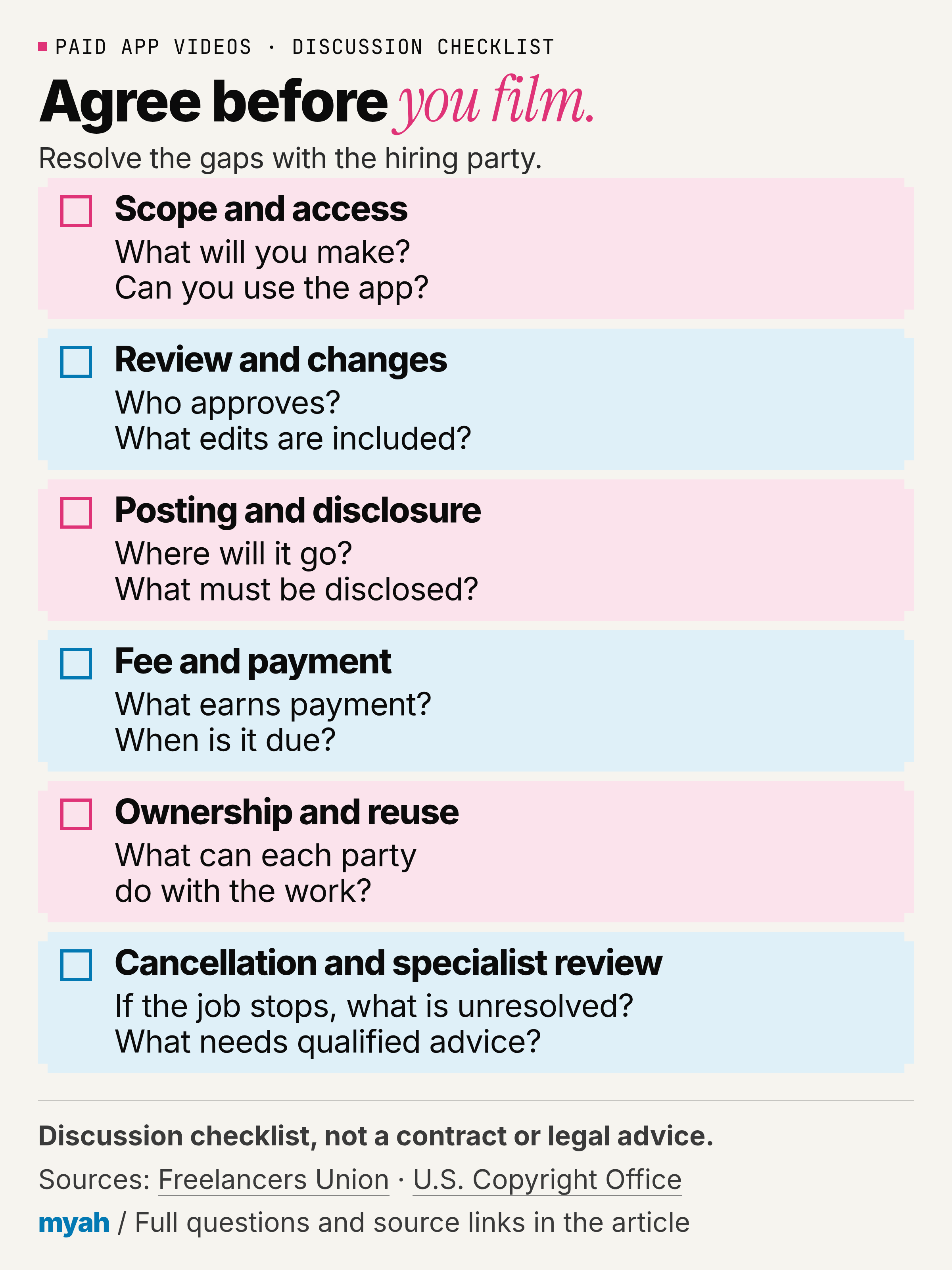
Download the discussion checklist PDF. It is a checklist, not a contract.
What exactly will you film and post?
Write the finished video and the public post as separate deliverables. Specify the video quantity, length, orientation, hooks, captions and export format. Say whether raw footage is included. For the post, name the platform and account, posting window and how long it must stay public.
Freelancers Union's scope guidance recommends being specific enough that the client knows what to expect before work starts.
For app work, settle the screen flow before filming. Identify the feature and build you will demonstrate, who supplies logos or other assets, and who can approve the script and final video. Use a demonstration account without real user information, and agree which screens may appear.
Ask for working access to any paid features needed for the brief. Agree any launch embargo too. Tie the draft deadline to working access and approval of the brief, rather than assuming you can film immediately. Record how you will reschedule if the build, login or approved flow changes.
Keep the agreed brief somewhere both parties can refer to. “Show the app” leaves much more room for disagreement than a named feature, approved screen flow and defined export.
How many revisions should a UGC contract allow?
Agree a finite number of rounds, what each round includes and when feedback is due. This guide does not prescribe a universal count. A caption correction, an editing preference and a new app screen should not be treated as the same request without checking the scope.
Freelancers Union recommends stating the included revision rounds, defining a round and agreeing charges for additional rounds.
Ask the authorised approver to send consolidated feedback against the agreed brief. Set a review deadline and a process for following up or rescheduling when it is missed. Do not leave everyone guessing whether silence means approval.
| Request | Check | Agree next |
|---|---|---|
| An agreed caption is missing | Was the caption required by the recorded brief? | Confirm the correction and delivery time. |
| A small edit within the agreed round | Does it fit the scope and feedback window? | Confirm the consolidated edit list. |
| A new app screen after filming | Does it change the approved build or screen flow? | Agree any new fee and timetable before reshooting. |
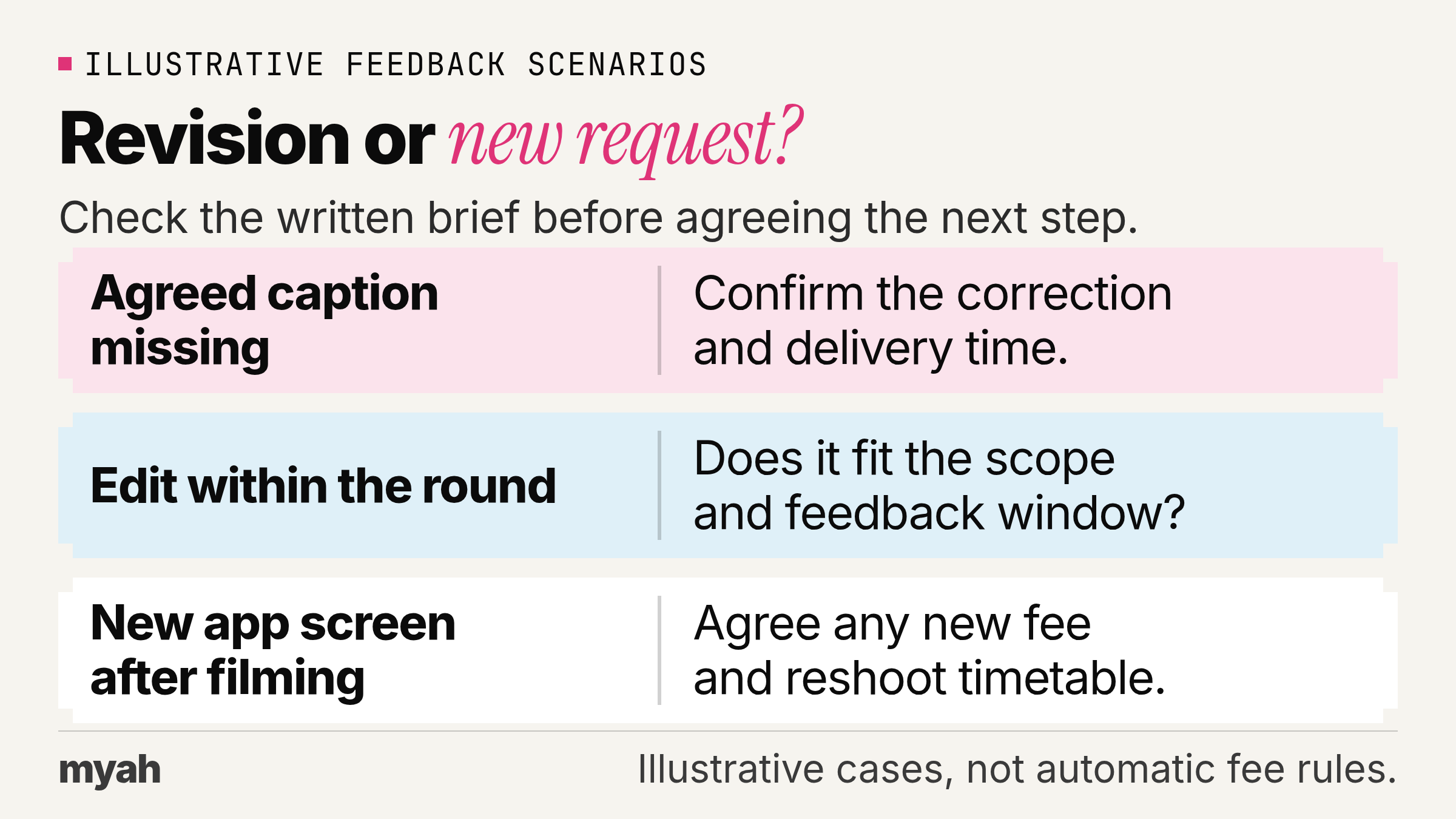
As a practical change-control step, record the proposed extra work, price and revised deadline together. Ask both parties to confirm that record before the extra work starts. This is a discussion prompt, not a statement that a particular contract-change procedure is legally required.
When do you get paid, and what triggers payment?
Agree the amount and currency, what earns the fee, who pays, the invoice requirements, payment method and due date. Delivery, approval and publication are different events. “Paid on completion” needs an agreed definition of completion.
For milestone payments, agree what earns each payment, how much it is and when it is due. The Freelancers Union Contract Creator has separate fields for a milestone's description, due date and amount. Use these as practical prompts, not a universal payment timetable.
Also agree which expenses qualify for reimbursement and what advance approval or records are needed. Freelancers Union's expense guidance recommends making those conditions explicit.
If the offer depends on views, ask:
- Which post and metric count, and which record will be used?
- When does measurement start and end?
- How will disputed counts be checked?
- What is payable if the target is never reached?
- What starts the payment deadline once the condition is met?
Keep any set fee separate from conditional pay. Do not assume every offer has a base fee, or budget as though a target is certain to be reached. These are deal questions, not a list of controls every marketplace supplies.
Today, the brand pays the creator directly; Myah records what is owed, and the creator confirms receipt. See the payment section of the terms.
What is a kill fee, and what if the job is cancelled?
A kill fee is an agreed payment tied to a specified cancellation or non-use event. Define the trigger and amount rather than relying on the name.
Freelancers Union's guidance describes a pre-agreed payment for early termination, sometimes called a kill fee. Its Contract Creator lists cancellation and kill-fee options separately. Another option to discuss is payment for work completed by the cancellation date.
As practical cancellation prompts, ask what is payable before filming, after filming and after approval. Clarify how any deposit is credited, which expenses are covered, and whether unused work may be used. Do not assume a fee is automatically owed because you call it a kill fee.
Illustrative situation: an app launch is delayed after you film. First clarify whether the job is postponed or cancelled. Then resolve the revised timetable or payment for completed work. Keep that discussion separate from rejection because the video missed the agreed brief.
Which rights are you granting, and which are you keeping?
Ownership and permission to use a video are separate questions. The U.S. Copyright Office describes a license as permission from the copyright owner to use a work. A requirement to post the video does not, by itself, describe every requested reuse.
Record the exact assets, accounts and channels covered; the use period and when it starts; permitted edits; raw footage; and whether others may receive permission to use the work. Ask separately about synthetic voice or likeness reuse rather than leaving it inside a vague “all uses” phrase.
If a competitor restriction is proposed, ask which apps or category it covers and for how long. Agree whether and when you may show the finished work in your portfolio. For presentation ideas after permission is settled, see building a creator portfolio.
For a separate paid-reuse request, read what to agree if a brand requests paid usage. Do not treat it as part of a posting-only brief without reviewing the terms.
On Myah, creators own their videos and their posts; the terms do not transfer ownership to Myah or a brand. Read the terms for permissions as well as ownership. Retaining ownership does not mean nobody else has permission to use the work.
Get qualified legal advice before agreeing to unfamiliar licensing terms.
Who checks claims, disclosures and material in the video?
Agree who checks feature accuracy, personal-experience statements, on-screen claims, captions, music and other material before publication. Describe what you actually tested. An approved script is not evidence that you achieved an outcome.
For a US audience, the FTC's Endorsement Guides call for clear and conspicuous disclosure of a connection that could materially affect an endorsement's credibility when the audience would not reasonably expect it. Payment can be such a connection.
TikTok requires its content disclosure setting when you post commercial content. Check the current rules for the platform you will use, including Instagram if that is where you will post. Do not assume a platform label settles every legal disclosure obligation; seek qualified advice for the rules that apply to you.
For other people's material, check permission for your intended use. The U.S. Copyright Office explains that permission to use a copyrighted work is needed unless a limitation applies, such as fair use. Do not assume an audio track is cleared for your paid video just because you can access it.
What does a filled app-video agreement checklist look like?
The worksheet below shows how scope, approval, posting and payment fit together. It is fictional and illustrative, not a contract, a market rate, a customer result or a platform default. The amounts and deadlines are arbitrary teaching values, not recommendations.
| Field | Illustrative entry |
|---|---|
| Deliverable | One 30-second vertical app demonstration and one post on the creator's TikTok account. |
| Access | Working test account and mutually approved screen flow before filming. |
| Draft | Within five business days of working access and approval of the brief. |
| Review | One consolidated edit round within the brief; feedback within three business days. |
| Late feedback | Agree a revised timetable in writing, not automatic approval. |
| Posting | Agreed publication date and a 30-day public-live period. |
| Payment | US$300 due seven calendar days after both final approval and required posting; invoice sent at that milestone. |
| Additional use | Raw footage and additional reuse outside this scope; separate agreement needed. Discuss portfolio permission after launch. |
| Still unresolved | Cancellation amount, liability and dispute provisions need appropriate advice before agreement. |
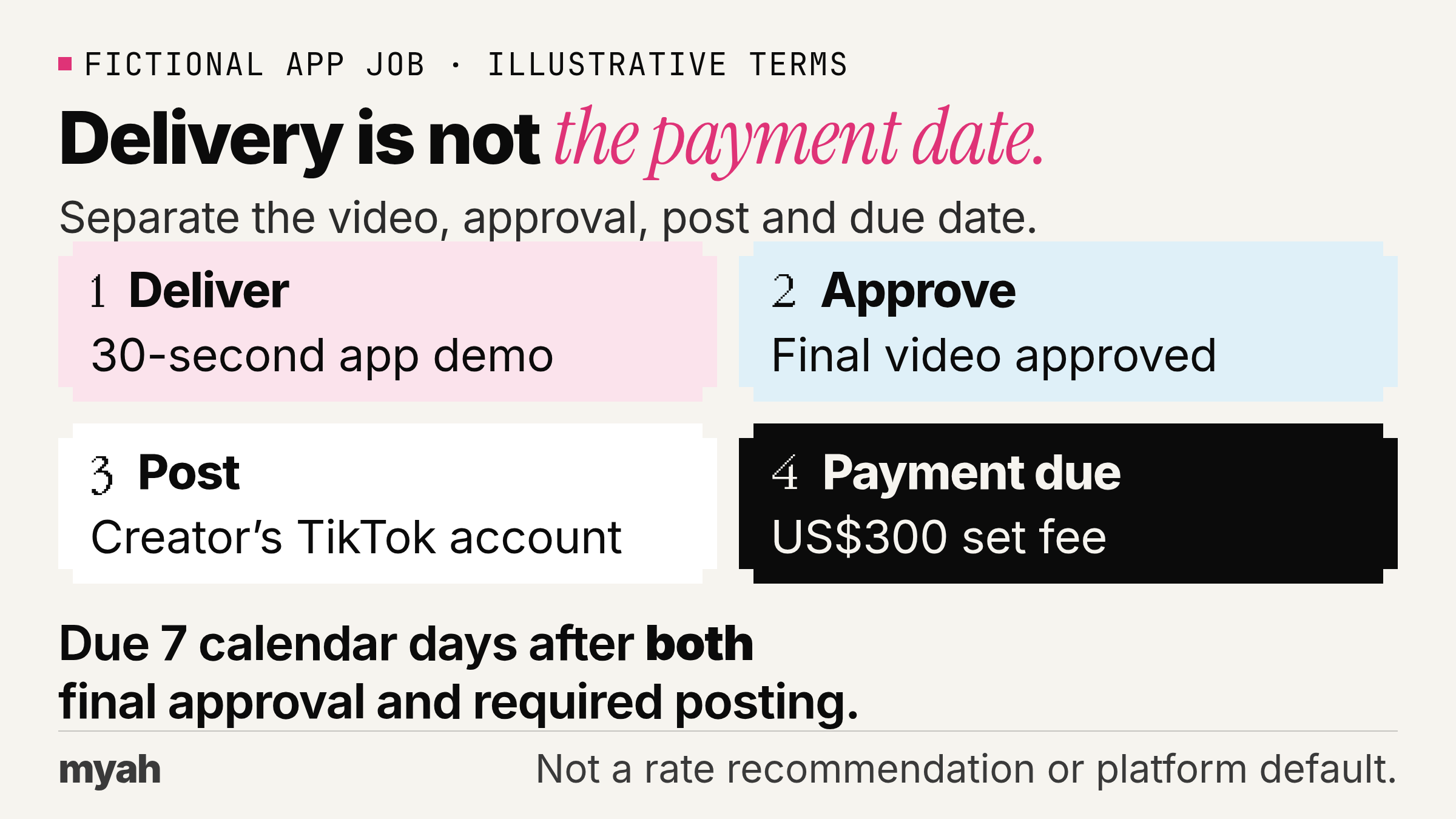
This example contains no view-linked payment. An offer with that condition would need a separate metric, measurement-window and payment row. It does not change any marketplace's terms.
Copy these blank discussion fields into your own notes:
- Hiring party and authorised approver: ______
- Brief version, deliverables and exclusions: ______
- App build, access and schedule dependencies: ______
- Revision scope, review deadline and change process: ______
- Posting account, date, public-live period and disclosure: ______
- Fee, currency, payment trigger, payer and due date: ______
- Any view-linked conditions and counting record: ______
- Ownership, permitted uses, exclusivity and portfolio: ______
- Cancellation, completed work and expenses: ______
- Confidentiality, liability and dispute questions for advice: ______
Is there a free UGC contract template I can use?
Free contract-building tools exist. Freelancers Union offers a free Contract Creator with fields for scope, payment terms and deadlines. Treat it as a starting point to review for your actual deal, not a universally suitable app-video agreement.
This guide provides a free discussion checklist PDF, not a ready-to-sign template or legal approval. Use the blank fields above to collect missing answers.
Before filming, resolve the gaps with the actual hiring party and confirm the written scope. Before signing unfamiliar ownership, liability, exclusivity or governing-law terms, seek qualified advice. A completed checklist is not a substitute for that review.
Ready to look for paid app-video jobs?
Myah is a UGC marketplace where apps pay creators to post about them. Apps post paid jobs with the pay shown upfront, and you post approved videos on your own TikTok or Instagram. See how the marketplace works.
Signing up does not guarantee jobs or earnings. Review the job's terms before committing to the work.