

To join Instagram Creator Marketplace, you need to meet Meta's creator requirements: be at least 18, have a public professional Instagram account with at least 1,000 followers, and agree to its partner monetization policies. From your profile, the documented route is Professional dashboard > Branded content > Join creator marketplace. If the join option is missing, Meta says the feature is not available to you yet. Meeting the published requirements is not a promise of immediate access.
Start by separating an unmet requirement from an unexplained missing button. Then, if you can join, make your portfolio clear about what you create, what you contributed and whether a sample was commissioned. This guide follows Meta's published instructions, not a logged-in account test.
What is Instagram Creator Marketplace?
Instagram Creator Marketplace helps creators connect with brands for branded content and partnership ads. Meta also calls it Meta Creator Marketplace in its getting-started guide. Joining makes you discoverable for partnerships; it is not the same as accepting a project.
Think of your account, portfolio and project conversations as separate parts of getting considered. Your account establishes eligibility. Your portfolio gives a brand context for your work. A project conversation is where you decide whether the requested work and terms suit you. Do not treat a visible join button as a job offer.
If you are reading as a brand, use Meta's Creator Marketing Hub guidance for discovering and evaluating creators through Meta Business Suite or Ads Manager. The steps below are for creators using Instagram, not advertiser onboarding.
Who can join, and how many followers do you need?
Meta publishes a minimum of 1,000 followers for Creator Marketplace. Its creator-specific eligibility page also lists age, account and policy requirements. Use that page for Marketplace entry rather than borrowing a threshold from another Instagram feature.
| Requirement | Meta's wording | What to check |
|---|---|---|
| Age | Creators must be at least 18 years old. | Whether you meet the minimum age. |
| Account | Creators must have a professional, public Instagram account. | Whether your account is professional and public. |
| Followers | Creators must have a minimum of 1,000 followers. | Whether your account meets the published minimum. |
| Policies | Creators must agree to our partner monetization policies. | Read the policies linked from Meta's eligibility page before agreeing. |
Meta describes availability for eligible creators worldwide in countries where Meta advertising operates, excluding Crimea, Cuba, Iran, North Korea, Syria and Russia. That is a geographic scope, not a guarantee that every account in an included country has the feature.
The same page lists business and creator accounts but warns that the feature may not be available to you yet. Keep account eligibility and feature availability separate. Also keep Marketplace requirements separate from branded-content and partnership-ad requirements: admission to the marketplace is not blanket permission for every kind of content or advertising use.
How do you join from your professional dashboard?
You need a professional Instagram account to access the professional dashboard at the top of your profile. Meta documents this joining sequence:
- From your Instagram profile, tap Professional dashboard.
- Tap Branded content, then Join creator marketplace.
- Tap Accept to make your information and insights visible to brands and allow them to contact you through a Partnership messages folder.
- Tap Accept changes, then review and accept the Terms.
Read the information-sharing and terms screens before accepting, because the onboarding step gives brands access to information about your account.
There is also a separate invitation route. For an invitation at the top of your profile or in your feed, tap Accept invite, then Next, then Join now.
If you dismissed an invitation, Meta says you can still onboard through your Professional dashboard; under Your tools, tap Branded content.
After joining, you can choose preferred brand partners, but only participating brands can be selected. Treat this as an optional way to express interest, not a prerequisite for joining or a promise of contact.
Why can't you see Creator Marketplace?
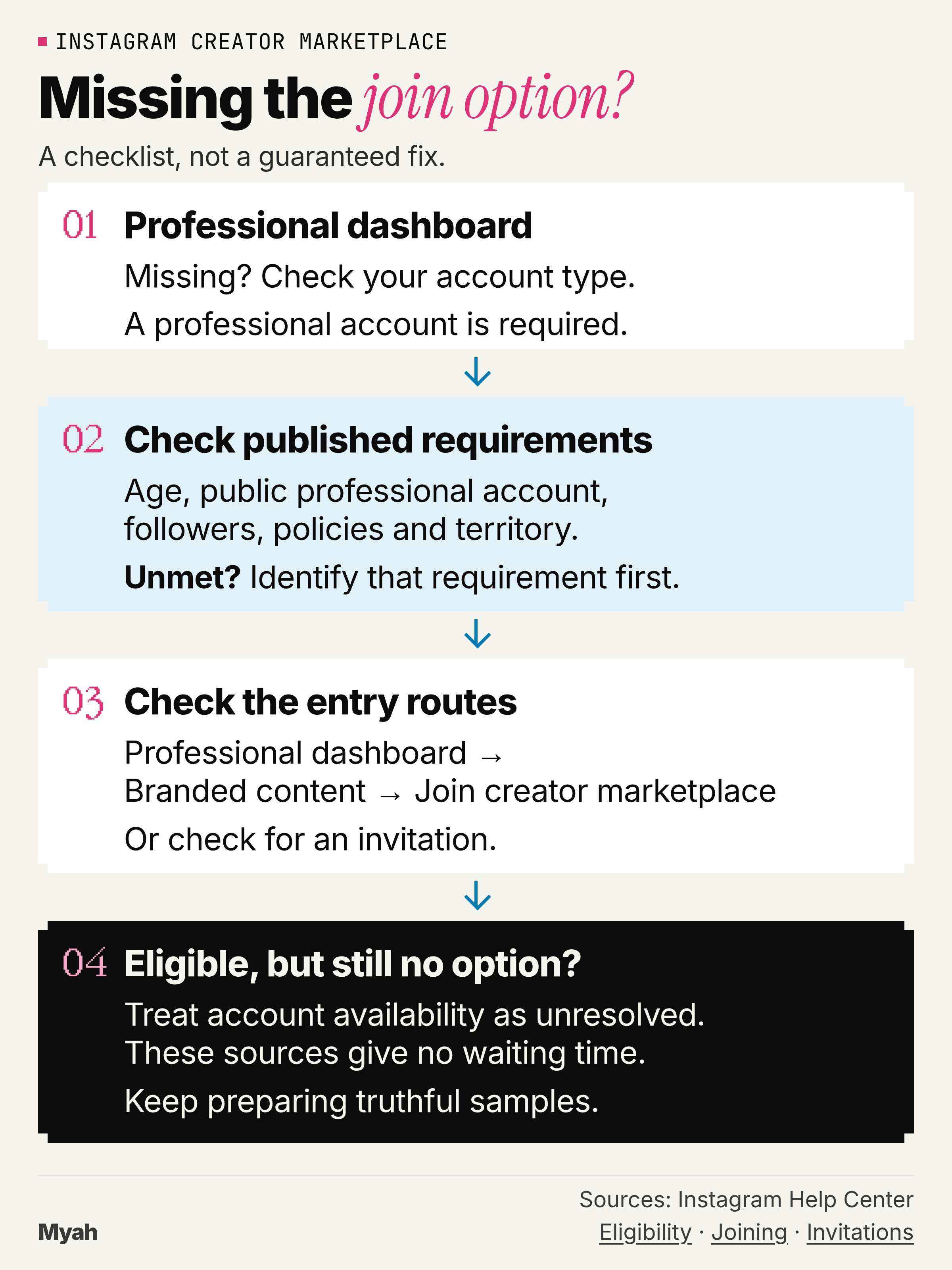
A missing option does not, by itself, tell you which requirement is unmet. Meta's getting-started page says an absent Join creator marketplace option means the feature is not available to you yet. Use this editorial checklist to narrow what you can actually verify, rather than guessing at an account restriction.
- Can you access Professional dashboard? If not, check whether your Instagram account is professional. A professional account is required for dashboard access; changing account type is not a guaranteed Marketplace unlock.
- Do you meet the published requirements? Compare your age, public professional account, followers, policy agreement and territory with the requirements above. If something is visibly unmet, identify that requirement before looking for a technical fix.
- Have you checked the documented entry routes? Look for an invitation or use Professional dashboard > Branded content > Join creator marketplace. If you dismissed an invitation, return through the dashboard.
- Still no join option? If you appear to meet the requirements, treat this as unresolved account availability. The cited help pages do not establish a reason or waiting time for your account. Continue preparing truthful samples rather than relying on an unlock promise.
Illustrative access scenario: a creator below the published follower minimum has an identifiable unmet requirement. A creator who appears to meet the list but still has no join option has an unresolved availability case. Neither situation gives you evidence of a shadowban.
The useful outcome is knowing what is documented and what remains unknown. These sources do not support a fixed waiting period or a promise that reinstalling the app will enable access.
What do brands see, and what should your portfolio show?
Brands can see content you have posted and insights such as your average reach and follower count, according to Meta's getting-started guide. Your separately created portfolio is a chance to explain the work, not a reason to invent better-looking metrics or client credits.
You must join Creator Marketplace before creating a creator portfolio. From the professional dashboard, go to Your tools > Branded content > Creator portfolio, then choose a cover image. Meta's portfolio guide documents these sections:
- Text: describe your work.
- Posts: share posts and Reels that show the type of content you like to create.
- Profiles: share profiles of people and brands you have worked with.
Check visibility after saving. Meta says your portfolio is visible only to you by default; tap Change visibility to change that. Review the choices shown to you. Sharing account insights during onboarding and making your portfolio visible are not the same action.
Use the following writing prompts to give a brand useful context. These are editorial prompts, not official Instagram fields. The filled example is illustrative portfolio content, not Instagram UI or a real client record.
- Who I make content for: I make clear consumer-app demonstrations.
- Sample: Setting up a reminder in a task app.
- What this sample demonstrates: A clear walkthrough of creating and editing a reminder.
- My role: Concept, screen recording, voiceover and editing.
- Relationship and status: Self-directed spec work, not commissioned by the app and not tested as an ad.
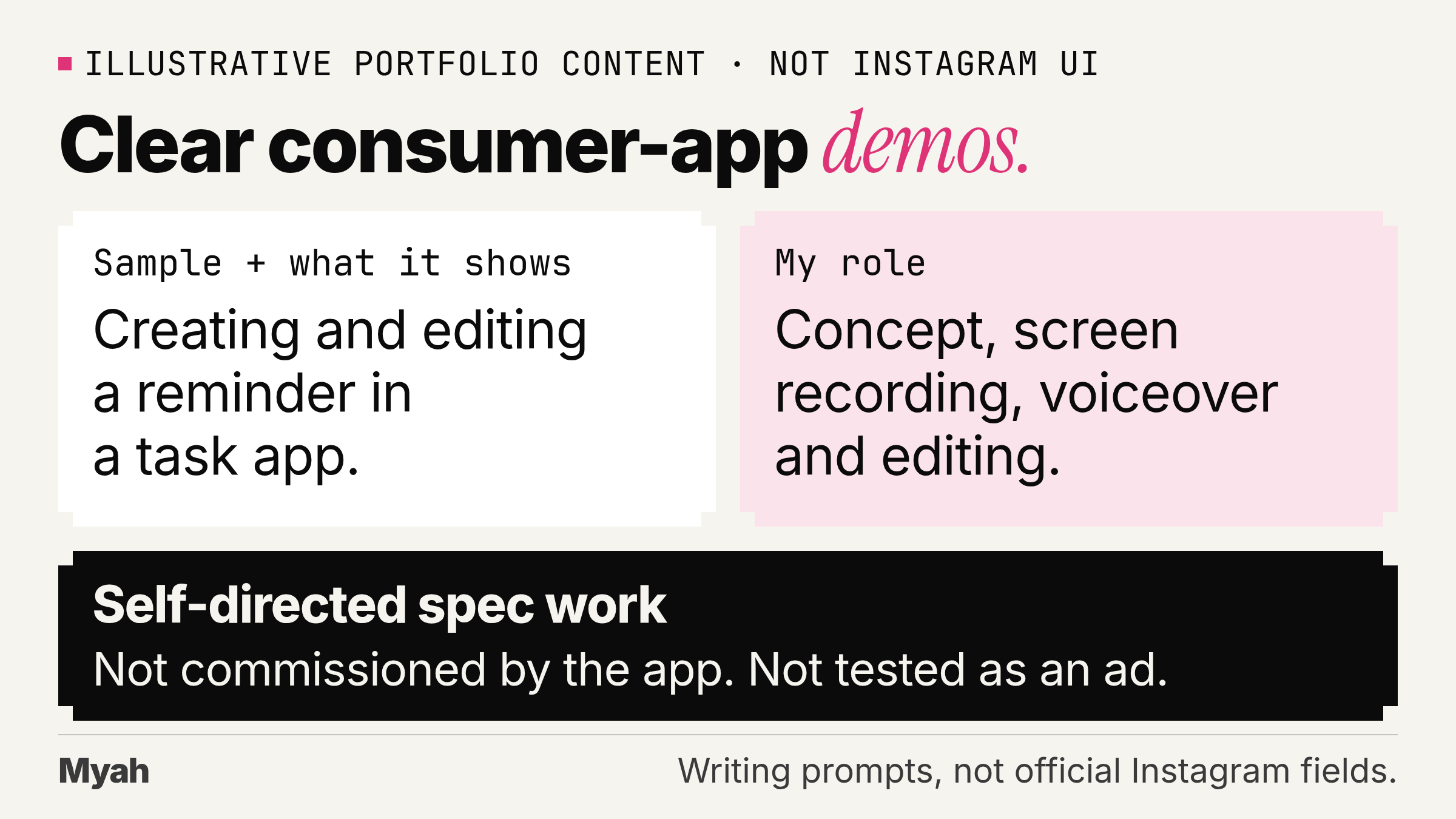
Replace the example with what you actually made. If an app merely appears in your sample, do not list it as a past client. Use the Profiles section for real working relationships, not a wish list of brands.
Need filming exercises or somewhere to host samples? See how to build a portfolio before your first client.
How do you find projects and respond to a brand?
Meta's projects page scopes project discovery to creator accounts on Instagram and Facebook and warns that it may not be available yet. That is narrower than the business-and-creator-account wording on the joining page. Do not assume every professional account gets every project feature.
From the professional dashboard, go to Your tools > Branded content, then View available projects under Creator marketplace. Project details include a description, the number of Reels, posts or stories requested, the posting date and the offered payment.
| Project terms | What can change? |
|---|---|
| Negotiable | For negotiable projects, the brand may customize details such as requested content or pay, and you can discuss changes. |
| Fixed | For fixed projects, Meta says you can discuss details, but the requested content and pay cannot be changed. |
Tapping I'm interested adds you to a list the brand can review; it is not confirmation that you have been selected. Project invitations can appear in your Partnership messages folder or under Creator marketplace in your professional dashboard.
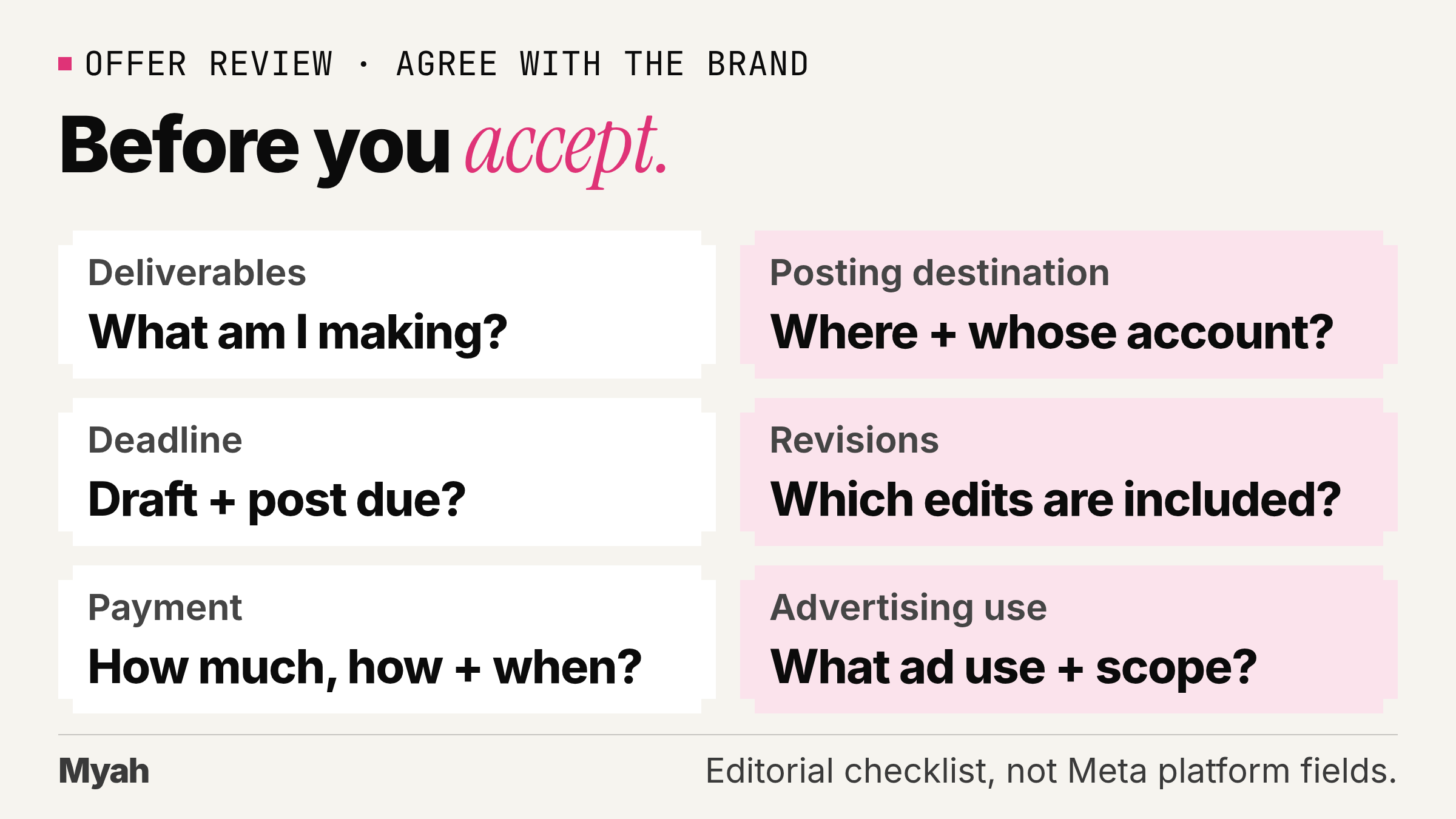
Before accepting, use this editorial offer-review checklist. These are questions to agree with the brand, not a list of fields or protections that Meta promises to supply.
- Deliverables: What am I making, and in which formats?
- Posting destination: Where will it appear, and whose account will post it?
- Deadline: When are the draft and published post due?
- Revisions: What changes are included, and what would be additional work?
- Payment: What is the agreed pay, how will it be paid, and when is it due?
- Advertising use: Is ad use requested, and what scope are we agreeing to?
Accepting a project means agreeing to post the outlined content in exchange for the offered payment. Meta advises making sure any agreed changes are reflected in the project before tapping Accept project.
Is joining the same as agreeing to partnership ads?
No. Keep discovery, disclosure and advertising permission separate. Meta requires the paid partnership label to tag the brand when you create organic branded content on Instagram. That is a platform disclosure requirement, not a blanket agreement to every proposed advertising use.
Advertisers need permission from the partner whose handle a partnership ad will run from. Before granting it, clarify what content the brand wants to promote and the scope you are agreeing to.
For the separate permission mechanics, read how partnership-ad codes and permissions work. Do not use a Marketplace invitation as a substitute for reviewing an ad request, and do not assume the platform label settles every disclosure obligation that may apply to your work.
What can you do if you do not have access yet?
Keep working on the parts you control: a truthful sample, a clear description of your role and a portfolio that is easy to assess. For an app demonstration, show a task you actually completed. Describe what the viewer can see rather than promising results you have not measured.
When looking at briefs outside Marketplace, ask whether the brand wants a video for its own channels or a post on your account. Those are different deliverables. For the content-only distinction, read when creator work does not depend on followers. It is not a promise that every platform or brief accepts every creator; check the requirements of the opportunity itself.
Myah is a separate marketplace to consider, not a way to unlock Instagram's feature. Myah is a UGC marketplace where apps pay creators to post about them. Apps post paid jobs with the pay shown upfront, and you post approved videos on your own TikTok or Instagram. See how Myah works.
Signing up does not guarantee jobs, acceptance or earnings. Read Myah's terms and the job brief before committing.